
High Resolution Earbuds Explained: LDAC, Lossless Audio, Wireless Sound Quality & High Bitrate Streaming
Amazon Affiliate Disclosure: EarsBud may earn a commission when readers buy through qualifying Amazon links. This does not change the price you pay, and it does not influence how we explain audio technology, compare features, or evaluate wireless earbuds.
High resolution earbuds sound exciting on paper, but the real story is more complicated than a gold badge on a product box. A pair of true wireless earbuds may support LDAC, aptX Adaptive, aptX Lossless, LHDC, or high-bitrate AAC, yet still sound ordinary if the drivers are poorly tuned, the ear tips leak, the phone does not support the codec, or the streaming app is set to standard quality.
At EarsBud, we treat wireless audio quality as a full system: the earbuds, the phone, the Bluetooth codec, the music source, the fit, the app settings, the noise floor around you, and the kind of listening you actually do. Hi-res audio is not magic. It is a chain, and one weak link can pull the entire experience down.
This page explains what hi-res audio earbuds really mean, how LDAC and lossless audio work, why wireless sound quality depends on more than bitrate, and when high bitrate streaming is worth paying for.
Quick Jump
- What Are Hi-Res Audio Earbuds?
- Who Needs Hi-Res Audio Earbuds?
- LDAC, aptX Lossless, AAC, SBC and LHDC Explained
- LDAC vs aptX Lossless Comparison
- Benefits of Hi-Res Wireless Earbuds
- Costs of Hi-Res Audio Earbuds
- Risks, Trade-Offs and Buying Mistakes
- Best Listening Setup for High Bitrate Streaming
- Upcoming Trends in Wireless Sound Quality
- FAQs
- People Also Ask
What Is This Guide For?
This guide is for readers who want to understand hi-res audio earbuds before buying or upgrading. It is not a hype page for expensive earbuds. It is a practical explanation of what affects wireless sound quality and what does not.
You will learn:
- What hi-res audio earbuds actually are
- Whether LDAC earbuds are better than AAC earbuds
- Whether lossless audio works over Bluetooth
- Why some “Hi-Res Wireless” earbuds still sound average
- How streaming quality, bitrate, codec support, and fit change sound
- Which users benefit most from high bitrate wireless audio
- What to check before buying the best hi res wireless earbuds
For a broader buying path, you can also explore the main Bluetooth earbuds guide, where EarsBud organizes wireless earbuds by use case, feature set, sound profile, and budget.
What Are Hi-Res Audio Earbuds?
Hi-res audio earbuds are wireless earbuds designed to transmit or reproduce higher-quality audio than basic Bluetooth earbuds. In practical terms, they usually support one or more advanced codecs such as LDAC, aptX Adaptive, aptX Lossless, LHDC, or another high-bitrate wireless format.
But the phrase “hi-res audio earbuds” can mean three different things:
1. The Earbuds Support a High-Resolution Bluetooth Codec
This is the most common meaning. The earbuds can receive a higher bitrate wireless signal than standard SBC or AAC in the right conditions.
Examples include:
- LDAC earbuds
- aptX Adaptive earbuds
- aptX Lossless earbuds
- LHDC earbuds
- Hi-Res Audio Wireless certified earbuds
2. The Earbuds Can Reproduce More Detail
Codec support alone does not guarantee great sound. The driver, amplifier, acoustic chamber, tuning, ear tip seal, and distortion control matter just as much. A well-tuned AAC earbud can sound more pleasing than a poorly tuned LDAC earbud.
3. The Entire Listening Chain Supports Better Audio
A true hi-res wireless experience needs more than the earbuds. You also need:
- A compatible phone or music player
- A streaming app set to high quality or lossless
- Stable Bluetooth connection
- Proper ear tip seal
- Music that was actually mastered well
- A quiet enough environment to hear subtle detail
This is where many people get misled. They buy lossless audio earbuds, then stream compressed music from a phone that does not support the advanced codec. The earbuds may still sound good, but the “hi-res” part is not being fully used.
Who Needs High resolution earbuds?
High resolution earbuds are not necessary for every listener. They are most useful for people who listen actively, notice sound texture, and use quality sources.
High resolution earbuds Make Sense If You:
- Stream from services with lossless or high-bitrate settings
- Use an Android phone that supports LDAC, aptX Adaptive, aptX Lossless, or LHDC
- Listen to acoustic, jazz, classical, vocal, instrumental, ambient, electronic, or well-mastered music
- Care about separation, imaging, treble air, bass texture, and vocal clarity
- Often listen in quiet rooms rather than only on noisy streets
- Want premium earbuds for music, not only calls or gym use
You May Not Need Them If You:
- Mostly listen to podcasts, audiobooks, TikTok, YouTube clips, or casual playlists
- Use earbuds only for calls, commuting, or workouts
- Own an iPhone and do not plan to use wired or external audio hardware
- Listen in loud environments where ANC matters more than codec quality
- Prefer heavy bass over balanced detail
- Do not want to adjust app and Bluetooth settings
If your main priority is meetings, voice pickup, and office use, the better page to visit is best wireless earbuds for calls, because microphone quality and noise reduction matter more there than LDAC or lossless playback.
Why High Resolution Earbuds Matter
Wireless earbuds used to be judged mainly by convenience. Did they connect quickly? Did the case fit in a pocket? Did the battery survive a commute?
Now the market has changed. Premium earbuds are expected to act like miniature audio systems. Buyers want strong ANC, multipoint, spatial audio, app EQ, gaming latency, voice clarity, and high-resolution streaming in a shell smaller than a coin.
Hi-res audio earbuds matter because they push Bluetooth closer to serious listening. They can preserve more information from the original track, especially in quiet environments where detail is easier to hear.
But the best wireless sound is not only about “more data.” It is about cleaner decisions across the full signal path.
Think of wireless audio like a water pipe. A wider pipe can carry more water, but if the source is dirty, the pipe leaks, or the outlet is poorly shaped, the result is still disappointing. High bitrate is valuable, but only when the full system is built to use it.
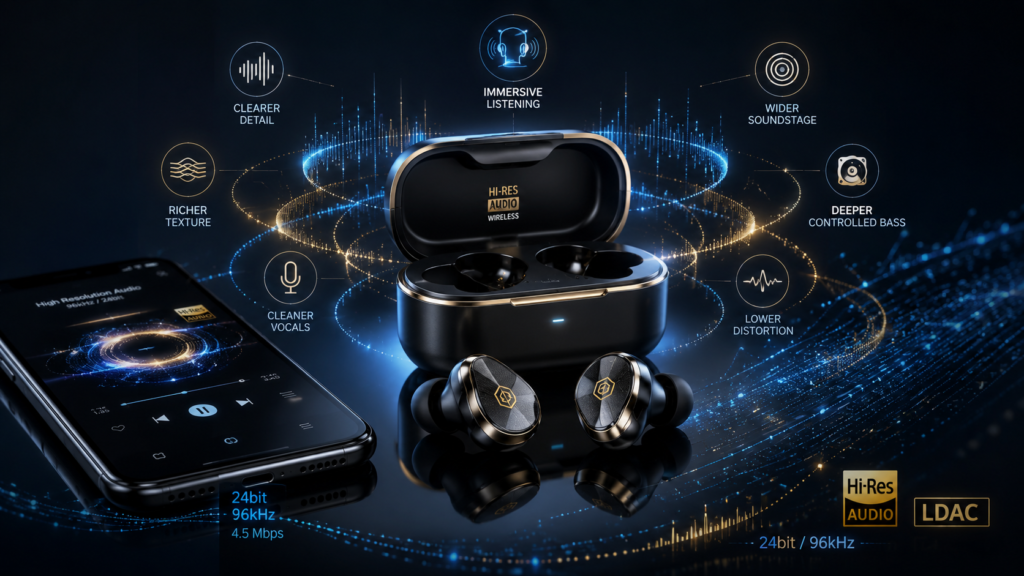
Benefits of High Resolution Earbuds
1. Better Detail Retrieval
High bitrate codecs can preserve more subtle information from a track. That may include finger movement on strings, room reverb, cymbal decay, layered harmonies, and background textures that can become blurred on basic codecs.
2. Cleaner Instrument Separation
With better transmission and good tuning, instruments can feel less crowded. This is especially noticeable in complex tracks where vocals, drums, bass, synths, and background effects compete for space.
To hear those extra details consistently, the earbuds also need a clean acoustic path. Wax buildup, blocked mesh, dirty ear tips, or clogged microphone vents can reduce clarity even when the codec is technically capable of higher-quality transmission. For maintenance steps that protect sound detail and separation, see our guide on how to clean earbuds.
3. More Natural Vocals
Hi-res audio earbuds can make vocals sound less grainy and more lifelike when the recording quality is good. Breath, tone, and studio ambience may come through with more nuance.
4. Improved High-Frequency Texture
Treble is one of the first areas where compression can become obvious. Poor wireless audio can make cymbals sound splashy or brittle. Better codecs and tuning can preserve smoother upper detail.
5. More Controlled Bass
Hi-res does not automatically mean more bass. In fact, the benefit is often better bass texture rather than louder bass. You may hear cleaner bass lines, faster decay, and less muddy overlap with mids.
6. Better Value From Lossless Streaming Plans
If you pay for a high-quality streaming tier, hi-res audio earbuds help you get more from that subscription. Without compatible earbuds and phone support, much of the extra quality may never reach your ears.
The Wireless Audio Chain: Why One Feature Is Never Enough
A hi-res badge does not work alone. Wireless sound quality depends on a sequence of decisions.
The Wireless Sound Quality Chain
| Stage | What It Controls | Why It Matters |
|---|---|---|
| Music file or stream | Source quality | A poor master cannot become hi-res later |
| Streaming app setting | Bitrate and compression | Many apps default to lower quality to save data |
| Phone codec support | Transmission format | The phone must support the same codec as the earbuds |
| Bluetooth stability | Dropouts and bitrate changes | A weak connection may lower quality automatically |
| Earbud codec support | Receiving capability | Earbuds must decode the selected codec |
| Driver and tuning | Actual sound character | Codec quality cannot fix bad tuning |
| Ear tip seal | Bass, isolation, ANC | A weak seal destroys low-end response |
| Listening environment | Noise floor | Street noise hides fine detail |
The important lesson is simple: hi-res audio earbuds are most valuable when the whole system is aligned.
LDAC, aptX Lossless, AAC, SBC and LHDC Explained
Bluetooth codecs are compression systems. They decide how your phone sends audio to your earbuds. Some codecs prioritize universal compatibility. Some prioritize efficiency. Others chase higher bitrate, better quality, or lower latency.
SBC: The Basic Bluetooth Codec
SBC is the standard fallback codec. Almost every Bluetooth audio device supports it. It is reliable and widely compatible, but it is not the first choice for high-quality music listening.
SBC is acceptable for casual listening, podcasts, and simple streaming. It is not ideal for listeners chasing clarity, depth, or high-resolution performance.
AAC: Important for iPhone Users
AAC is the main codec used by Apple devices for Bluetooth earbuds. Many iPhone users will hear very good results with well-tuned AAC earbuds, especially because Apple’s ecosystem handles AAC efficiently.
The limitation is that AAC over Bluetooth is not lossless. Even if you play a lossless file, the Bluetooth transmission still compresses the audio.
For iPhone users, tuning, ANC, comfort, and ecosystem integration often matter more than chasing LDAC or aptX compatibility.
LDAC: High Bitrate Wireless Audio
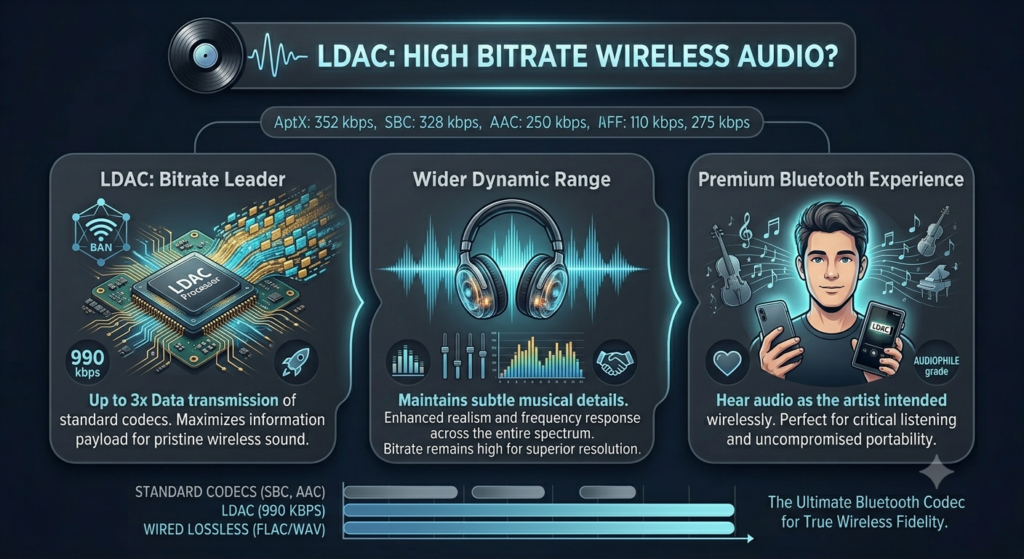
LDAC is one of the most recognized hi-res Bluetooth codecs. It can transmit at higher bitrates than standard Bluetooth codecs when supported by both the phone and earbuds.
LDAC is popular with Android users because many Android phones support it. It can deliver excellent wireless sound, especially when the connection is stable and the earbuds are well tuned.
However, LDAC is not automatically lossless. It uses compression and can shift between quality levels depending on connection conditions. In real life, LDAC sounds best when the phone is close, the wireless environment is clean, and the earbuds are set to prioritize sound quality.
aptX Adaptive: Quality and Stability Balance
aptX Adaptive is designed to adjust bitrate depending on connection strength and use case. It can balance sound quality, latency, and stability.
This makes it useful for users who switch between music, video, gaming, and calls. It may not always chase the highest possible bitrate, but it can offer a smoother real-world experience.
aptX Lossless: CD-Quality Wireless Ambition
aptX Lossless is designed to deliver bit-for-bit CD-quality audio under suitable conditions. It is one of the most important developments for listeners searching for lossless audio earbuds.
The catch is compatibility. You need earbuds, a phone or transmitter, and chipset support that all work together. Without that, the connection may fall back to another aptX mode or a different codec.
LHDC: Another Hi-Res Wireless Option
LHDC is another high-resolution Bluetooth codec used by some Android phones and earbuds. It can support high bitrate streaming, but device compatibility is less universal than SBC or AAC.
LHDC can be excellent when your phone and earbuds both support it, but buyers should confirm compatibility before making it a deciding factor.
Which Hi-Res Earbuds Direction Should You Choose?
Use this interactive guide to match your phone, music habits, codec needs, call priorities, and listening environment with the right wireless earbuds buying direction.
| Buying Question | Best Direction | Why It Matters |
|---|
LDAC vs aptX Lossless vs AAC vs SBC Codec Comparison
| Codec | Best For | Typical Strength | Main Limitation | Best User Type |
|---|---|---|---|---|
| SBC | Basic compatibility | Works almost everywhere | Lower fidelity than advanced codecs | Casual listeners |
| AAC | iPhone users | Efficient Apple ecosystem playback | Not lossless over Bluetooth | Apple users, daily listeners |
| LDAC | Android hi-res streaming | Very high bitrate potential | Needs stable connection and Android support | Music-focused Android users |
| aptX Adaptive | Balanced premium wireless audio | Adjusts quality and stability | Requires compatible phone and earbuds | Mixed music, video, gaming users |
| aptX Lossless | Wireless CD-quality playback | Lossless-style transmission in ideal setup | Limited compatibility | Audiophile Android users |
| LHDC | Hi-res Android listening | High bitrate support | Compatibility varies by brand | Users with matching phone and earbuds |
Visual Bitrate Ladder: How Wireless Codecs Compare
This is a simplified educational chart. Actual performance depends on implementation, connection quality, codec mode, source quality, and tuning.
| Wireless Audio Level | Simplified Quality Position | Practical Meaning |
|---|---|---|
| SBC | ▰▰ | Basic Bluetooth playback |
| AAC | ▰▰▰ | Strong everyday sound, especially on iPhone |
| aptX Adaptive | ▰▰▰▰ | Balanced premium wireless performance |
| LHDC | ▰▰▰▰▰ | High bitrate Android-focused option |
| LDAC | ▰▰▰▰▰ | High bitrate hi-res wireless option |
| aptX Lossless | ▰▰▰▰▰▰ | CD-quality wireless goal in compatible setups |
LDAC vs aptX Lossless: Which Is Better?
LDAC vs aptX Lossless is one of the most common comparisons in premium wireless audio.
The short answer: LDAC is easier to find on many Android devices, while aptX Lossless is more focused on preserving CD-quality audio when the full Snapdragon Sound chain is compatible.
LDAC Is Better If:
- Your Android phone already supports LDAC
- Your earbuds support LDAC at high quality settings
- You stream high-bitrate or lossless music
- You mostly listen in quiet spaces
- You want a proven high-bitrate wireless codec
aptX Lossless Is Better If:
- Your phone and earbuds both support Snapdragon Sound with aptX Lossless
- You want CD-quality wireless playback where supported
- You care about bit-perfect style transmission more than only high bitrate
- You are buying a newer premium Android audio setup
- You want a codec designed around lossless wireless listening
The Real-World Winner
The better codec is the one your phone and earbuds both support well. A perfectly matched aptX Lossless setup can outperform a weak LDAC setup. A stable LDAC connection can outperform an aptX product that falls back to a lower mode. A beautifully tuned AAC earbud can sound better than a badly tuned hi-res earbud.
Codec matters. Tuning decides whether you enjoy listening.
Hi-Res Audio Earbuds vs Regular Wireless Earbuds
| Feature | Regular Wireless Earbuds | Hi-Res Audio Earbuds |
|---|---|---|
| Codec support | SBC, AAC, basic aptX | LDAC, aptX Adaptive, aptX Lossless, LHDC |
| Music detail | Good enough for casual use | More potential detail with good source |
| Streaming benefit | Limited from lossless tiers | Better use of high-quality streaming |
| Phone compatibility | Easier | Must be checked carefully |
| Battery impact | Often better | High-quality modes may use more power |
| Price range | Budget to mid-range | Mostly mid-range to premium |
| Best for | Calls, casual music, commuting | Focused listening, premium sound |
Are Hi-Res Audio Earbuds the Same as Lossless Audio Earbuds?
No. Hi-res audio earbuds and lossless audio earbuds are related, but they are not the same.
Hi-res usually refers to higher-than-standard audio quality or high-resolution codec support. Lossless refers to audio compression that preserves the original data without removing information.
A pair of earbuds can be marketed as hi-res without delivering true lossless Bluetooth playback. LDAC, for example, is high bitrate and can sound excellent, but it is not the same as fully lossless transmission in all conditions.
aptX Lossless is closer to the idea of lossless wireless playback, but it still depends on a compatible phone, earbuds, chipset, and connection quality.
Why iPhone Users Should Be Careful With Hi-Res Earbuds
iPhone users often see “Hi-Res Audio Wireless,” “LDAC,” or “aptX” on earbud packaging and assume they will benefit from it. In many cases, they will not.
Most iPhones use AAC for Bluetooth audio. That does not mean the sound is bad. Some AAC earbuds sound excellent with iPhones. But it does mean that LDAC, LHDC, and aptX Lossless should not be your main buying reason unless you are using a special external transmitter or wired path.
For iPhone users, prioritize:
- Tuning quality
- ANC performance
- Transparency mode
- Comfort and fit
- Microphone quality
- App support
- Battery life
- Multipoint if needed
- Spatial audio if you use Apple-friendly features
The best iPhone earbud is not necessarily the one with the highest bitrate on the box. It is the one that performs best inside Apple’s actual Bluetooth ecosystem.
Best Listening Setup for High Bitrate Streaming
To hear the benefit of hi-res audio earbuds, set up the chain properly.
Step 1: Use a Compatible Phone
For LDAC, aptX Adaptive, aptX Lossless, or LHDC, Android phones usually offer more codec flexibility than iPhones. Still, support varies by brand and chipset. Check your phone’s Bluetooth audio codec options before buying.
Step 2: Choose Earbuds With Matching Codec Support
Do not buy LDAC earbuds if your phone cannot send LDAC. Do not buy aptX Lossless earbuds unless your phone or transmitter supports it too. Wireless audio is a two-device handshake.
Step 3: Turn On High Quality in the Earbud App
Many earbuds default to stable connection mode. To activate LDAC or high-bitrate streaming, you may need to choose a setting such as:
- Prioritize sound quality
- High quality audio
- Best sound mode
- LDAC mode
- High bitrate mode
Step 4: Set Your Streaming App to High Quality
Check Wi-Fi and mobile data settings separately. Many apps lower quality on mobile data unless you change it manually.
Step 5: Use the Right Ear Tips
A poor seal can make premium earbuds sound thin, weak, or harsh. Before blaming the codec, test different ear tip sizes.
Step 6: Listen in the Right Environment
High-resolution detail is easier to hear in a quiet room. On a bus, plane, gym floor, or busy street, ANC and fit may matter more than codec bitrate.
Best Hi Res Wireless Earbuds: What to Look For Before Buying
The best hi res wireless earbuds should not be judged by codec support alone. Look at the full feature set.
Essential Buying Checklist
| What to Check | Why It Matters |
|---|---|
| Codec compatibility | Phone and earbuds must support the same codec |
| Driver quality | Determines texture, dynamics, and clarity |
| App EQ | Lets you correct tuning problems |
| ANC performance | Reduces noise that masks detail |
| Ear tip options | Improves seal, bass, and comfort |
| Battery in hi-res mode | High-quality codecs may drain faster |
| Multipoint behavior | Some earbuds disable hi-res mode with multipoint |
| Latency | Important for gaming and video |
| Call quality | Music earbuds are not always great call earbuds |
| Firmware support | Audio performance can improve or worsen with updates |
For category-level buying guidance, visit the true wireless Bluetooth earbuds center, where EarsBud organizes TWS earbuds by listening style, use case, and feature priority.
Costs of Hi-Res Audio Earbuds
Hi-res audio features usually appear in mid-range and premium earbuds. The cost is not only for the codec; you are often paying for better chipsets, more microphones, advanced ANC, higher-quality drivers, app control, battery management, and more careful acoustic engineering.
Cost Breakdown Table
| Price Tier | What You Usually Get | Hi-Res Expectation | Best For |
|---|---|---|---|
| Under $50 | Basic Bluetooth earbuds | Rare or limited hi-res support | Casual listening |
| $50–$100 | Better battery and app features | Some high-bitrate claims, mixed quality | Budget buyers |
| $100–$180 | Stronger ANC, better tuning | LDAC or aptX Adaptive more likely | Value-focused music listeners |
| $180–$300 | Premium ANC, richer sound, better apps | Strong hi-res codec support common | Serious wireless listeners |
| $300+ | Flagship features, premium materials | Best chance of advanced codec + tuning | Enthusiasts and early adopters |
Hidden Costs to Consider
- A better streaming subscription may be needed
- Some phones do not support your desired codec
- Replacement ear tips may improve performance
- Battery replacement is rarely simple in TWS earbuds
- Premium earbuds may lose value quickly as new codecs arrive
The smartest purchase is not always the most expensive one. It is the earbud that matches your phone, music service, listening habits, and comfort needs.
Risks, Trade-Offs and Buying Mistakes
1. Codec Mismatch
The most common mistake is buying earbuds for a codec your phone does not support. LDAC earbuds on a non-LDAC source will fall back to another codec. aptX Lossless earbuds without a compatible Snapdragon Sound source may not deliver lossless playback.
2. Battery Drain
High-bitrate modes can use more power. You may get shorter listening time when LDAC or similar modes are enabled.
3. Connection Instability
Higher bitrate transmission can be more sensitive to interference. In crowded wireless environments, the earbuds may stutter, drop quality, or switch modes.
4. Multipoint Limitations
Some earbuds reduce codec quality when connected to two devices at once. If you use a laptop and phone together, check whether hi-res mode still works.
5. Marketing Confusion
“Hi-Res,” “lossless,” “HD audio,” “studio sound,” and “audiophile tuning” are not interchangeable terms. Brands sometimes use them loosely. Always check codec support and real-world feature behavior.
6. Poor Fit
A weak seal can erase the benefits of premium audio. Bass disappears, ANC weakens, and the tonal balance becomes thinner.
7. Expecting Night-and-Day Differences
Hi-res audio can sound better, but it is not always dramatic. The difference depends on the recording, the listener, the environment, and the gear.
Hi-Res Audio Earbuds vs ANC Earbuds vs Call-Focused Earbuds
Different earbud categories solve different problems. A music-first buyer should not use the same checklist as a remote worker or frequent traveler.
| Category | Main Goal | Key Features | Best Buyer |
|---|---|---|---|
| Hi-res audio earbuds | Better music quality | LDAC, aptX Lossless, LHDC, strong tuning | Music-focused listeners |
| ANC earbuds | Noise control | Strong ANC, transparency, wind handling | Travelers and commuters |
| Call-focused earbuds | Voice clarity | Beamforming mics, ENC, sidetone | Remote workers and office users |
| Gaming earbuds | Low latency | Game mode, aptX Adaptive, dongle support | Mobile and handheld gamers |
| Fitness earbuds | Stability and durability | Secure fit, water resistance, light design | Gym and running users |
This is why a single “best earbuds” label rarely helps. The best earbud depends on the job. Hi-res audio earbuds are built for better listening, not automatically better meetings, workouts, or gaming.
High Bitrate Streaming: Does It Really Sound Better?
High bitrate streaming can sound better, but only when the rest of the system is capable enough to reveal it.
You are more likely to hear a difference when:
- The track is well recorded and well mastered
- You listen in a quiet space
- Your earbuds have strong drivers and tuning
- Your phone and earbuds use the intended codec
- Your streaming app is set to high quality or lossless
- Your ear tips seal properly
You are less likely to hear a difference when:
- You are walking near traffic
- ANC is working hard against loud noise
- The track is already heavily compressed
- You are listening at very low volume
- The earbuds have weak tuning
- The Bluetooth connection keeps shifting quality
High bitrate streaming is best understood as headroom. It gives the system more information to work with. Whether that becomes better sound depends on the rest of the chain.
Lossless Audio and Bluetooth: The Practical Reality
Lossless audio is easy to misunderstand. A music service may stream a lossless file to your phone, but that does not automatically mean the exact lossless signal reaches your wireless earbuds.
Bluetooth usually compresses audio before sending it to earbuds. Advanced codecs reduce the damage and may preserve more detail, but most Bluetooth listening is still shaped by codec behavior.
aptX Lossless is important because it is built around the promise of lossless-style wireless playback in compatible conditions. Even then, buyers must confirm device support carefully.
For many listeners, the best practical target is not theoretical perfection. It is a well-matched system that sounds clean, stable, balanced, and enjoyable every day.
ATRAC Lossless Audio: What Is ATRAC Lossless and How Does It Compare?
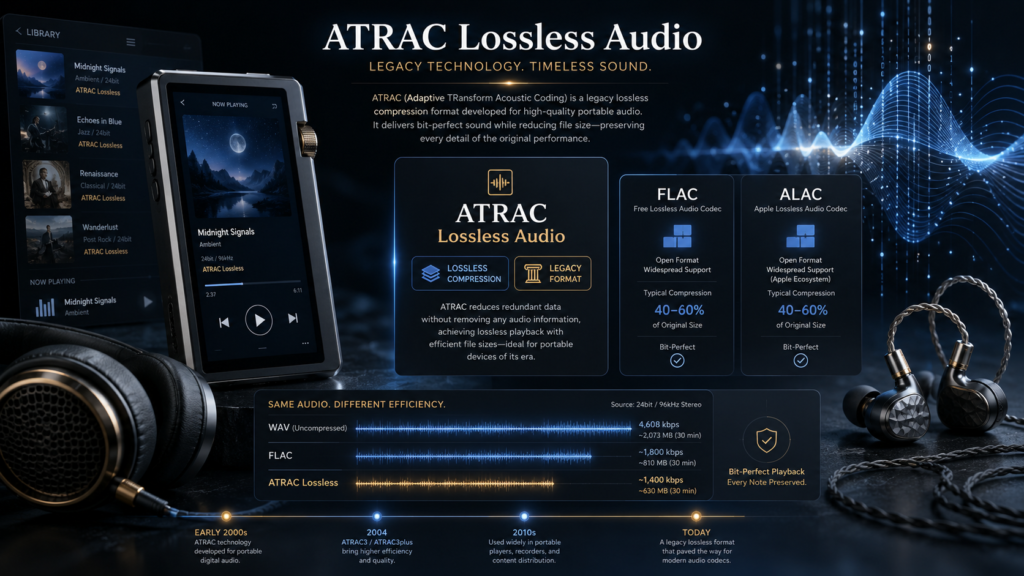
ATRAC lossless audio usually refers to ATRAC Advanced Lossless, Sony’s lossless audio compression format. It was designed as part of Sony’s ATRAC family, which was historically connected to MiniDisc, Walkman, SonicStage, and older Sony digital music ecosystems.
The key idea behind ATRAC lossless is simple: it compresses music without losing audio data, while also maintaining compatibility with parts of the older ATRAC ecosystem. Officially, the format is called ATRAC Advanced Lossless, but many users search for it as ATRAC lossless, atrac lossless audio, or simply lossless audio ATRAC.
ATRAC Lossless vs FLAC vs ALAC
| Format | Full Name | Company / Ecosystem | Lossless? | Best Known For | Modern Use |
|---|---|---|---|---|---|
| ATRAC Advanced Lossless | Sony ATRAC Advanced Lossless | Sony | Yes | Older Sony Walkman, SonicStage, ATRAC ecosystem | Niche / legacy |
| FLAC | Free Lossless Audio Codec | Open format | Yes | Open-source lossless music libraries | Very common |
| ALAC | Apple Lossless Audio Codec | Apple | Yes | Apple Music, iPhone, Mac, Apple ecosystem | Very common |
| WAV | Waveform Audio File Format | Broad compatibility | Uncompressed | Studio-quality PCM storage | Common but large |
| AIFF | Audio Interchange File Format | Apple / pro audio | Uncompressed | Professional audio and Mac workflows | Common but large |
Why ATRAC Lossless Was Different
ATRAC Advanced Lossless was built around Sony’s existing ATRAC3 and ATRAC3plus technology. That made it unusual because it was not just a generic lossless file format; it was designed to fit inside Sony’s older music-management and device ecosystem.
In practical terms, ATRAC lossless audio was meant to offer:
| Benefit | Explanation |
|---|---|
| Lossless compression | Music could be compressed without losing the original audio data |
| Smaller file size than uncompressed audio | CD audio could be reduced significantly depending on the song |
| Sony ecosystem compatibility | Designed around older ATRAC3 and ATRAC3plus playback logic |
| Archival quality inside Sony software | Useful for users who managed music through SonicStage and compatible Sony devices |
| Hybrid-style thinking | Built to preserve quality while fitting older device workflows |
Is ATRAC Lossless Still Useful Today?
For most modern listeners, ATRAC lossless is more of a legacy format than a mainstream choice. FLAC and ALAC are easier to use today because they have broader software, device, and streaming support. If someone is building a modern lossless audio library, FLAC is usually the safest open-format choice, while ALAC is convenient for Apple users.
ATRAC lossless still matters historically because it shows how Sony approached high-quality digital audio before today’s streaming-first ecosystem took over. It is also relevant for collectors, MiniDisc enthusiasts, older Walkman users, and people managing archived music from SonicStage-era libraries.
ATRAC Lossless Buyer/Listener Guidance
| User Type | Should You Use ATRAC Lossless? | Better Modern Option |
|---|---|---|
| Sony legacy device collector | Yes, if your device/software supports it | ATRAC Advanced Lossless |
| Modern Android listener | Usually no | FLAC |
| iPhone / Apple Music user | Usually no | ALAC |
| Audiophile building a long-term library | Usually no | FLAC or ALAC |
| MiniDisc / SonicStage enthusiast | Possibly yes | ATRAC lossless if compatible |
| Streaming-focused listener | No need | Apple Music Lossless, FLAC-based services, or platform-supported lossless |
Bottom Line on ATRAC Lossless Audio
ATRAC lossless audio is Sony’s legacy lossless compression system, officially known as ATRAC Advanced Lossless. It was designed to compress music without losing audio data while fitting into Sony’s older ATRAC-based ecosystem. For modern lossless audio listening, FLAC and ALAC are usually more practical. But for Sony collectors, Walkman history, SonicStage libraries, and MiniDisc-era audio research, ATRAC lossless remains an important part of lossless audio history.
Upcoming Trends & Latest Tech in Hi-Res Audio Earbuds
Wireless audio is moving quickly. The next stage will not only be about bigger bitrate numbers. It will be about smarter transmission, lower power use, better personalization, and more consistent quality across devices.
1. aptX Lossless and More Complete Wireless Chains
More earbuds and Android devices are expected to support advanced Snapdragon Sound features. The key shift is compatibility. Lossless wireless audio becomes more useful when phone makers, earbud brands, and chipsets align.
2. LE Audio and LC3 Efficiency
Bluetooth LE Audio introduces LC3, a more efficient codec designed to improve quality at lower bitrates. This matters because future earbuds may deliver better sound while using less battery.
3. Auracast Broadcast Audio
Auracast can allow public audio sharing in places like airports, gyms, lecture halls, cinemas, and public venues. It is not only a music feature; it may change how people connect to shared audio environments.
4. Better Adaptive Codec Switching
Future earbuds will likely become smarter at switching between quality, latency, battery, and stability. Instead of forcing users to choose manually, earbuds may adjust more intelligently based on the app, environment, and content.
5. Personalized Sound Profiles
Hearing-based personalization is becoming more important. Earbuds may increasingly tune sound based on ear shape, hearing sensitivity, age-related hearing changes, and listening preferences.
6. Spatial Audio With Higher Quality Sources
Spatial audio is often discussed separately from hi-res audio, but the two will overlap more. Better source quality, head tracking, and personalized HRTF profiles may make immersive listening feel less gimmicky and more natural.
7. External Wireless Transmitters for iPhone and Consoles
Because built-in codec support varies, compact USB-C transmitters may become more common. These can add support for codecs that a device does not natively offer.
Practical Buying Framework: The EarsBud Hi-Res Test
Before buying hi-res audio earbuds, ask five questions.
1. Does My Phone Support the Codec?
Codec support must exist on both sides. If your phone cannot send LDAC, LDAC earbuds will not magically create LDAC playback.
2. Does My Music Source Justify It?
Lossless or high-bitrate streaming makes hi-res earbuds more useful. Low-quality streams reduce the benefit.
3. Are the Earbuds Tuned Well?
A codec can transmit more data, but tuning shapes what you actually hear. Look for balanced bass, clear mids, smooth treble, and low distortion.
4. Can I Keep a Proper Seal?
Ear tips affect bass, ANC, clarity, and comfort. Fit is not a small detail. It is part of the audio system.
5. Will I Use the Sound Quality Mode?
Some users buy premium earbuds but keep default settings. If the app has a high-quality mode, learn how it works.
Best Use Cases for Hi-Res Audio Earbuds
Music Listening at Home
This is where hi-res earbuds make the most sense. Quiet rooms let you hear texture, depth, and small production details.
Travel With Premium ANC
Hi-res codecs can still help during travel, but ANC and comfort become equally important. On planes and trains, low-frequency noise can overpower subtle detail.
Focus Work
If you use instrumental music, ambient tracks, or deep-focus playlists, better separation and smoother treble can reduce listening fatigue.
Mobile Gaming and Video
Hi-res codecs are not always best for latency. For gaming, look for low-latency modes, aptX Adaptive support, or a dedicated dongle.
Fitness
Most gym users should prioritize fit, sweat resistance, durability, and bass stability over lossless audio. Hi-res is a bonus, not the main requirement.
When Hi-Res Audio Earbuds Are Not Worth It
Hi-res audio earbuds may not be worth the upgrade if your current earbuds already fit well, sound balanced, and match your phone ecosystem.
They may also be unnecessary if:
- You mostly listen casually
- You use low-quality streams
- You cannot hear a difference between codec modes
- You prioritize calls more than music
- Your phone does not support advanced codecs
- Battery life matters more than peak quality
- You listen mostly in loud outdoor environments
The goal is not to buy the most technical earbuds. The goal is to buy the right earbuds for how you listen.
Editorial Recommendation
If you are buying hi-res audio earbuds, rank your priorities in this order:
- Comfort and seal
- Sound tuning
- Phone codec compatibility
- Streaming source quality
- ANC and noise control
- Battery life in high-quality mode
- App EQ and firmware support
- Advanced codec support
- Multipoint behavior
- Price
This order may surprise people. Codec is important, but it should not come before fit and tuning. A bad seal ruins bass immediately. Bad tuning ruins everything slowly.
FAQs
What are hi res audio earbuds and are they worth buying?
Hi res audio earbuds are wireless earbuds designed to support higher-quality audio playback through advanced codecs, better drivers, or both. They are worth buying if you use compatible devices, listen to high-quality music streams, and care about detail, separation, and tonal balance. They are less necessary for casual podcast listening, basic calls, or noisy outdoor use. The biggest benefit appears when the full chain works together: phone, codec, music app, earbud tuning, fit, and listening environment.
What Is Lossless Audio?
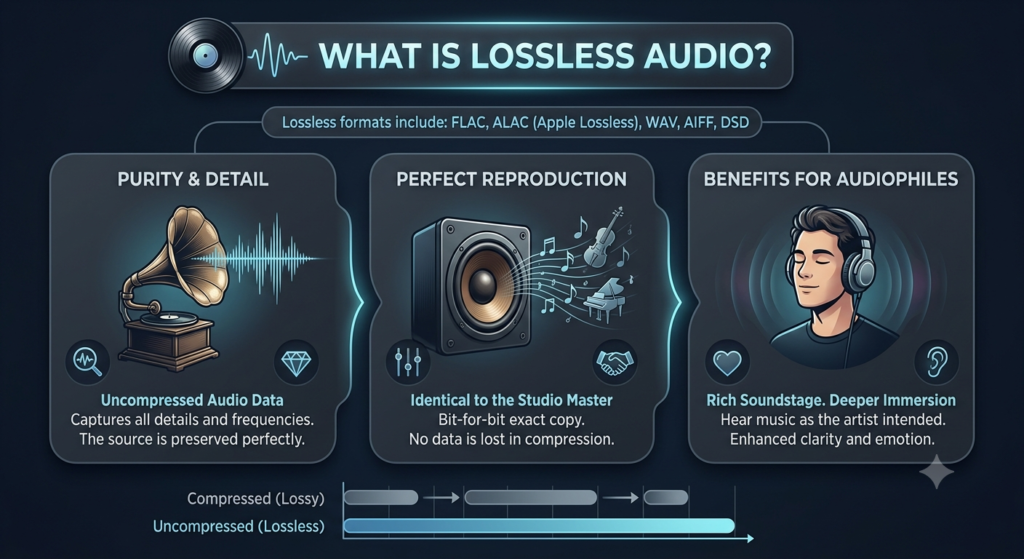
Lossless audio is a digital audio format that keeps all of the original sound data from the source recording while still reducing file size through compression. In simple terms, lossless audio is like a perfectly packed version of a song: it takes up less space than an uncompressed studio or CD-quality file, but when it is decoded for playback, the audio data can be restored without permanent loss.
This is different from lossy audio formats such as MP3, AAC, and many standard Bluetooth streams. Lossy formats reduce file size by removing audio information that the encoder assumes most people will not notice. That can be useful for streaming speed, storage, and mobile listening, but it means the file is no longer a complete copy of the original source. Lossless audio, by contrast, is designed for accuracy. It compresses music without throwing away the musical data.
Lossless Audio Explained in One Chart
| Audio Type | What Happens to the Original Audio Data? | Common Formats | Best For | Main Trade-Off |
|---|---|---|---|---|
| Uncompressed audio | No compression; all data remains | WAV, AIFF, PCM | Studio work, editing, archival masters | Very large files |
| Lossless audio | Compressed, but all original data can be restored | FLAC, ALAC, WAVPACK, ATRAC Advanced Lossless | High-quality listening, music libraries, archiving | Larger than lossy files |
| Lossy audio | Some data is permanently removed | MP3, AAC, OGG, standard Bluetooth codecs | Casual streaming, small files, mobile use | Not a perfect copy of the source |
Why Lossless Audio Matters
Lossless audio matters because it protects the full detail of the recording. The difference may be subtle on cheap earbuds, phone speakers, or noisy commutes, but it becomes more meaningful when the rest of the listening chain is good: high-quality headphones, a clean DAC, a proper wired connection, good speakers, or a quiet room.
Lossless audio does not automatically make bad recordings sound good. It also does not magically improve a track that was mastered poorly. What it does is preserve what is actually in the source. If the original master has better dynamics, cleaner instrument separation, natural vocals, and fine background detail, a lossless file gives your playback system more complete information to work with.
Lossless Audio vs High-Resolution Audio
Lossless audio and high-resolution audio are related, but they are not the same thing.
| Term | Meaning | Example | Important Difference |
|---|---|---|---|
| Lossless audio | Compression without permanent data loss | 16-bit/44.1 kHz ALAC or FLAC | Can be CD-quality or higher |
| CD-quality lossless | Lossless audio at standard CD resolution | 16-bit/44.1 kHz | Often enough for excellent listening |
| Hi-Res Lossless | Lossless audio above CD resolution | 24-bit/96 kHz or 24-bit/192 kHz | Requires better equipment and more storage |
| Lossy high-bitrate audio | Compressed audio with some removed data | 256 kbps AAC, 320 kbps MP3 | Can sound very good, but is not lossless |
The most practical way to understand it is this: lossless describes how the file is compressed; hi-res describes the resolution of the audio file. A track can be lossless without being hi-res, and a hi-res track should ideally be delivered in a lossless format to preserve its extra detail.
Does Lossless Audio Work Over Bluetooth?
Usually, lossless audio is best experienced through a wired connection. Standard Bluetooth audio typically re-encodes the signal using a Bluetooth codec, which means the final sound reaching your earbuds may not remain truly lossless even if the original track is lossless.
This is especially important for earbud buyers. Many premium wireless earbuds advertise hi-res support, high-bitrate codecs, or “lossless-like” listening, but the actual result depends on the phone, earbud chipset, codec support, connection stability, and playback app. A lossless file is only one part of the chain.
Lossless Audio Listening Chain
| Part of the Chain | Why It Matters |
|---|---|
| Music file or stream | Must be available in a lossless format such as FLAC or ALAC |
| Playback app | Must support lossless playback instead of downsampling or converting |
| Device | Phone, computer, streamer, or music player must handle the file properly |
| DAC | Converts digital audio into analog sound; important for wired listening |
| Connection | Wired is usually the safest route for true lossless playback |
| Headphones or speakers | Must be resolving enough to reveal the benefit |
Practical Answer
Lossless audio is best understood as music compression without permanent audio-data loss. It gives listeners a cleaner, more complete version of the recording than typical lossy formats, especially when paired with good headphones, speakers, or a wired DAC setup. For casual listening, high-quality AAC or MP3 can still sound impressive. For serious listening, archiving, and high-fidelity playback, lossless audio is the better foundation.
What Does Lossless Audio Mean?
Lossless audio means the audio file has been compressed in a way that does not permanently remove information from the original recording. When a lossless file is played back, the decoder can reconstruct the original audio data accurately. That is why lossless audio is often described as a “bit-perfect” or “full-data” format, depending on the playback chain and source.
The easiest comparison is a ZIP file. When you compress a document into a ZIP file, the file becomes smaller, but the original document can be restored exactly when opened. Lossless audio works with a similar idea, except the compression is designed specifically for sound.
What “Lossless” Means in Real Listening
| Phrase | What It Really Means |
|---|---|
| “Lossless audio” | The audio data is compressed without permanent loss |
| “CD-quality lossless” | Usually 16-bit/44.1 kHz audio preserved in a lossless format |
| “Hi-Res Lossless” | Higher-than-CD-resolution audio preserved without loss |
| “Lossless streaming” | A music service streams a lossless version of the track |
| “Lossless earbuds” | Usually means the earbuds support a codec or system designed for very high-quality wireless playback, but the full chain matters |
| “Lossless file” | A format such as FLAC, ALAC, or another codec that preserves the original data |
Lossless Does Not Always Mean Better Sound Automatically
This is where many buyers get confused. Lossless audio means the file preserves more information. It does not guarantee that every listener will hear a dramatic difference.
The audible benefit depends on several factors:
| Factor | Impact on Lossless Audio |
|---|---|
| Recording quality | A well-recorded track benefits more than a poorly mastered one |
| Headphones or speakers | Higher-quality gear reveals more detail |
| Listening environment | Quiet rooms reveal more than noisy streets |
| Connection type | Wired connections are usually better for true lossless playback |
| Listener sensitivity | Some people notice subtle changes more easily than others |
| Source resolution | CD-quality and hi-res lossless are not identical |
For example, listening to a lossless track through a phone speaker may not sound dramatically different from a high-quality lossy stream. But listening through a good wired headphone setup can reveal better texture, cleaner cymbals, more natural vocals, tighter bass edges, and improved spatial detail.
Lossless Audio vs Normal Streaming Quality
| Feature | Standard Streaming | Lossless Streaming |
|---|---|---|
| File size | Smaller | Larger |
| Data usage | Lower | Higher |
| Storage use | Lower | Higher |
| Audio detail | Good, but compressed with some data removed | More complete source preservation |
| Best connection | Works well on mobile and Bluetooth | Best with wired or high-quality playback chain |
| Best user | Casual listener | Hi-fi listener, collector, audiophile, careful buyer |
Where Lossless Audio Is Most Useful
Lossless audio is especially useful for people who care about audio quality, keep personal music libraries, compare headphones, use wired DACs, or listen in quiet environments. It is also useful for archiving because a lossless file can be converted into other formats later without starting from a damaged or reduced source.
For earbuds and headphone buyers, lossless audio is not just a format question. It is a system question. The track, app, phone, codec, connection, DAC, and earbuds all influence what reaches your ears.
Simple Meaning
Lossless audio means no musical data is permanently removed during compression. The file may be smaller than an uncompressed studio or CD file, but it still preserves the original audio information. It is the preferred format for listeners who want cleaner, more faithful playback and a stronger foundation for serious music listening.
Do LDAC earbuds sound better than regular Bluetooth earbuds?
LDAC earbuds can sound better than regular Bluetooth earbuds because LDAC can transmit more audio data than basic SBC or AAC in supported setups. However, LDAC alone does not guarantee better sound. The earbuds still need good drivers, careful tuning, a strong seal, and a stable connection. A poorly tuned LDAC earbud may sound worse than a well-tuned AAC earbud. LDAC is best treated as a strong technical advantage, not a complete sound-quality guarantee.
Are lossless audio earbuds really lossless over Bluetooth?
Some newer systems aim to deliver lossless-style wireless playback, especially through aptX Lossless in compatible setups. However, many Bluetooth earbuds still compress audio before it reaches your ears. A streaming app may play a lossless file on your phone, but the Bluetooth connection may not transmit that file in fully lossless form unless the codec, phone, earbuds, and connection conditions support it. Buyers should check the exact codec chain instead of relying only on marketing language.
What is the best codec for hi res wireless earbuds?
The best codec depends on your device. LDAC is a strong choice for many Android users because it supports high bitrate wireless audio. aptX Lossless is attractive for users with compatible Snapdragon Sound devices who want CD-quality wireless playback. AAC is often the practical choice for iPhone users. LHDC can also be excellent when both the phone and earbuds support it. The best codec is the one your phone and earbuds can use consistently without dropouts.
Do hi res audio earbuds use more battery?
Hi res audio earbuds can use more battery when high-quality codec modes are enabled. Higher bitrate transmission may require more processing and stronger wireless performance. Battery impact varies by model, codec, volume level, ANC use, and connection conditions. If battery life is a priority, check the manufacturer’s playback estimates for standard mode and high-quality mode separately. Some earbuds sound better in hi-res mode but lose meaningful listening time.
People Also Ask
What are the best hi res wireless earbuds for Android phones?
The best hi res wireless earbuds for Android phones are usually models that support LDAC, aptX Adaptive, aptX Lossless, or LHDC, depending on your phone. Android users have more codec flexibility than iPhone users, so matching the earbud codec to the phone is the first step. After that, focus on tuning, ANC, comfort, app EQ, and battery life. A well-matched Android setup can deliver some of the strongest wireless music quality available from true wireless earbuds.
Is LDAC better than aptX Lossless for wireless earbuds?
LDAC and aptX Lossless solve slightly different problems. LDAC is known for high bitrate wireless audio and is available on many Android devices. aptX Lossless is designed around preserving CD-quality audio in compatible Snapdragon Sound setups. LDAC may be easier to access for many Android users, while aptX Lossless may be more appealing for buyers building a newer compatible system. The better option depends on your phone, earbuds, connection stability, and music source.
Can I hear the difference between AAC and LDAC earbuds?
Some listeners can hear a difference between AAC and LDAC earbuds, especially with high-quality recordings, quiet rooms, good ear tips, and well-tuned earbuds. The difference may appear as better separation, smoother treble, cleaner reverb, or more natural vocals. But the difference is not guaranteed for every person or every track. In noisy environments, ANC and fit may matter more than codec quality. On iPhone, AAC is usually the practical Bluetooth path.
Do I need lossless streaming for hi res audio earbuds?
You do not strictly need lossless streaming, but it helps. Hi res audio earbuds perform best when the source quality is high. If you stream at low quality, the earbuds cannot restore detail that was already removed. High-bitrate or lossless streaming gives advanced codecs more information to transmit. Still, a well-mastered high-bitrate track can sound better than a poorly mastered lossless track. Source quality is important, but mastering quality also matters.
Why do my hi res audio earbuds not sound better?
Hi res audio earbuds may not sound better if the codec is not active, the streaming app is set to standard quality, the phone does not support the codec, the ear tips do not seal, or the earbuds are tuned poorly. Multipoint can also reduce codec quality on some models. Start by checking Bluetooth codec settings, earbud app sound mode, streaming quality, and ear tip fit. Many “bad sound” problems come from setup issues rather than the earbuds themselves.
Where Wireless Audio Is Going Next
Hi-res audio earbuds are part of a larger shift in wireless listening. The next premium earbud will not be judged only by loud bass, strong ANC, or a familiar brand name. It will be judged by how intelligently it manages the entire sound chain.
The future belongs to earbuds that can move between high bitrate music, low latency video, clear calls, efficient battery use, spatial audio, and public broadcast audio without making the user fight through confusing settings.
For now, the smartest buyer should look past the badge. Check the codec. Check the phone. Check the app. Check the fit. Then listen.
Hi-res audio is not just a specification. It is the result of a complete wireless system working cleanly from source to ear. For more earbud guides, comparisons, and buying explainers, return to EarsBud.