
Best Earbuds for Gaming: Low-Latency Gaming Earbuds for PC, PS5, Mobile & Streamers
Amazon Affiliate Disclosure
EarsBud may earn a commission when you purchase through qualifying affiliate links, including Amazon links, at no extra cost to you. Our recommendations are written to help readers understand gaming performance, comfort, latency, platform compatibility, microphone quality, and long-term value before choosing any product.
Updated July, 2026.
Why Gaming TWS Earbuds Are No Longer a Casual Accessory
The best earbuds for gaming are not just smaller versions of gaming headsets. They are a different kind of gaming tool: lighter, more portable, less sweaty, easier to use with handheld consoles, and often more comfortable for long sessions than bulky over-ear headsets.
For years, gaming earbuds were treated as a compromise. A person used them when a headset was too large, too hot, or too obvious. That has changed. The new generation of gaming earbuds is built around True Wireless Stereo architecture, incorporating features like low-latency wireless, USB-C dongles, 2.4GHz connections, adaptive audio modes, active noise cancellation, transparency modes, app-based EQ, and platform-specific tuning for PC, PS5, mobile gaming, handheld consoles, and streaming setups.
At EarsBud, we look at earbuds as more than tiny speakers. When evaluating the Best Earbuds 2026, we treat gaming TWS earbuds as miniature performance systems. Their job is to deliver timing, directional awareness, voice clarity, comfort, battery confidence, and enough audio detail to separate footsteps from explosions, dialogue from chaos, and teammate calls from background noise.
This guide focuses on the best gaming earbuds 2026 available in the current market, especially models designed for serious wireless play. It covers PC gaming, PS5 gaming, mobile gaming, casual console play, streaming, travel, and hybrid gaming-plus-music use.
Quick Picks
Jump to the relevant section
| Need | Best Direction | Jump |
|---|---|---|
| Technical buying framework | Latency, mic, battery, comfort, ANC | Jump to Buying Framework |
| Streaming and creator use | What streamers should look for | Jump to Streamer Section |
| Future gaming earbud trends | Latest tech and upcoming direction | Jump to Upcoming Trends |
| FAQs | Gaming earbud questions | Jump to FAQs |
| Editorial Insights | Must Read | Jump to Editorial Insights |
Best TWS Earbuds for Gaming: Editorial Ranking
| Rank | Earbuds | Best For | Connection Strength | Main Advantage | Main Trade-Off |
|---|---|---|---|---|---|
| 1 | SteelSeries Arctis GameBuds | Best overall gaming TWS earbuds | 2.4GHz + Bluetooth | Strong all-round gaming package | Not the most audiophile-focused music tuning |
| 2 | Sony INZONE Buds | Best gaming earbuds for PC and PS5 | 2.4GHz + Bluetooth LE Audio support on compatible devices | Excellent long-session battery and gaming focus | Less universal for every casual phone user |
| 3 | Razer Hammerhead V3 HyperSpeed | Best premium gaming lifestyle earbuds | 2.4GHz HyperSpeed + Bluetooth | Fast, stylish, platform-flexible gaming use | Razer ecosystem appeal may matter more to some than others |
| 4 | ASUS ROG Cetra Open Wireless | Best open-ear gaming earbuds | 2.4GHz SpeedNova + Bluetooth | Comfort, awareness, open-ear design | Less isolation than sealed earbuds |
| 5 | JBL Quantum TWS | Best casual gaming and music hybrid | Gaming dongle/Bluetooth depending on model | Familiar JBL sound with gaming utility | Less focused than the top gaming-first models |
| 6 | PlayStation Pulse Explore | Best for PlayStation Portal and PlayStation Link | PlayStation Link + Bluetooth | Strong fit for PlayStation ecosystem | Narrower appeal outside Sony gaming setups |
What Are TWS Earbuds for Gaming?
TWS stands for true wireless stereo. In simple terms, TWS earbuds are completely wireless left-and-right earbuds with no cable connecting them. Standard TWS earbuds are made mainly for music, calls, commuting, workouts, and everyday listening. TWS earbuds for gaming are different because they must solve one brutal problem: delay.
In gaming, audio delay can change the experience. A footstep heard half a second late is not information; it is a replay. A gunshot that arrives after the visual action breaks immersion. A teammate’s callout that lags during a fast push can make voice chat feel messy.
That is why the best gaming earbuds often use a USB-C 2.4GHz dongle or a dedicated low-latency mode instead of ordinary Bluetooth alone. Bluetooth can be excellent for music, podcasts, and casual video, but serious gaming rewards faster wireless paths.
See the main Earbuds homepage for a broader understanding of True Wireless Earbuds formats, then use this page as the gaming-focused decision center.
Who Needs Gaming TWS Earbuds?
Gaming TWS earbuds make sense for several types of people.
PC Gamers Who Want Less Weight
Over-ear headsets can sound powerful, but they can also feel heavy after long sessions. A person who plays competitive shooters, MOBAs, strategy games, or open-world titles for hours may prefer lightweight earbuds that do not clamp the head.
PS5 and Console Players
Console gaming has become more flexible. Many players now switch between a TV, monitor, handheld companion device, or travel setup. Gaming earbuds with a USB-C dongle can make that transition easier.
Mobile Gamers
Mobile gaming is one of the biggest reasons gaming TWS earbuds matter. A phone, tablet, or handheld console feels awkward with a large headset. Low-latency earbuds create a more portable gaming system.
Streamers and Content Creators
Many streamers do not want a large headset covering their face or hairstyle on camera. Earbuds create a cleaner visual appearance while keeping game audio private. The right pair also helps avoid speaker bleed into a microphone.
People Who Game and Listen to Music
Some individuals want one pair for gaming, music, calls, commuting, and content. In that case, the best tws earphones must balance low-latency gaming modes with daily essentials like sound quality, ANC, comfort, battery life, and microphone performance.
Benefits of TWS Earbuds for Gaming
1. Lower Weight During Long Sessions
Gaming headsets can feel immersive, but they add pressure around the ears and head. TWS gaming earbuds remove that bulk. This matters during long PC sessions, late-night gaming, mobile play, and handheld console use.
2. Better Portability
A pair of gaming earbuds fits in a pocket. A headset needs bag space. For Steam Deck, Nintendo Switch, laptop gaming, mobile gaming, and travel, earbuds are simply easier to carry.
3. Cleaner Streaming Appearance
For streamers, visual presence matters. Earbuds keep the face unobstructed and help create a more polished camera frame.
4. Low-Latency Audio Without a Full Headset
The best gaming earbuds now use 2.4GHz dongles to reduce delay. This gives players a headset-like connection style in a much smaller product.
5. Hybrid Everyday Use
Some models can switch between gaming and daily listening. A person can use them for PC gaming, then transition seamlessly to finding the best earbuds for phone calls, listening to music, watching YouTube, commuting, or casual daily listening.
6. Better Heat Management
Over-ear headsets trap warmth. Earbuds leave the ears more open, which is useful in hot rooms, summer gaming, or long sessions.
The EarsBud Gaming Earbud Framework
Choosing the best gaming earbuds is not the same as choosing the best music earbuds. A beautiful-sounding earbud can still be poor for gaming if it has high latency, weak microphone pickup, or bad platform support.
Use this framework before choosing any TWS gaming earbuds.
1. Latency Comes First
For gaming, the connection path matters more than the driver size on the box. Look for:
- 2.4GHz wireless dongle
- USB-C receiver
- Dedicated gaming mode
- Low-latency mode
- Stable connection under interference
- Platform-specific compatibility
For competitive gaming, ordinary Bluetooth should be treated as a backup, not the primary connection. If you regularly switch between a gaming PC, laptop, and phone, understanding multipoint Bluetooth can help you manage connections more effectively.
2. Directional Clarity Matters More Than Bass
Big bass can feel exciting, but too much low-end can blur footsteps, reloads, ability cues, and positional detail. The best earbuds for FPS gaming usually have controlled bass, clear mids, and crisp upper detail.
3. Microphone Quality Is Not Optional
Gaming earbuds with mic support should handle voice chat clearly. A person playing with teammates needs speech to cut through keyboard noise, room noise, fan noise, and controller clicks.
4. Comfort Must Survive Real Sessions
A gaming earbud is not truly good if it feels fine for 10 minutes but painful after two hours. Comfort depends on nozzle shape, ear tip pressure, earbud weight, stability, heat, and whether the design seals the ear canal.
5. Battery Life Should Match Your Session Length
Battery life matters differently for different players. A casual mobile gamer may need three to five hours. A PC or PS5 player may need eight to twelve hours. A streamer may need even more planning because stopping mid-session to charge is not ideal.
6. Platform Compatibility Can Make or Break the Purchase
Before choosing gaming earbuds, check whether they work well with:
- PC
- PS5
- Xbox
- Nintendo Switch
- Steam Deck
- Android
- iPhone
- PlayStation Portal
- VR headsets
- USB-C tablets
- Laptops
Not all gaming earbuds support every platform equally.
Best Gaming Earbuds (2026): Full Reviews
SteelSeries Arctis GameBuds Review
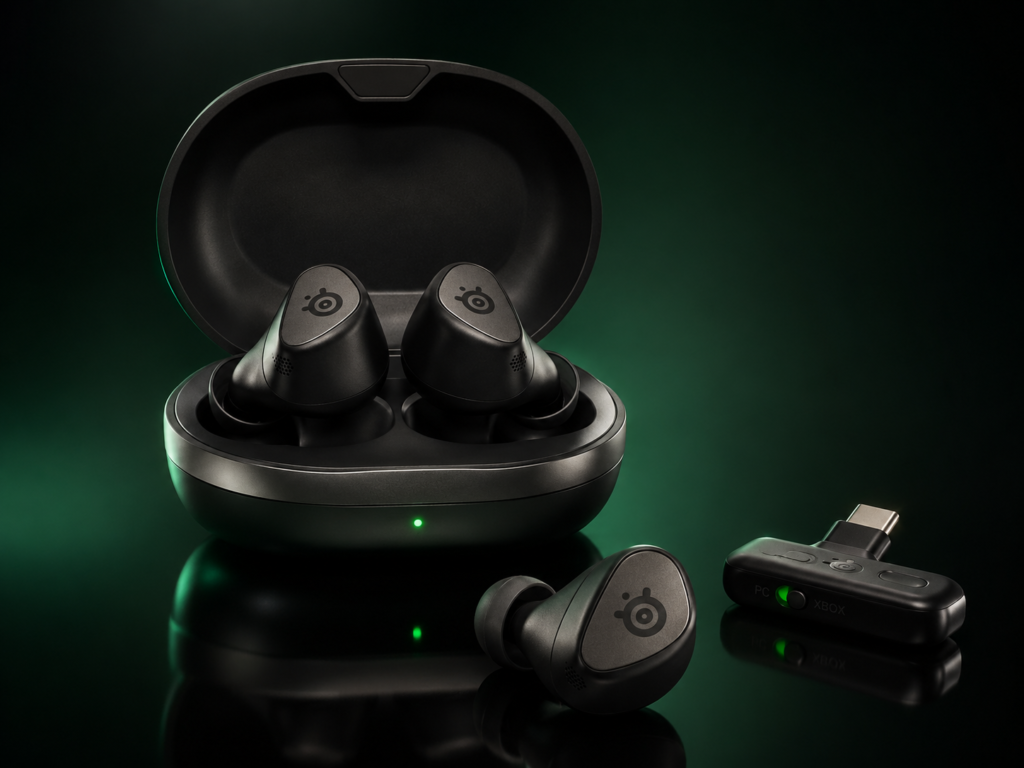
Best for: Overall gaming performance
Primary audience: PC, PS5, Xbox version users, Nintendo Switch, mobile, handheld gaming
The SteelSeries Arctis GameBuds are the strongest all-round recommendation for most people looking for the best TWS earbuds for gaming. They understand the assignment: low latency, broad platform support, comfortable design, ANC, transparency mode, app control, and a case that makes the earbuds feel like a real everyday product instead of a strange gaming experiment.
Their biggest strength is balance. Many gaming earbuds do one thing well and then compromise heavily somewhere else. The Arctis GameBuds feel more complete. They are designed for actual gaming sessions, not just short mobile matches.

- QUICK-SWITCH DUAL WIRELESS — High-speed 2.4GHz wireless specifically for PS5 gaming, or switch to Bluetooth 5.3 for mobi…
- ACTIVE NOICE CANCELLATION — 4-mic hybrid ANC provides true gaming immersion; ability to switch transparency mode for awa…
- 100+ GAME AUDIO PRESETS — Easy-to-use SteelSeries Arctis Companion App contains 100+ presets to boost critical sounds in…
The 2.4GHz wireless connection is the main reason they belong near the top. This helps reduce delay compared with typical Bluetooth earbuds. For competitive titles, low-latency audio is the difference between reacting to a sound cue and simply hearing it too late.
The SteelSeries companion experience also gives them a serious advantage. Game-specific EQ presets can help players tune the earbuds toward footsteps, dialogue, environmental awareness, or a more cinematic sound. This is especially useful for people who move between shooters, RPGs, racing games, sports games, and casual multiplayer titles.
Sound Quality
The Arctis GameBuds deliver a gaming-first sound profile. They are not trying to be delicate studio monitors. Their tuning is built to make games feel energetic while still preserving important cues. Bass has enough presence for explosions and cinematic impact, but the better reason to choose them is the way they organize game information.
Footsteps, reloads, menu sounds, effects, and voice chat sit in a usable space. This matters because game audio is not just entertainment; it is a layer of information.
Microphone and Voice Chat
The microphone is suitable for in-game chat, Discord-style communication, and casual calls. Like most TWS earbuds, they will not replace a dedicated broadcast microphone, but they work well enough for team communication.
Comfort
Comfort is one of their main advantages over a headset. They are easier to wear for long sessions and avoid headset clamp. For people who dislike over-ear heat, the Arctis GameBuds are a strong alternative.
Best Use Cases
- Competitive multiplayer
- PC gaming
- Console gaming
- Handheld gaming
- Travel gaming
- Players who want one gaming-first TWS option
Limitations
They are not the purest music earbuds in the premium audio world. If a person mainly wants high-resolution music and only plays casual games, a music-first earbud may feel more refined. But for gaming, the Arctis GameBuds are one of the best-balanced options available.
EarsBud Verdict
The SteelSeries Arctis GameBuds are the safest top recommendation for most players because they combine low-latency gaming performance, comfort, battery confidence, ANC, app control, and platform flexibility in one compact package.
Sony INZONE Buds Review
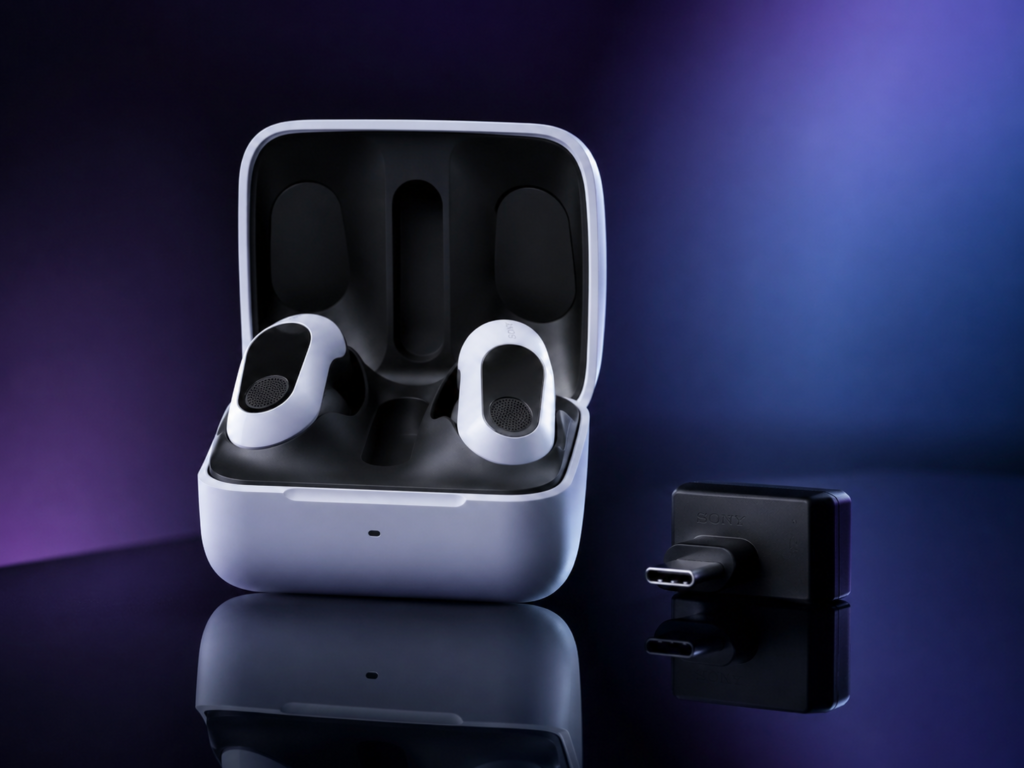
Best for: PC and PS5 gaming
Primary audience: PS5 players, PC gamers, long-session players
The Sony INZONE Buds are built for players who want a serious gaming experience in a true wireless form. They make the most sense for PC and PS5 gaming, especially for individuals who care about long battery life, clean sound, and a low-latency 2.4GHz connection.
Sony has strong audio heritage, and the INZONE line is clearly positioned toward gaming rather than casual listening alone. These earbuds are not just lifestyle earbuds with a gaming label. They are meant to sit inside a gaming setup.

- PERFECT FOR PLAYSTATION 5: Experience PS5 compatibility with on-screen status (volume, battery level, microphone mute) a…
- 360 SPATIAL SOUND plus ACTIVE NOISE CANCELING: Sony’s algorithm customizes 360 spatial sound for your ear shape, helping…
- IMPRESSIVE BATTERY: Enjoy up to 12 hours of uninterrupted gaming and chat on a single charge, 48 hours of battery with t…
Their biggest advantage is endurance. Long battery life on a 2.4GHz gaming connection is not just convenient; it changes how confidently a person can play. A player should not feel battery anxiety during ranked matches, long RPG sessions, raid nights, or livestreams.
Sound Quality
The INZONE Buds lean toward clarity and gaming precision. The sound is clean, controlled, and focused enough for game detail. The tuning works especially well for players who want separation rather than overwhelming bass.
For PC and PS5, they can feel more purpose-built than many ordinary Bluetooth earbuds. They suit players who want a more refined gaming sound without carrying a headset.
Microphone and Communication
The mic system is good enough for gaming chat, though creators who record voice professionally should still use a dedicated external microphone. For team play, it handles normal communication well.
Comfort
The INZONE Buds are compact enough for extended wear and more practical than a full headset for people who dislike heat or pressure. As always, fit depends on ear shape, but they are clearly built for long play.
Best Use Cases
- Best gaming earbuds for PC
- PS5 gaming
- Long sessions
- Players who care about battery life
- People who want a clean, gaming-focused sound profile
Limitations
They are not the most universal pick for everyone. If a person moves constantly between Xbox, Switch, phone, PC, PS5, and streaming gear, SteelSeries or Razer may feel more flexible. The INZONE Buds shine brightest inside Sony and PC-oriented setups.
EarsBud Verdict
The Sony INZONE Buds are among the best gaming earbuds for PC and PS5 because they prioritize long-session wireless gaming, low-latency play, and clean game audio without the bulk of a headset.
Razer Hammerhead V3 HyperSpeed Review
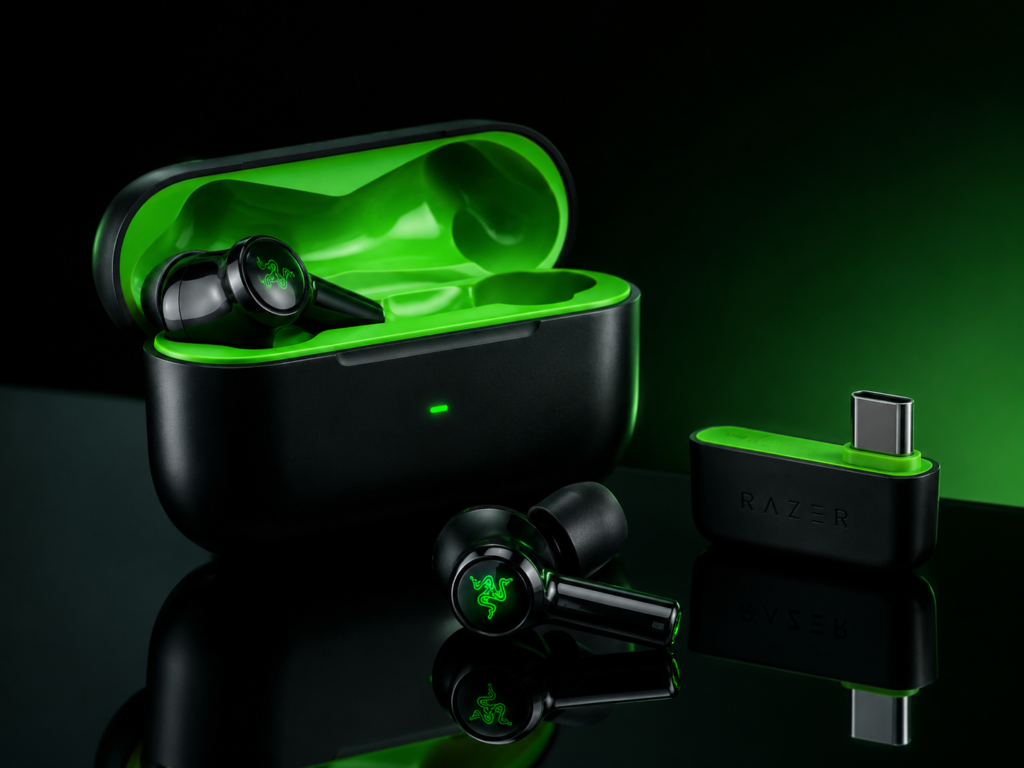
Best for: Premium gaming lifestyle use
Primary audience: PC, PS5, Steam Deck, mobile, Razer ecosystem users
The Razer Hammerhead V3 HyperSpeed is designed for the gamer who wants performance and identity in the same product. Razer’s gaming products usually carry a certain visual language: bold, sharp, modern, and unmistakably gaming-oriented. The Hammerhead V3 HyperSpeed continues that direction while adding practical wireless gaming features.
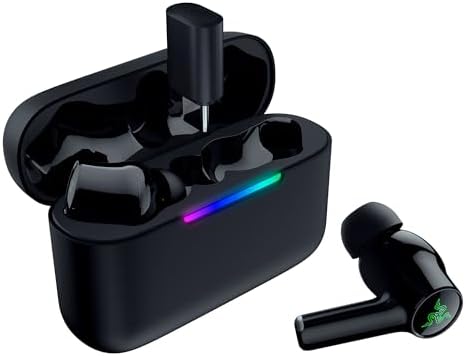
- MULTI‑PLATFORM WIRELESS FREEDOM — Experience ultra‑low‑latency gaming audio using 2.4 GHz Razer HyperSpeed Wireless on m…
- HYBRID ACTIVE NOISE CANCELLATION — Stay fully immersed by blocking distractions whether gaming, commuting, traveling or …
- HYPERSPEED CASE WITH COMPACT DONGLE — Use the removable dongle on the go or plug in the case to play and charge at the s…
Its main strength is connection flexibility. The combination of 2.4GHz HyperSpeed wireless and Bluetooth makes it useful across multiple devices. That matters because modern gaming is fragmented. A person might play a competitive shooter on PC, a story game on PS5, a handheld title on Steam Deck, and a mobile game on a phone.
The Hammerhead V3 HyperSpeed is built for that kind of movement.
Sound Quality
The sound profile is energetic and gaming-friendly. Razer usually leans toward excitement, impact, and immersion rather than a flat studio character. That works well for action games, racing games, shooters, and cinematic single-player titles.
For competitive FPS players, EQ control and low-latency connection matter more than raw bass. The Hammerhead V3 HyperSpeed performs best when used through its gaming connection rather than relying only on standard Bluetooth.
ANC and Everyday Use
Hybrid ANC makes these more useful outside gaming. A person can use them in a noisy room, while traveling, during commutes, or when trying to focus. This gives them stronger lifestyle value than basic gaming earbuds.
Microphone
The microphone is suitable for gaming chat and casual calls. Streamers should still use a dedicated mic for broadcast-quality voice, but these earbuds can work well as monitoring earbuds while a separate microphone handles the stream.
Best Use Cases
- PC gaming
- PS5 gaming
- Steam Deck
- Mobile gaming
- Razer ecosystem setups
- Players who want gaming earbuds that also feel stylish
Limitations
The Razer identity is part of the product. Some people will love the gaming-forward style and ecosystem. Others may prefer the more neutral presentation of SteelSeries or Sony. The sound is also more entertainment-focused than reference-focused.
EarsBud Verdict
The Razer Hammerhead V3 HyperSpeed is one of the strongest premium gaming TWS options for players who want low-latency gaming, ANC, modern wireless features, and a more aggressive gaming personality.
ASUS ROG Cetra Open Wireless Review
Best for: Open-ear comfort and awareness
Primary audience: Players who dislike sealed earbuds, streamers, casual gamers, long-session users
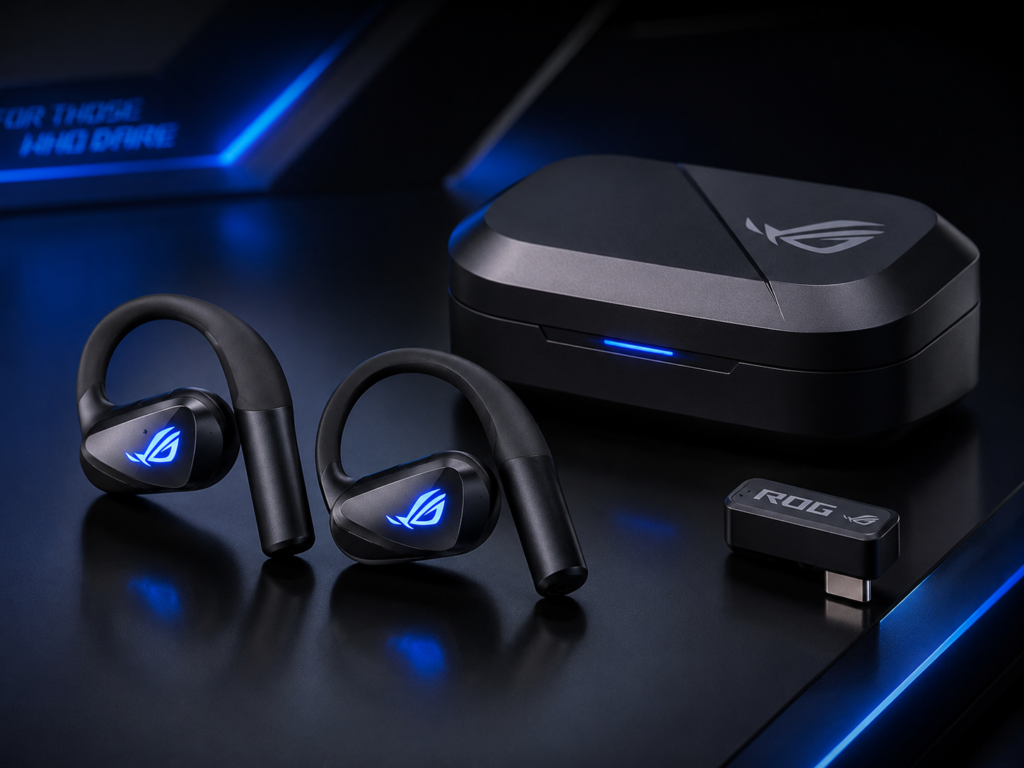
The ASUS ROG Cetra Open Wireless takes a different approach. Instead of sealing the ear canal like most TWS earbuds, it uses an open-ear design. This makes it one of the most interesting gaming earbuds for people who value comfort, airflow, and environmental awareness.

- Dual-Mode Connectivity: With Bluetooth and low-latency ROG SpeedNova 2.4GHz connectivity, plus USB-C passthrough chargin…
- 14.2 mm DLC-coated Diaphragm Drivers: Featuring a 14.2mm DLC-coated diaphragm, deliver crisp highs, deep bass, and a spa…
- IPX5 Water-Resistant Gaming Open Earbuds: With IPX5 water-resistant protection, your music stays with you through rain, …
Open-ear gaming is not for everyone. It does not isolate sound like sealed earbuds. It does not create the same enclosed bass pressure. But it solves a real problem: many people hate the plugged-in feeling of traditional earbuds.
For a streamer, an open-ear design can also be useful. It allows the person to hear the room, monitor their voice naturally, and avoid the heavy look of a headset. This is why open-ear gaming earbuds may become more common in creator setups.
Sound Quality
The ROG Cetra Open Wireless uses larger open-style drivers to create a spacious sound without sealing the ear. The result is different from in-ear gaming earbuds. It feels more airy and less pressurized.
For competitive gaming, open-ear sound has a trade-off. Awareness is excellent, but isolation is limited. If the room is quiet, this can feel comfortable and natural. If the room is loud, sealed gaming earbuds may be better.
Microphone and Voice
The quad-mic AI noise-canceling system is one of the important features. Open-ear earbuds need strong voice handling because they are likely to be used in mixed environments. ASUS clearly positions this model toward gaming communication as well as daily use.
Comfort
Comfort is the reason to consider these. For people who feel pressure, irritation, or fatigue from silicone tips, the ROG Cetra Open Wireless is a meaningful alternative.
Best Use Cases
- Long gaming sessions
- Streamers who want a cleaner on-camera look
- People who dislike in-ear pressure
- Casual PC and console gaming
- Gaming in quiet rooms
- Users who need awareness of surroundings
Limitations
Open-ear design is not ideal for noisy environments. It also does not produce the same sealed bass impact as traditional in-ear earbuds. If the goal is maximum immersion, the SteelSeries, Sony, or Razer options may be stronger.
EarsBud Verdict
The ASUS ROG Cetra Open Wireless is the best choice for players who want comfort and awareness more than isolation. It is not the universal gaming earbud, but it is one of the most distinct and practical options for people who dislike sealed earbuds.
JBL Quantum TWS Review
Best for: Casual gaming plus music
Primary audience: JBL fans, hybrid listeners, mobile gamers, casual console players
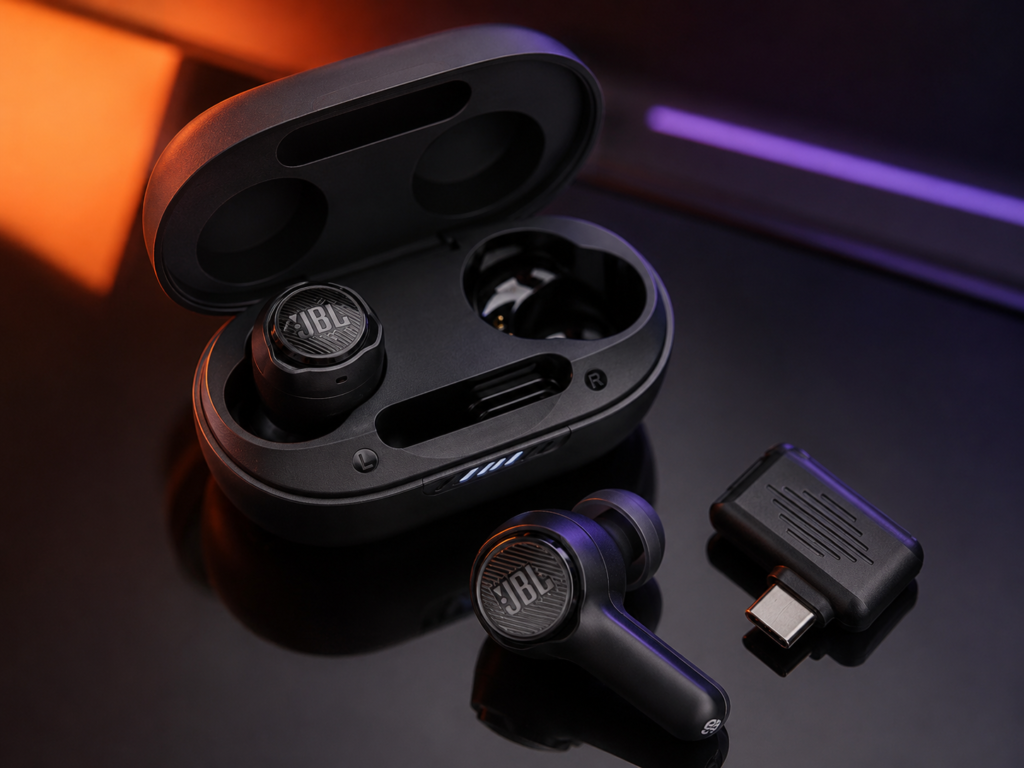
The JBL Quantum TWS belongs in the conversation because it aim to bridge gaming and everyday listening. JBL is not only a gaming brand; it is a mainstream audio brand with a strong sound identity. That gives the Quantum earbuds a different flavor from SteelSeries, Razer, Sony INZONE or ASUS ROG.

- JBL QuantumSURROUND: Feel like you’re stepping inside the game with JBL QuantumSURROUND* for immersive and accurate soun…
- Low latency wireless connection: Establish low latency 2.4GHz connection to compatible devices with the included USB-C d…
- Fast Pair and JBL Dual Source: Never miss a call while defending the galaxy. After connecting via 2.4GHz lossless wirele…
These earbuds are best for someone who wants gaming features but still cares about music, streaming video, casual listening, and daily comfort.
Sound Quality
JBL’s house sound tends to be lively and consumer-friendly. In gaming, that can make explosions, racing engines, open-world ambience, and action scenes feel enjoyable. For casual gaming, this is a strength.
For highly competitive FPS gaming, however, the most exciting sound is not always the most useful sound. A person who plays ranked shooters may prefer earbuds with more precise gaming EQ and stronger low-latency implementation.
Gaming Performance
The Quantum models are more gaming-aware than ordinary lifestyle earbuds. Depending on the version and platform, dongle-based connectivity can improve gaming usability. They are stronger than normal Bluetooth earbuds for gaming but may not feel as gaming-specialized as SteelSeries Arctis GameBuds or Sony INZONE Buds.
Mic and Calls
Mic quality is acceptable for casual gaming chat and everyday calls. For serious streaming, use a dedicated microphone and treat the earbuds as monitoring devices.
Best Use Cases
- Casual gaming
- Music and gaming hybrid use
- Mobile gaming
- Travel
- Everyday listening
- People who already like JBL sound
Limitations
They are not the top recommendation for competitive PC gaming or serious PS5 sessions. Their appeal is broader lifestyle flexibility rather than pure gaming optimization.
EarsBud Verdict
The JBL Quantum TWS is best for people who want gaming-capable earbuds that still behave like everyday audio products. They are sensible for casual gaming and music, but not the strongest choice for a competitive-first setup.
PlayStation Pulse Explore Review
Best for: PlayStation Portal and PlayStation ecosystem
Primary audience: PS5, PlayStation Portal, PlayStation Link users
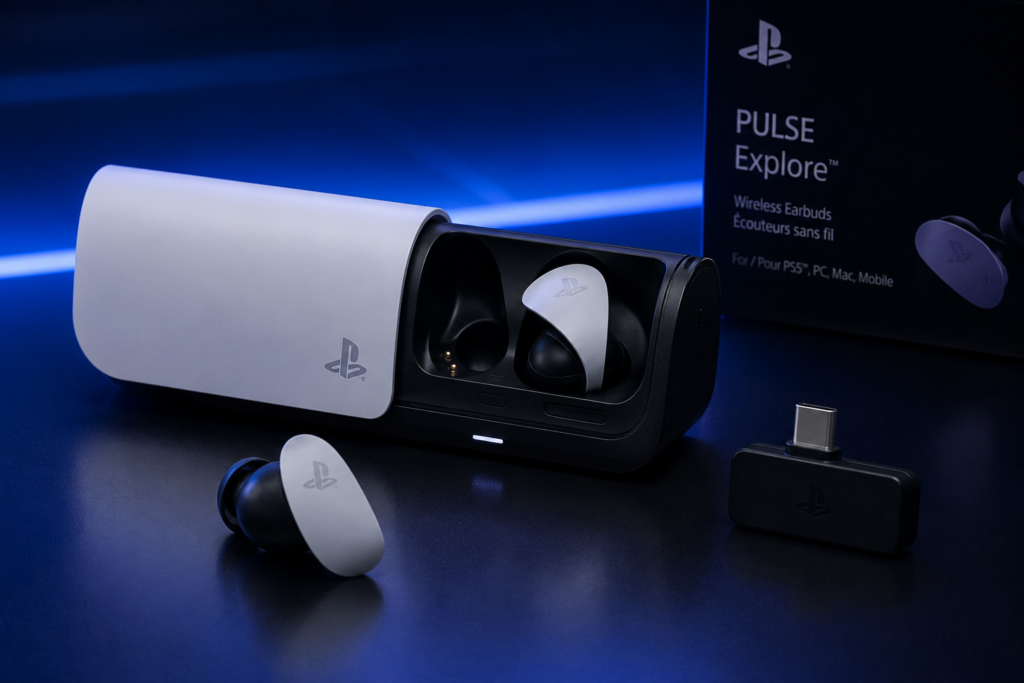
The PlayStation Pulse Explore earbuds are a specialized choice. They make the most sense for people already invested in the PlayStation ecosystem, especially those using PlayStation Portal or PlayStation Link-compatible setups.

- Next Generation Gaming Audio
- Multi-Device Connectivity
- Command and Control
Unlike general-purpose gaming earbuds, Pulse Explore is not trying to be everything to everyone. Its value comes from ecosystem fit. If your gaming life is centered around PlayStation, that may be enough to make it attractive.
Sound Quality
Pulse Explore is built around PlayStation gaming rather than general music-first tuning. The goal is immersive console audio in a small form factor. It can work well for story games, remote play, action titles, and PlayStation-first setups.
Connectivity
The PlayStation Link angle is the key selling point. This matters most for PlayStation Portal and compatible PlayStation hardware. For a person outside that world, the value drops.
Comfort and Use
The earbuds are more portable than a headset and work well for players who want a compact PlayStation audio option. For couch gaming, travel, or remote play, they make sense.
Best Use Cases
- PlayStation Portal
- PS5 ecosystem
- Remote play
- PlayStation-first individuals
- Compact console gaming
Limitations
They are not the most flexible recommendation for PC, Xbox, Android, iPhone, or mixed-platform households. They should be chosen for PlayStation ecosystem reasons, not because they are the universal best gaming earbuds.
EarsBud Verdict
The PlayStation Pulse Explore earbuds are best for PlayStation-focused players who want a compact, ecosystem-friendly alternative to a full headset.
TWS Gaming Earbuds Comparison Chart
| Earbud Model | Best Platform Fit | Low-Latency Gaming | ANC | Open-Ear Design | Best For |
|---|---|---|---|---|---|
| SteelSeries Arctis GameBuds | PC, PS5, Xbox version, Switch, mobile | Excellent | Yes | No | Best overall |
| Sony INZONE Buds | PC, PS5 | Excellent | Yes | No | Long sessions |
| Razer Hammerhead V3 HyperSpeed | PC, PS5, Steam Deck, mobile | Excellent | Yes | No | Premium gaming lifestyle |
| ASUS ROG Cetra Open Wireless | PC, mobile, casual console | Strong | No traditional seal | Yes | Comfort and awareness |
| JBL Quantum TWS | Mobile, casual gaming, everyday listening | Good to strong depending on model | Model-dependent | No | Gaming and music hybrid |
| PlayStation Pulse Explore | PlayStation Portal, PS5 ecosystem | Strong in ecosystem | No traditional ANC focus | No | PlayStation users |
For players who want strong performance without overspending, our full guide to the best budget gaming earbuds covers affordable low-latency picks built for mobile, PC, console and handheld gaming.
Best Gaming Earbuds for PC
The best gaming earbuds for PC should have three things: low-latency wireless, reliable microphone performance, and software or EQ control. PC gaming is less forgiving than casual mobile play because audio cues often decide outcomes in competitive games.
Best PC Picks
- SteelSeries Arctis GameBuds
Best overall because of platform flexibility, gaming presets, comfort, and strong low-latency design. - Sony INZONE Buds
Excellent for PC players who also use PS5 and want long battery life. - Razer Hammerhead V3 HyperSpeed
Best for players who want a premium gaming brand experience, fast wireless, ANC, and strong device flexibility. - ASUS ROG Cetra Open Wireless
Best for PC players who dislike sealed earbuds and want a more breathable design.
What PC Gamers Should Avoid
Avoid choosing normal Bluetooth earbuds only because they sound good for music. PC games expose latency quickly. If you play FPS, battle royale, fighting games, rhythm games, or fast multiplayer titles, a USB-C 2.4GHz dongle is usually a better direction.
Best Gaming Earbuds for PS5
For PS5, platform support matters. Some earbuds work beautifully through a USB-C dongle, while others may have limitations depending on the console, firmware, or connection method.
Best PS5 Picks
| Need | Best Pick |
|---|---|
| Best all-round PS5 gaming earbuds | SteelSeries Arctis GameBuds |
| Best Sony gaming ecosystem option | Sony INZONE Buds |
| Best PlayStation Portal option | PlayStation Pulse Explore |
| Best premium gaming lifestyle option | Razer Hammerhead V3 HyperSpeed |
Sony INZONE Buds and Pulse Explore are especially relevant for PlayStation users, but they serve different needs. INZONE Buds are more attractive for PS5 and PC gaming. Pulse Explore is more specialized for PlayStation Portal and PlayStation Link.
Best Gaming Earbuds for Mobile
Mobile gaming needs low latency, comfort, and simple switching. The best earbuds for mobile gaming should avoid awkward dongles when possible, but for serious play, a USB-C dongle can still make a major difference.
Strong Mobile Gaming Options
- Razer Hammerhead V3 HyperSpeed
- SteelSeries Arctis GameBuds
- JBL Quantum TWS
- ASUS ROG Cetra Open Wireless
For casual mobile gaming, Bluetooth can be acceptable. For competitive mobile gaming, use the fastest available low-latency mode.
Earbuds Gaming Streamers Use: What Actually Matters
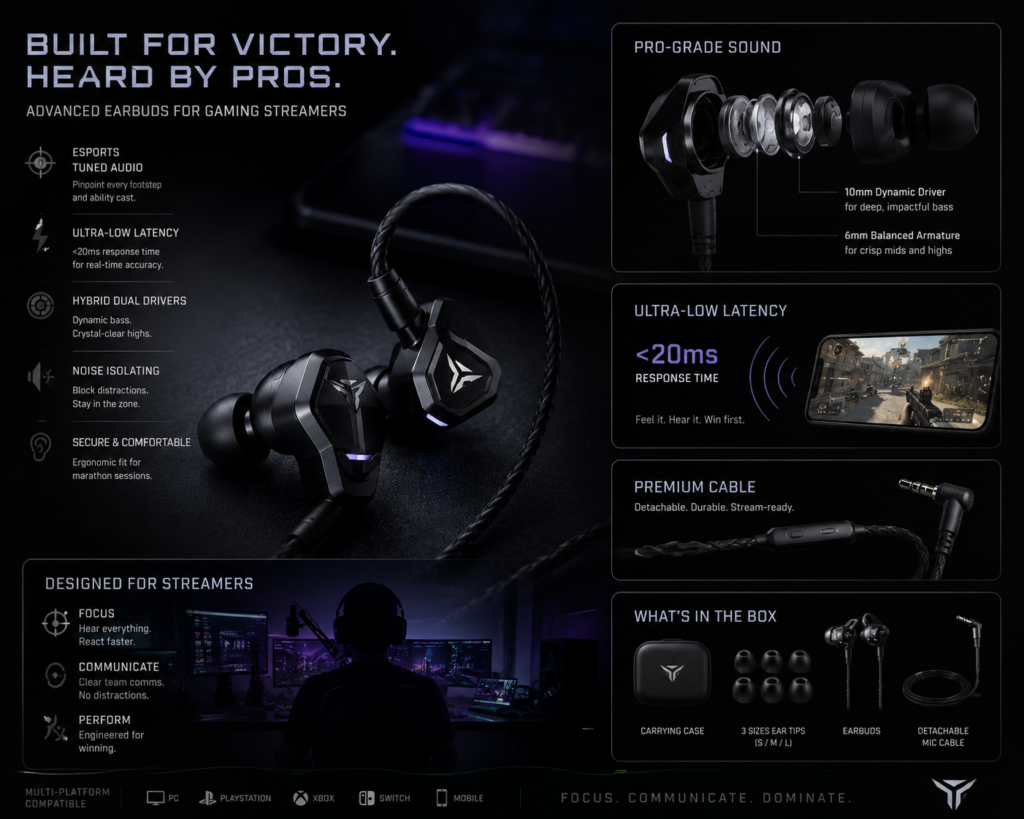
Earbuds gaming streamers use, have become a real change in the trend because viewers often notice that streamers are not always wearing large headsets. Many use earbuds for a cleaner camera look, better comfort, and reduced headset fatigue.
But streamers should think differently from ordinary players.
A Streamer’s Earbud Setup Has Two Audio Jobs
First, the earbuds handle monitoring. The streamer hears the game, teammates, alerts, and sometimes their own voice monitoring.
Second, the microphone handles the audience. In many good setups, the earbuds are not the main microphone. A separate USB or XLR mic captures the stream voice.
This means the best earbuds for streamers do not always need the best built-in mic. They need comfort, low latency, no audio bleed, stable connection, and a clean visual profile.
What earbuds do gaming streamers use and why do many streamers prefer earbuds over gaming headsets?
Many gaming streamers use earbuds instead of traditional gaming headsets because earbuds can provide faster comfort, lower heat buildup, better microphone flexibility, and cleaner audio monitoring during long streaming sessions. While gaming headsets remain popular, an increasing number of professional streamers, esports competitors, and content creators choose high-performance earbuds for competitive gaming and broadcasting.
The primary advantage is comfort. Streamers often spend 4–12 hours live on platforms such as Twitch, YouTube, and Kick. Large over-ear headsets can become heavy, trap heat, flatten hair, and cause pressure around the jaw and temples. Lightweight earbuds eliminate many of these issues while still delivering accurate in-game sound cues.
Why Streamers Choose Earbuds
| Factor | Earbuds | Gaming Headsets |
|---|---|---|
| Long-session comfort | Excellent | Good |
| Heat buildup | Very Low | Moderate to High |
| Weight | Extremely Light | Heavy |
| Hair and appearance on camera | Unaffected | Can flatten hair |
| Audio positioning | Very Good to Excellent | Excellent |
| Portability | Excellent | Limited |
| Streaming desk setup | Cleaner | Bulkier |
| Travel convenience | Excellent | Poor |
Most Important Features Gaming Streamers Look For
Not all earbuds are suitable for streaming. Professional streamers typically prioritize the following factors:
| Feature | Importance for Streaming |
|---|---|
| Low latency mode | Critical |
| Clear footstep positioning | Critical |
| Voice chat clarity | High |
| Comfortable fit | High |
| Stable wireless connection | High |
| Battery life | Medium |
| Active Noise Cancellation | Medium |
| Multi-device connectivity | Medium |
Relative Importance of Earbud Features
Low Latency              ██████████ 100%
Audio Positioning        ██████████ 100%
Comfort                  █████████  90%
Connection Stability     █████████  90%
Voice Clarity            ████████   80%
Battery Life             ███████    70%
ANC                      ██████     60%
Customization            █████      50%
Why Low Latency Matters More Than Sound Quality
Many beginners focus entirely on sound quality, but experienced streamers often prioritize latency. Even a small audio delay can affect reaction times in competitive titles such as FPS, battle royale, and tactical shooters.
Consider this comparison:
| Latency Range | Gaming Experience |
|---|---|
| Under 30ms | Professional-grade responsiveness |
| 30–60ms | Excellent for competitive gaming |
| 60–100ms | Acceptable for casual gaming |
| 100–150ms | Noticeable delay |
| Above 150ms | Poor competitive performance |
When audio arrives late, footsteps, reload sounds, and enemy movements may be heard after they occur on screen, reducing competitive awareness.
Why Some Top Streamers Wear Earbuds Under Headsets
A common professional setup combines earbuds with a large headset.
In this configuration:
- Earbuds deliver game audio.
- The headset functions as a microphone and noise-isolation device.
- Streamers maintain accurate audio monitoring while keeping communication quality high.
- Tournament organizers often require this setup during esports events.
Should Streamers Use Open-Ear Gaming Earbuds?
Open-ear earbuds can be excellent for comfort and natural speaking, but they may leak more sound into a sensitive microphone than sealed earbuds. If your mic is close to your mouth with good noise rejection, open-ear designs can work. If your room is reflective or your mic is far away, sealed earbuds may be safer.
The Ideal Earbud Profile for Streaming
The earbuds gaming streamers use most successfully generally share these characteristics:
✓ Low-latency gaming mode
✓ Precise directional audio
✓ Secure fit that remains comfortable for hours
✓ Stable Bluetooth or wired connection
✓ Clear mids and treble for hearing footsteps
✓ Strong passive noise isolation
✓ Long battery endurance
Ultimately, the best earbuds for gaming streamers are not necessarily the loudest or most expensive. The ideal pair is the one that delivers accurate positional audio, minimal delay, all-day comfort, and reliable performance during long broadcasts where every sound cue can influence gameplay and audience engagement.
Best Earbuds for Streamers
| Streamer Need | Best Direction |
|---|---|
| Clean on-camera look | ASUS ROG Cetra Open Wireless |
| Competitive play | SteelSeries Arctis GameBuds |
| PS5 streaming | Sony INZONE Buds or Playstation Pulse Explore |
| Mobile streaming | Razer Hammerhead V3 HyperSpeed |
| Long comfort | ASUS ROG Cetra Open Wireless |
| Separate mic setup | Any low-latency option with reliable monitoring |
Low Latency Explained: Why 2.4GHz Beats Ordinary Bluetooth for Gaming
Latency is the time between an action happening and the sound reaching your ears. In music, latency usually does not matter because you are not reacting to a live event. In gaming, latency is part of performance.
Why Bluetooth Can Be a Problem
Bluetooth audio is compressed, transmitted, decoded, and played back. That chain can create delay. For videos, devices often compensate by syncing video and audio. Games are different because the action is interactive and unpredictable.
Why 2.4GHz Gaming Dongles Help
A 2.4GHz dongle creates a dedicated connection path designed for faster gaming audio. This is why many of the best gaming earbuds include a USB-C receiver. The dongle is not just an accessory; it is often the feature that makes the earbuds truly gaming-ready.
Best Rule
For casual gaming, Bluetooth can be enough.
For competitive gaming, choose 2.4GHz or a dedicated low-latency mode.
ANC vs Transparency Mode for Gaming
Active noise cancellation can help gaming, but it is not always automatically better.
When ANC Helps
ANC is useful when you play near:
- Fans
- Air conditioners
- Traffic
- Family noise
- Keyboard noise
- Laptop fan noise
- Public spaces
It can make game audio easier to hear at lower volume.
When Transparency Helps
Transparency mode lets outside sound in. This helps when you need awareness of your room, doorbell, family, pets, or your own speaking voice.
When Open-Ear Helps
Open-ear designs like ASUS ROG Cetra Open Wireless are naturally aware. They are less isolating, but more breathable and socially practical.
Best Earbuds for FPS Gaming
FPS gaming requires fast timing and clean directional cues. Bass-heavy earbuds can make explosions exciting, but they may bury quiet footsteps.
Best FPS Gaming Priorities
| Priority | Why It Matters |
|---|---|
| Low latency | Audio cues must arrive quickly |
| Footstep clarity | Helps with positioning |
| Controlled bass | Prevents muddy sound |
| Comfort | Long sessions require stable fit |
| Mic clarity | Team communication matters |
| EQ control | Different games need different tuning |
Best FPS Picks
- SteelSeries Arctis GameBuds
- Sony INZONE Buds
- Razer Hammerhead V3 HyperSpeed
For FPS players, the SteelSeries presets and low-latency design are especially useful.
Best Earbuds for Gaming and Music
A person who wants one pair for everything should look beyond latency. Music quality, ANC, comfort, and daily usability matter.
Best Hybrid Picks
| Earbuds | Gaming Strength | Music Strength |
|---|---|---|
| Razer Hammerhead V3 HyperSpeed | Fast wireless and premium feature set | Energetic sound and ANC |
| JBL Quantum TWS / TWS Air | Gaming-aware design | Familiar JBL tuning |
| SteelSeries Arctis GameBuds | Strong gaming performance | Good everyday listening |
| Sony INZONE Buds | Clean gaming sound | Refined enough for casual music |
Are Normal TWS Earbuds Good for Gaming?
Normal earbuds can be fine for casual gaming, but they are usually not ideal for serious gaming. AirPods, Galaxy Buds, Bose earbuds, and premium music earbuds may sound excellent, but many are not built around gaming latency.
A normal TWS earbud may work for:
- Puzzle games
- Casual mobile games
- Turn-based games
- Story games where timing is not critical
- Watching gaming content
A gaming TWS earbud is better for:
- Competitive shooters
- Battle royale games
- Fighting games
- Fast multiplayer games
- Rhythm games
- Streaming setups
- PC and console gaming
The difference is not just sound quality. It is timing.
TWS Earbuds vs Gaming Headsets
| Category | TWS Gaming Earbuds | Gaming Headsets |
|---|---|---|
| Comfort | Lighter, less heat | More clamp, more coverage |
| Portability | Excellent | Bulky |
| Mic Quality | Usually acceptable | Often better, especially boom mics |
| Immersion | Good, depends on seal | Usually stronger |
| Battery | Varies by model | Often longer on large models |
| Streaming Look | Cleaner on camera | More visible |
| Competitive Audio | Strong with 2.4GHz | Strong with proper headset |
| Best For | Travel, mobile, lightweight gaming | Desk setups, serious voice chat, maximum immersion |
The real question is not which category is always better. The better question is where and how you play. A desk-only competitive player may still prefer a headset. A multi-platform player who moves between PC, PS5, phone, and handheld gaming may prefer TWS gaming earbuds.
The Best TWS Earbuds for Gaming by Player Type
| Player Type | Best Match | Why |
|---|---|---|
| Competitive FPS player | SteelSeries Arctis GameBuds | Low latency, presets, strong gaming focus |
| PS5 and PC player | Sony INZONE Buds | Built for long-session gaming |
| Premium multi-device gamer | Razer Hammerhead V3 HyperSpeed | 2.4GHz, Bluetooth, ANC, lifestyle appeal |
| Streamer who hates headsets | ASUS ROG Cetra Open Wireless | Open-ear comfort and cleaner look |
| Casual gamer and music listener | JBL Quantum TWS / TWS Air | Gaming features plus mainstream sound |
| PlayStation Portal user | PlayStation Pulse Explore | Ecosystem fit |
Upcoming Trends and Latest Tech in Gaming Earbuds
Gaming earbuds are entering a more serious phase. The next wave will not only be about smaller cases and stronger bass. It will be about smarter wireless systems, better microphones, and more platform-aware audio.
1. 2.4GHz Dongles Will Become Standard
Gaming earbuds without low-latency dongles will feel less competitive. Expect more USB-C dongle cases, hidden receivers, and multi-platform dongle designs.
2. Bluetooth LE Audio Will Matter More
Bluetooth LE Audio and LC3-style efficiency can improve battery life, stability, and latency on compatible devices. It will not replace gaming dongles immediately, but it will improve casual wireless gaming.
3. Spatial Audio Will Become More Game-Specific
Generic spatial audio is not enough. Future gaming earbuds will likely use game-aware profiles, head tracking, and personalized HRTF-style tuning to make positional audio more natural.
4. AI Noise Reduction Will Improve Microphones
Earbud microphones are physically limited. They are far from the mouth and exposed to room noise. AI noise reduction, beamforming, and bone-conduction-style pickup will become more important for voice chat.
5. Open-Ear Gaming Will Grow
Not everyone wants sealed earbuds. Open-ear gaming products will grow among streamers, home office players, casual gamers, and people who want awareness without a headset.
6. More Earbuds Will Target Handheld Gaming
Steam Deck, Nintendo Switch, cloud gaming handhelds, tablets, and mobile controllers are changing how people play. Gaming earbuds are naturally suited to this world.
7. App-Based Game Profiles Will Become a Major Feature
The next battle will be software. Earbuds that can switch EQ by game genre, platform, or player preference will feel smarter than earbuds with one fixed sound.
Best TWS Earbuds for Gaming: Editorial Buying Guide
Choose SteelSeries Arctis GameBuds if…
You want the best overall gaming TWS earbuds with low-latency wireless, ANC, game presets, strong platform flexibility, and a complete gaming-first feature set.
Choose Sony INZONE Buds if…
You mainly play on PC and PS5, care about long battery life, and want a clean gaming audio profile from a brand with serious audio experience.
Choose Razer Hammerhead V3 HyperSpeed if…
You want premium gaming earbuds with bold styling, fast wireless, ANC, Bluetooth flexibility, and strong multi-device appeal.
Choose ASUS ROG Cetra Open Wireless if…
You hate sealed earbuds, want room awareness, stream on camera, or prefer a breathable open-ear design.
Choose JBL Quantum TWS / Quantum TWS Air if…
You want gaming-capable earbuds that also behave like everyday JBL-style audio products for music, video, and casual play.
Choose PlayStation Pulse Explore if…
You are focused on PlayStation Portal, PlayStation Link, and the Sony gaming ecosystem.
Common Mistakes When Choosing Gaming Earbuds
Mistake 1: Choosing Music Earbuds for Competitive Gaming
Music earbuds can sound beautiful and still perform poorly in games because of latency. For gaming, timing is a performance feature.
Mistake 2: Ignoring Platform Support
An earbud that works well on PC may not work equally well on PS5, Xbox, or Switch. Always check the platform before choosing.
Mistake 3: Overvaluing Bass
Heavy bass can hide footsteps and small cues. For FPS gaming, clarity beats rumble.
Mistake 4: Forgetting Mic Position
TWS microphones are tiny and far from the mouth. For streaming, use a dedicated mic when possible.
Mistake 5: Thinking ANC Is Always Better
ANC helps in noisy rooms, but transparency or open-ear design may be better when you need awareness.
FAQs
What are the best TWS earbuds for gaming with low latency?
The best TWS earbuds for gaming with low latency are models that use a 2.4GHz USB-C dongle or dedicated gaming wireless connection. SteelSeries Arctis GameBuds, Sony INZONE Buds, and Razer Hammerhead V3 HyperSpeed are among the strongest options because they are designed around gaming response rather than ordinary Bluetooth listening. For competitive games, low latency should be the first requirement.
What are the best gaming earbuds for PC with mic?
The best gaming earbuds for PC with mic should combine 2.4GHz wireless, stable voice chat, software controls, and comfortable long-session fit. SteelSeries Arctis GameBuds are the best all-round PC pick, while Sony INZONE Buds are excellent for PC and PS5 users. Razer Hammerhead V3 HyperSpeed is also strong for PC gamers who want a premium gaming design and multi-device flexibility.
Are TWS earbuds good for FPS gaming?
TWS earbuds can be good for FPS gaming if they use low-latency wireless and have clear directional tuning. The most important features are fast connection, controlled bass, footstep clarity, stable fit, and good team chat. Ordinary Bluetooth earbuds are usually not ideal for serious FPS gaming because latency can delay key audio cues.
Which earbuds for gaming are best for streamers?
The best gaming earbuds for streamers depend on the setup. SteelSeries Arctis GameBuds are strong for competitive monitoring, ASUS ROG Cetra Open Wireless is useful for streamers who want open-ear comfort and a cleaner camera look, and Razer Hammerhead V3 HyperSpeed works well for premium multi-device streaming setups. For professional voice quality, streamers should still use a separate microphone.
Are earbuds for gaming better than gaming headsets?
eEarbuds for gaming are better for portability, comfort, heat reduction, travel, mobile gaming, handheld consoles, and clean streaming visuals. Gaming headsets are often better for maximum immersion and stronger boom-mic voice quality. The best choice depends on whether the person values lightweight flexibility or full-size headset performance.
People Also Ask
What earbuds do gamers use for gaming?
Gamers use different earbuds depending on platform and play style. Competitive players often choose low-latency gaming earbuds with 2.4GHz dongles, such as SteelSeries Arctis GameBuds, Sony INZONE Buds, or Razer Hammerhead V3 HyperSpeed. Streamers may use earbuds mainly for monitoring while a separate microphone handles voice capture.
Can Bluetooth earbuds be used for gaming?
Bluetooth earbuds can be used for casual gaming, but they are not always ideal for competitive gaming. The issue is latency. For puzzle games, story games, and casual mobile titles, Bluetooth may be fine. For shooters, fighting games, rhythm games, and fast multiplayer, 2.4GHz gaming earbuds are usually better.
Which earbuds are best for gaming and music?
For gaming and music together, Razer Hammerhead V3 HyperSpeed, JBL Quantum TWS / TWS Air, SteelSeries Arctis GameBuds, and Sony INZONE Buds are strong options. Razer and JBL feel more lifestyle-friendly, while SteelSeries and Sony lean more strongly into gaming performance.
Do gaming earbuds need noise cancellation?
Gaming earbuds do not always need noise cancellation, but ANC can help in noisy rooms. If you play near fans, traffic, family noise, or public spaces, ANC improves focus. If you need awareness of your surroundings, transparency mode or open-ear gaming earbuds may be better.
What makes earbuds good for gaming?
Good gaming earbuds need low latency, clear directional sound, stable wireless connection, comfortable fit, reliable microphone performance, useful battery life, and platform compatibility. Sound quality matters, but gaming sound is not only about music detail. It is about timing, separation, and information.
How to Connect Bluetooth Headphones to PS5
To understand how to connect Bluetooth headphones to PS5, it is important to separate ordinary Bluetooth pairing from USB wireless audio.
The PS5’s documented wireless-headset connection process relies on a USB wireless adapter. Sony instructs users to plug the headset’s USB adapter into the console, switch the headset on and wait for the indicator to show that pairing is complete. The company also notes that compatible third-party headset instructions should be checked with the manufacturer.
For ordinary Bluetooth headphones that do not include a PS5-compatible USB receiver, the practical method is usually to use a compatible USB Bluetooth audio transmitter or connect through the television. Compatibility is not guaranteed, and microphone functionality may be limited.
Method 1: Connect Bluetooth Headphones Using a PS5-Compatible USB Transmitter
This is generally the most direct way to use existing Bluetooth headphones with a PS5.
- Check transmitter compatibilityConfirm that the Bluetooth transmitter explicitly supports PS5 or USB audio consoles. A generic computer Bluetooth adapter is not necessarily the same as a USB audio transmitter.
- Plug the transmitter into the PS5Insert the adapter into a compatible USB port. Sony states that a wireless headset adapter can be connected to any PS5 USB port, although specific third-party devices may have their own requirements.
- Place the transmitter in pairing modePress and hold its pairing button until the status light begins flashing.
- Put the Bluetooth headphones in pairing modeTurn off connections to nearby phones or laptops first. Then activate the headphone pairing mode according to the manufacturer’s instructions.
- Wait for both devices to connectThe status lights normally become steady or change pattern when pairing is successful.
- Select the USB audio device on PS5Open:Settings → Sound → Audio Output → Output DeviceSelect the connected USB headset or USB audio device. Sony confirms that the output device can be selected from this menu or from the control center under Sound.
- Choose what audio is sent to the headphonesUnder the compatible headphone settings, open Output to Headphones and choose the desired audio output.
- Test game audio and voice chatStart a game and confirm that audio is synchronized. Then check whether the microphone appears under:Settings → Sound → Microphone → Input DeviceSony notes that microphone input devices can be chosen from the PS5 microphone settings, but available options depend on headset compatibility.
Method 2: Connect Bluetooth Headphones Through the Television
Many modern televisions can send incoming HDMI audio to Bluetooth headphones.
The general process is:
- Connect the PS5 to the television through HDMI.
- Open the television’s Bluetooth or audio-device settings.
- Place the headphones in pairing mode.
- Select the headphones from the television’s Bluetooth list.
- Set the television audio output to Bluetooth.
This method can work well for single-player games, streaming and casual use. However, television Bluetooth may introduce noticeable audio delay, and the headphone microphone normally will not function as a PS5 chat microphone.
Method 3: Use Remote Play Through a Phone, Tablet or Computer
Another workaround is to use PS Remote Play on a compatible device and connect the Bluetooth headphones to that device.
This can be useful when:
- A USB transmitter is unavailable
- The headphones already work reliably with a laptop or phone
- The user wants private audio temporarily
- Voice communication is handled through the Remote Play device
Network quality can influence the experience, so this method is less ideal for highly competitive gaming.
PS5 Bluetooth Connection Methods Compared
| Connection method | Setup difficulty | Game-audio latency | Voice-chat microphone | Best use |
|---|---|---|---|---|
| PS5-compatible USB wireless headset | Easy | Low | Usually supported | Best overall PS5 gaming option |
| Bluetooth headphones with USB transmitter | Moderate | Low to moderate | Depends on transmitter | Reusing premium Bluetooth headphones |
| Bluetooth through television | Easy | Moderate to high | Usually unavailable | Single-player and media use |
| Remote Play device | Moderate | Network-dependent | Potentially supported through device | Temporary or secondary setup |
| 3.5 mm cable to DualSense controller | Easy | Very low | Supported with compatible headset cable | Best low-cost alternative |
Why Bluetooth Headphones May Connect but Produce No Sound
When the headphones appear connected but game audio is missing:
- Open Settings → Sound → Audio Output.
- Confirm that the USB audio device is selected.
- Increase headphone volume.
- Check Output to Headphones.
- Disconnect other USB audio devices.
- Restart the transmitter and headphones.
- Remove nearby Bluetooth connections that may steal the headphone connection.
- Verify that the transmitter supports audio output rather than only computer peripherals.
Sony also provides an automatic output-switching option that can change the audio device when a headset is connected.
Why the Bluetooth Headphone Microphone May Not Work on PS5
Some USB Bluetooth transmitters send only stereo game audio. They may not transmit the headphone microphone back to the console.
Possible solutions include:
- Using the microphone built into the DualSense controller
- Connecting a separate USB microphone
- Using a PS5-compatible gaming headset with its own receiver
- Using a transmitter that explicitly supports two-way game and chat audio
- Connecting a compatible wired microphone cable to the controller
For players who regularly use multiplayer chat, a headset designed for PS5 is usually more reliable than adapting ordinary Bluetooth headphones. When choosing the best budget gaming headphones, PS5 compatibility should therefore be treated as a core feature rather than an assumption.
Editorial Insights
The best TWS earbuds for gaming are not the loudest earbuds, the bassiest earbuds, or the most expensive earbuds. They are the earbuds that preserve timing.
For most people, SteelSeries Arctis GameBuds are the best overall gaming TWS earbuds because they offer the most complete mix of low-latency wireless, platform flexibility, comfort, ANC, game presets, and everyday practicality.
For PC and PS5 players, Sony INZONE Buds are one of the smartest choices because they are built around long-session gaming and clean low-latency performance.
For premium multi-device gaming, Razer Hammerhead V3 HyperSpeed is the strongest lifestyle-gaming option.
For people who hate sealed earbuds, ASUS ROG Cetra Open Wireless is the most interesting comfort-first alternative.
For casual gaming and music, JBL Quantum TWS / Quantum TWS Air makes sense.
For PlayStation Portal and PlayStation Link users, PlayStation Pulse Explore has a clear ecosystem role.
Gaming earbuds are moving toward faster wireless, smarter software, better voice isolation, open-ear comfort, and stronger handheld-console support. The category is no longer an accessory corner. It is becoming one of the most practical audio formats for modern gaming.
For more earbud guides, reviews, comparisons, buying frameworks, and audio technology explainers, return to EarsBud or explore the dedicated TWS Earbuds center.