
The Complete Earbuds Guides Hub (Fix, Clean, Reset & Optimize)
Amazon Affiliate Disclosure
Earsbud.com participates in the Amazon Services LLC Associates Program. This means we may earn a commission if you purchase through links on this page, at no extra cost to you.
Updated on July, 2026.
This Guides Hub is built differently—it’s a functional system for earbuds ownership.
Would you like to know about the Auracast bluetooth tech or how to clean earbuds or how to reset earbuds or even why is one earbud not working, only after something breaks? Instead of isolated fixes, this guide connects everything into one operational framework:
maintenance → troubleshooting → optimization → comparison → Upgrade
If you’re new to Earsbud, visit the homepage to explore the complete ecosystem of earbud guides, comparisons, troubleshooting resources, and wireless audio education.
Quick Picks (Jump)
👉 Choose your style type → Aesthetic-Tech
👉 Fix issues fast → How to Fix One Earbud Not Working
👉 Restore performance → How to Clean Earbuds Properly
👉 Battery Life Tips → Battery optimization tips
👉 Solve connection bugs → Reset Guides for Popular Brands
👉 Unlock Your Aura → Auracast Bluetooth Technology
👉 Connect two devices at once → Multipoint Bluetooth
👉 Improve stability → Update Earbud Firmware
👉 Choose the right type → Open-Ear vs In-Ear Comparison
What This Guide Hub Is For
Wireless earbuds have evolved far beyond simple audio accessories. Modern earbuds combine hardware, software, wireless connectivity, battery management, active noise cancellation, firmware systems, mobile apps, and increasingly advanced Bluetooth technologies. As a result, many users find themselves searching for solutions only after something stops working.
Common searches include:
- How to fix earbuds not working
- How to clean wireless earbuds
- Why do my earbuds disconnect
- How to reset Bluetooth earbuds
- Open-ear vs in-ear earbuds
- How to improve earbud battery life
- Why one earbud is quieter than the other
- How to update earbud firmware
- What is multipoint Bluetooth
- What is Auracast technology
The problem is that most online resources address these questions in isolation. A user troubleshooting a silent earbud may never discover that the issue is related to charging imbalance. Someone searching for battery drain solutions may not realize outdated firmware is contributing to the problem. A buyer comparing earbud styles may overlook how design affects comfort, awareness, battery life, and daily usability.
This Guides Hub was created to bridge those gaps.
Rather than functioning as a collection of unrelated tutorials, it organizes the entire earbud ownership experience into a structured system. Each topic connects naturally to the next, helping users understand not only how to solve individual problems, but also why those problems occur and how to prevent them in the future.
The Questions Most Earbud Owners Eventually Ask
At some point, nearly every earbud owner encounters one or more of the following situations:
- One earbud suddenly stops working
- Audio becomes muffled or quieter
- Bluetooth connections become unstable
- Battery life declines unexpectedly
- Earbuds fail to charge properly
- Firmware updates introduce new behavior
- Connectivity features become confusing
- Buying decisions become overwhelming
Instead of jumping between dozens of disconnected articles, this hub brings those answers together into a single operational framework.
From Problem Solving to Ownership Mastery
The purpose of this hub is not simply to help users fix earbuds when something goes wrong. It is designed to help readers understand the complete lifecycle of wireless earbud ownership.
That includes:
| Ownership Stage | Focus |
|---|---|
| Maintenance | Cleaning, care, prevention |
| Troubleshooting | Diagnosing common issues |
| Optimization | Battery life, settings, firmware |
| Recovery | Resets, repairs, system restoration |
| Connectivity | Multipoint, Bluetooth LE Audio, Auracast |
| Comparison | Choosing the right earbud type |
| Future Readiness | Emerging technologies and features |
This approach transforms earbuds from mysterious devices into understandable systems that users can maintain, troubleshoot, optimize, and upgrade with confidence.
Organized Into Actionable Workflows
Most earbud problems are interconnected. Cleaning affects charging. Charging affects battery health. Battery health affects connectivity. Firmware affects ANC, Bluetooth stability, and feature availability. Understanding these relationships creates better outcomes than treating every issue separately.
That is why this hub is organized into actionable workflows rather than isolated tutorials:
Clean → Diagnose → Fix → Optimize → Recover → Upgrade
Whether you are trying to restore volume, improve battery performance, solve connectivity issues, understand advanced Bluetooth features, or choose your next pair of earbuds, this Guides Hub provides a complete roadmap for smarter ownership and better long-term results.
Who Needs This
The modern earbud ecosystem has become surprisingly complex. Features such as active noise cancellation, transparency mode, spatial audio, Bluetooth LE Audio, multipoint connectivity, firmware updates, adaptive codecs, and companion apps mean that users often face challenges that go far beyond simply listening to music. This Guides Hub was created for people who want practical solutions, smarter buying decisions, and a deeper understanding of how wireless earbuds actually work.
Users Facing Audio Imbalance or Connection Drops
One of the most common frustrations among earbud owners is inconsistent performance. A single earbud may suddenly become quieter than the other, Bluetooth connections may drop unexpectedly, charging behavior may become unreliable, or audio may stutter during calls and streaming.
Many of these issues are not permanent hardware failures. They are often caused by dirty charging contacts, pairing conflicts, firmware bugs, battery imbalance, software glitches, or improper maintenance. This hub provides structured troubleshooting workflows designed to identify root causes and restore normal operation before expensive replacements become necessary.
Buyers Confused Between Earbud Types
The wireless audio market now includes true wireless earbuds, open-ear earbuds, in-ear earbuds, gaming earbuds, fitness earbuds, noise cancelling earbuds, and emerging Bluetooth LE Audio products. For many buyers, understanding which type best fits their lifestyle can be overwhelming.
This hub helps users compare different earbud categories based on comfort, sound quality, awareness, battery life, connectivity, work productivity, travel requirements, and long-term value. Instead of relying on marketing claims alone, readers gain practical insights into how different earbud designs perform in real-world situations.
Power Users Interested in Multipoint, Firmware, and Optimization
Some users want more than basic playback. They want to maximize performance, unlock advanced features, optimize battery life, improve connectivity, and take full advantage of modern wireless technologies.
Whether you’re exploring multipoint Bluetooth, firmware updates, adaptive noise cancellation, audio customization, app-based controls, Bluetooth LE Audio, or Auracast technology, this hub provides guidance designed for users who want to get the maximum capability from their earbuds rather than using only default settings.
Long-Term Owners Looking to Extend Earbud Lifespan
Wireless earbuds represent an ongoing investment. Battery degradation, charging issues, wear and tear, software aging, and neglected maintenance can shorten the lifespan of otherwise functional devices.
This hub is designed for users who want to preserve sound quality, maintain battery health, prevent avoidable failures, and extend the useful life of their earbuds. Through proper maintenance, cleaning routines, charging practices, and firmware management, many common problems can be prevented long before they become expensive.
Anyone Looking for DIY Solutions Before Replacement
Many people immediately consider buying new earbuds when performance declines. However, a significant percentage of common earbud problems can be solved through cleaning, resetting, firmware updates, charging maintenance, or simple troubleshooting procedures.
This hub focuses on repair-first thinking. Before spending money on replacements, readers can work through proven diagnostic paths that often restore functionality quickly and at little to no cost.
Whether you’re troubleshooting a silent earbud, comparing open-ear and in-ear designs, optimizing battery life, exploring advanced connectivity features, or simply trying to make your earbuds last longer, this Guides Hub provides a complete ownership framework from first purchase to long-term maintenance.
Benefits of Using This Guides Hub
Most earbud problems are interconnected. Battery issues can affect connectivity. Dirty charging contacts can create battery imbalance. Firmware bugs can appear as hardware failures. Poor maintenance can reduce volume and call quality. Because of this, solving problems effectively requires understanding the entire system rather than addressing symptoms in isolation.
This Guides Hub was built to provide that complete perspective.
Extend Earbud Lifespan by 2–3x
Many earbuds are replaced long before they actually reach the end of their usable life. Routine cleaning, proper charging habits, firmware maintenance, and early troubleshooting can significantly reduce wear and prevent avoidable failures.
Users who maintain their earbuds proactively often experience years of additional service compared to those who only react when problems appear.
Avoid Unnecessary Replacements
A surprising number of “broken” earbuds are not broken at all. Volume loss may be caused by clogged speaker mesh. Charging failures may result from dirty contacts. Connection issues may stem from software conflicts. Battery drain may be linked to firmware behavior rather than battery failure.
By understanding how earbuds function, users can often restore performance without spending money on new hardware.
Improve Sound Clarity Almost Instantly
Few upgrades provide a larger improvement than proper maintenance. Removing accumulated earwax, dust, and debris from speaker mesh can restore lost detail, improve volume consistency, and improve overall listening quality.
In many cases, users experience a noticeable sound improvement within minutes of performing proper cleaning procedures.
Unlock Features You Already Own
Many users never explore the capabilities built into their earbuds. Features such as multipoint Bluetooth, adaptive ANC modes, customizable EQ settings, gaming modes, firmware improvements, hearing personalization, Bluetooth LE Audio support, and advanced app controls often remain unused.
This hub helps readers discover functionality that can improve everyday usability without purchasing new devices.
Reduce Connectivity Frustration
Random disconnects, pairing failures, synchronization problems, and Bluetooth instability are among the most common complaints from wireless earbud users.
By learning proper reset procedures, firmware management strategies, Bluetooth troubleshooting techniques, and connectivity best practices, users can dramatically improve reliability across phones, laptops, tablets, gaming systems, and smart TVs.
Build Smarter Buying Knowledge
Technology changes rapidly. Features such as Auracast, Bluetooth LE Audio, multipoint connectivity, adaptive codecs, AI-powered audio processing, and software-driven optimization are becoming increasingly important purchase considerations.
This hub helps readers understand which features genuinely improve the ownership experience and which specifications are primarily marketing-driven.
Develop a Complete Ownership Framework
The greatest benefit of this Guides Hub is not solving a single problem—it is developing a repeatable system that works throughout the entire life of your earbuds.
Instead of relying on isolated fixes, readers learn how maintenance, troubleshooting, optimization, recovery, battery health, software updates, and advanced connectivity technologies work together.
The result is a better listening experience, lower ownership costs, fewer technical frustrations, and greater confidence when choosing, maintaining, and upgrading wireless earbuds.
This Guide = Structured System
1. Cleaning & Maintenance
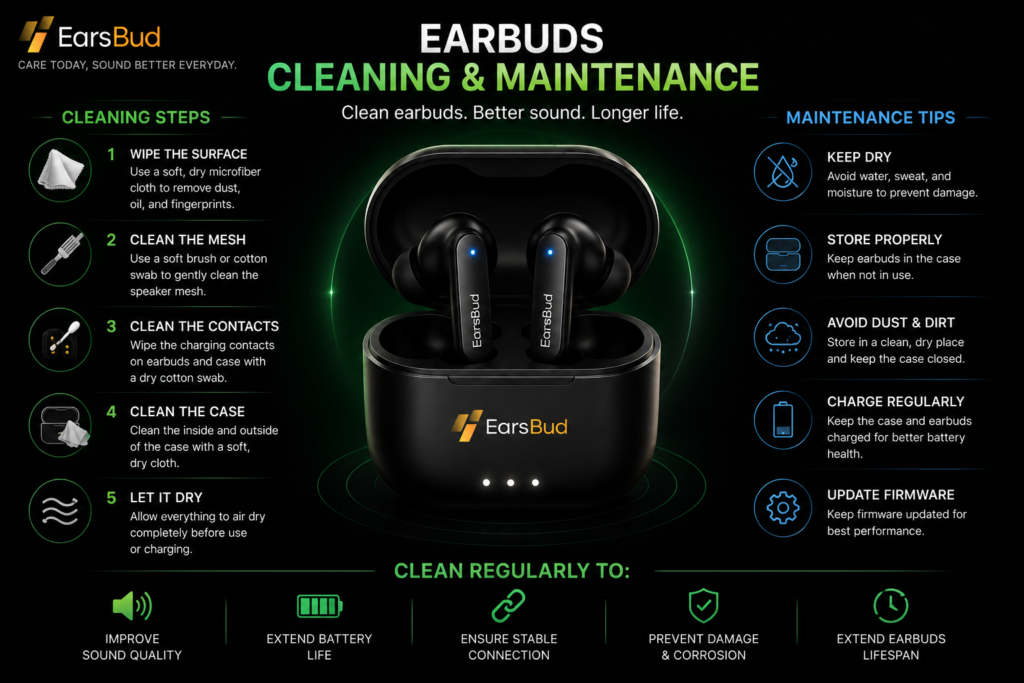
Cleaning is one of the most overlooked aspects of earbud ownership, yet it has a direct impact on sound quality, volume performance, charging reliability, comfort, hygiene, and long-term durability. Many users assume their earbuds are failing when volume drops, audio becomes muffled, charging becomes inconsistent, or one earbud sounds weaker than the other. In reality, accumulated earwax, dust, skin oils, lint, and debris are often responsible for these problems.
Regular earbud maintenance helps preserve audio performance while reducing the likelihood of troubleshooting issues later. Even premium true wireless earbuds can suffer from blocked speaker mesh, contaminated charging contacts, microphone obstruction, and sensor interference if they are not cleaned periodically. A few minutes of proper maintenance can often restore lost volume, improve call clarity, and prevent unnecessary replacements.
This section focuses on safe earbud cleaning techniques, preventative maintenance routines, and practical care strategies for wireless earbuds, noise cancelling earbuds, gaming earbuds, sports earbuds, and everyday Bluetooth earbuds. Rather than using aggressive cleaning methods that risk damaging sensitive components, the guides explain how to clean earbuds safely while protecting speaker mesh, microphones, charging contacts, sensors, and water-resistant seals.
Proper maintenance is also important for ear health. Earbuds sit directly in the ear canal and can accumulate bacteria, moisture, sweat, and wax over time. Regular cleaning not only improves performance but also creates a more hygienic listening experience, particularly for users who wear earbuds for extended periods during work, exercise, travel, gaming, or daily commuting.
Many common earbud complaints—including reduced volume, muffled sound, weak microphone performance, charging failures, and poor fit—can often be traced back to maintenance issues rather than hardware defects. Understanding how and when to clean your earbuds can significantly extend their usable lifespan.
Cleaning directly affects:
- Sound clarity
- Volume output
- Charging reliability
- Microphone performance
- Comfort and fit
- Hygiene and ear health
- Long-term durability
What you’ll learn:
- How to clean earbuds safely
- Removing earwax without damaging speaker mesh
- Cleaning charging contacts and charging pins
- Preventing muffled audio and volume loss
- Maintaining microphones and call quality
- Cleaning ear tips and earbud cases
- Protecting water-resistant components
- Establishing a long-term maintenance routine
- Identifying cleaning-related performance issues
Whether you are experiencing reduced volume, distorted sound, charging problems, poor call quality, or simply want to keep your earbuds performing at their best, this section provides practical maintenance techniques designed to improve reliability, extend lifespan, and preserve audio quality. For detailed step-by-step instructions, cleaning methods, and maintenance best practices, explore our complete guide on how to clean earbuds.
2. Troubleshooting & Fixes
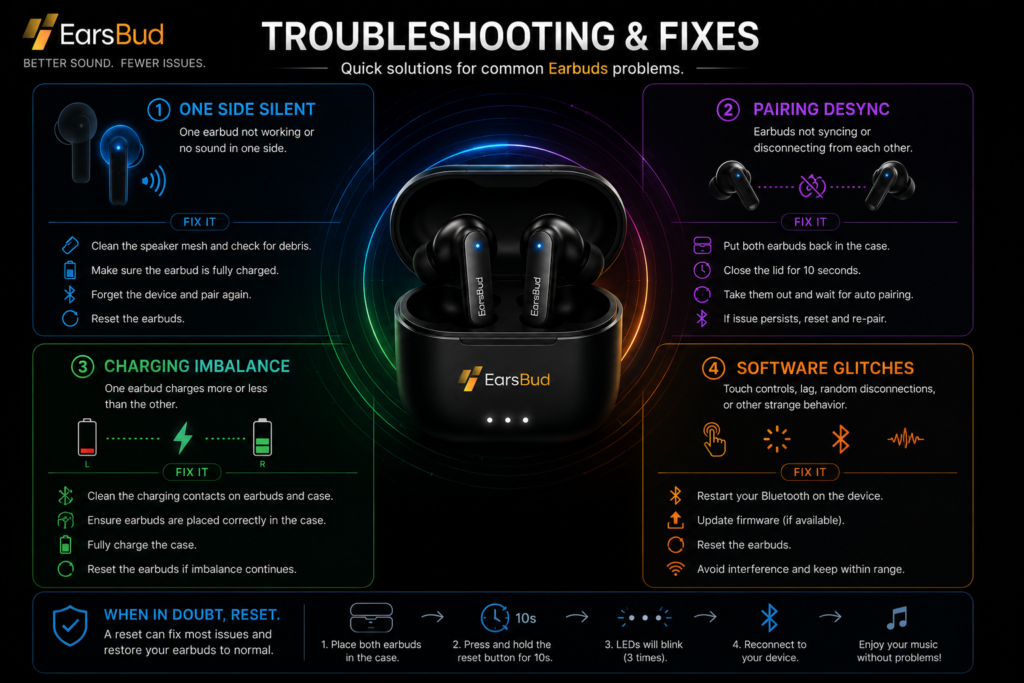
Even the best wireless earbuds occasionally develop problems. A connection that worked perfectly yesterday may suddenly fail, one earbud may stop producing sound, charging behavior may become inconsistent, or a firmware update may introduce unexpected glitches. While these issues can be frustrating, many of them are caused by software conflicts, pairing problems, charging errors, or maintenance-related issues rather than permanent hardware failure.
This section serves as the central troubleshooting hub for diagnosing and fixing common earbud problems across true wireless earbuds, noise cancelling earbuds, gaming earbuds, sports earbuds, and Bluetooth earbuds. Instead of relying on generic advice, the guides focus on identifying the root cause of a problem and applying the most effective solution before considering replacement.
Many earbud issues follow recognizable patterns. A silent earbud may result from a blocked mesh, charging failure, software desynchronization, or Bluetooth communication problem. Pairing failures can occur when earbuds lose synchronization with each other or become confused by multiple saved devices. Charging problems often stem from dirty contacts, damaged cables, weak charging cases, or battery imbalance between the left and right earbuds. Software glitches can appear after firmware updates, app changes, Bluetooth profile corruption, or failed pairing attempts.
The troubleshooting process also helps users distinguish between hardware defects and temporary operational problems. In many cases, cleaning, resetting, re-pairing, updating firmware, or correcting charging behavior can restore normal performance without the need for repairs or replacements.
This section connects maintenance, charging, battery, connectivity, firmware, and audio diagnostics into a practical framework that helps users quickly identify what is wrong and choose the right fix.
Covers:
- One earbud not working
- One side silent or low volume
- Earbuds not pairing together
- Bluetooth connection failures
- Earbuds disconnecting randomly
- Charging imbalance between left and right earbuds
- Earbuds not charging properly
- Charging case problems
- Audio synchronization issues
- Pairing desynchronization between earbuds
- Touch-control malfunctions
- Microphone and call-quality issues
- Firmware-related software glitches
- Bluetooth profile conflicts
- Battery reporting errors
- Connectivity troubleshooting across phones, tablets, laptops, and smart TVs
Key issues solved:
- One side silent
- Pairing desync
- Charging imbalance
- Software glitches
Whether your earbuds refuse to connect, one side suddenly stops working, charging becomes unreliable, or a recent update causes unexpected behavior, this section provides step-by-step troubleshooting paths designed to restore normal operation quickly and efficiently.
Learn How to fix earbuds not charging
3. Battery Life & Performance Tips
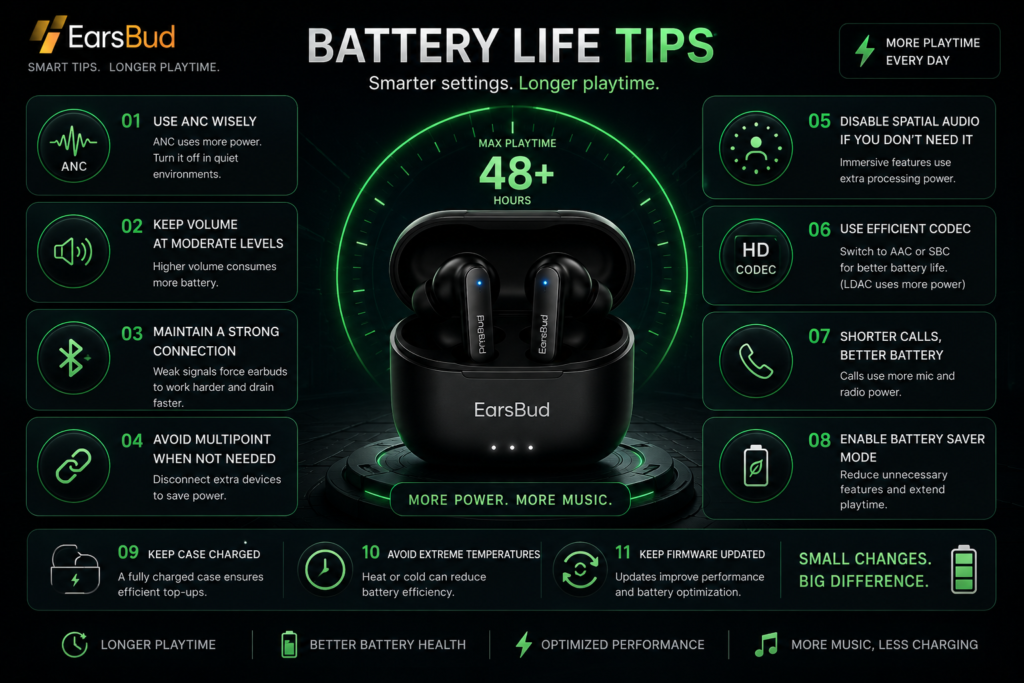
Battery life is one of the most important factors in the long-term ownership experience of wireless earbuds. Even the best-sounding earbuds can become frustrating if they constantly need charging, lose power during calls, develop battery imbalance between the left and right earbuds, or fail to deliver the runtime promised on the box. Understanding how earbud batteries work, what causes battery drain, and how daily habits affect battery health can significantly improve both short-term performance and long-term reliability.
This section focuses on maximizing earbud battery life, diagnosing battery-related problems, and helping users make informed decisions about maintenance, settings, charging habits, and eventual replacement. Modern earbuds rely on small lithium-based batteries that power Bluetooth connectivity, microphones, active noise cancellation, transparency mode, spatial audio processing, voice assistants, touch controls, companion app communication, and increasingly complex AI-powered audio features. Every enabled feature influences runtime in different ways.
The guides explore why earbuds drain fast, why one earbud may lose charge faster than the other, how charging case health affects daily reliability, and how advanced features such as ANC, multipoint Bluetooth, spatial audio, adaptive codecs, and high-resolution audio modes impact battery performance. You will also learn how signal strength, device placement, firmware behavior, and charging practices can influence real-world battery life far more than many users realize.
Battery troubleshooting goes beyond runtime alone. Many apparent battery failures are actually caused by dirty charging contacts, incomplete charging cycles, firmware bugs, Bluetooth connection issues, poor charging case performance, or inaccurate battery reporting. Understanding these factors can prevent unnecessary upgrades and help restore performance without replacing otherwise healthy earbuds.
This section also covers long-term battery health and ownership decisions. As earbuds age, battery capacity naturally declines. Knowing how to identify normal battery wear, recognize warning signs of battery failure, compare repair costs against replacement value, and evaluate battery specifications when shopping for new earbuds can help users get the most value from their investment.
Covers:
- Battery life tips for wireless earbuds
- How to improve earbud battery life
- Why earbuds drain fast
- One earbud battery draining faster than the other
- Charging case battery drain and charging issues
- ANC battery drain and transparency mode power consumption
- Multipoint Bluetooth battery impact
- Spatial audio and head-tracking battery usage
- Bluetooth codec and high-resolution audio battery drain
- Call-related battery consumption
- Standby battery loss and sleep mode problems
- Battery aging and long-term battery health
- Charging habits and battery maintenance
- Firmware-related battery issues
- Battery troubleshooting and diagnostics
For detailed optimization strategies, diagnostics, and maintenance advice, explore our Battery Life Tips guide.
4. Reset & System Recovery
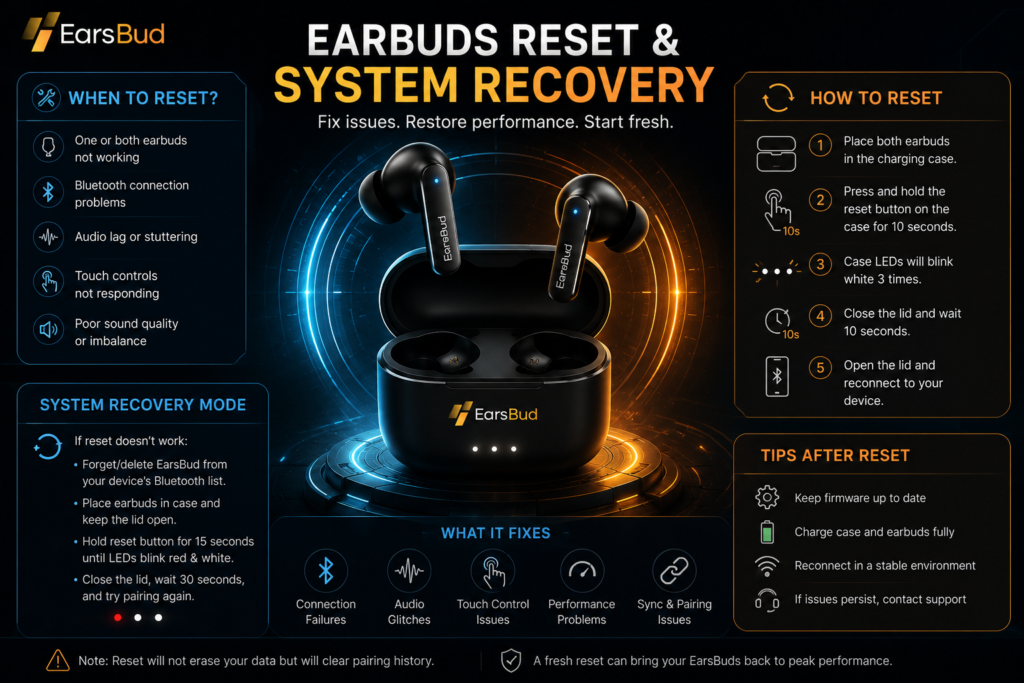
Many earbud problems are not caused by damaged hardware. Connection failures, pairing issues, audio desynchronization, battery reporting errors, touch-control glitches, firmware conflicts, and app communication problems can often be resolved through a proper earbud reset. In many cases, resetting earbuds is the fastest and most effective troubleshooting step before considering repairs, replacements, or warranty claims.
This section focuses on reset and recovery procedures for modern wireless earbuds, including true wireless earbuds, noise cancelling earbuds, gaming earbuds, and Bluetooth earbuds. Because reset methods vary between manufacturers, you will find brand-specific reset guides designed to restore normal operation safely and efficiently.
The guides cover common problems such as earbuds not pairing together, earbuds not connecting to phones or laptops, one earbud not working after an update, Bluetooth pairing failures, charging recognition issues, and persistent connectivity bugs that survive basic troubleshooting. You will also learn how factory resets help clear corrupted settings, remove old device pairings, rebuild wireless synchronization between left and right earbuds, and resolve firmware-related conflicts.
System recovery becomes especially important after firmware updates, companion app changes, Bluetooth profile corruption, or repeated pairing attempts across multiple devices. In these situations, a proper reset can restore stable performance without replacing otherwise functional earbuds.
Covers:
- Brand-specific earbud reset methods
- Factory reset procedures for popular earbud brands
- Fixing persistent Bluetooth connectivity bugs
- Resolving pairing and synchronization issues
- Clearing firmware conflicts and software glitches
- Restoring left and right earbud communication
- Removing corrupted Bluetooth device profiles
- Recovering earbuds after failed updates
- Troubleshooting touch-control and sensor issues
- Reconnecting earbuds to phones, tablets, laptops, and smart TVs
Whether your earbuds refuse to connect, keep disconnecting, appear stuck in pairing mode, or behave unpredictably after an update, this section provides a structured recovery path designed to restore reliable performance before more advanced troubleshooting becomes necessary.
Refer to the complete guide, for detailed reset procedures across different brands and models: Reset Guides for Popular Earbud Brands.
5. Software & Firmware Optimization
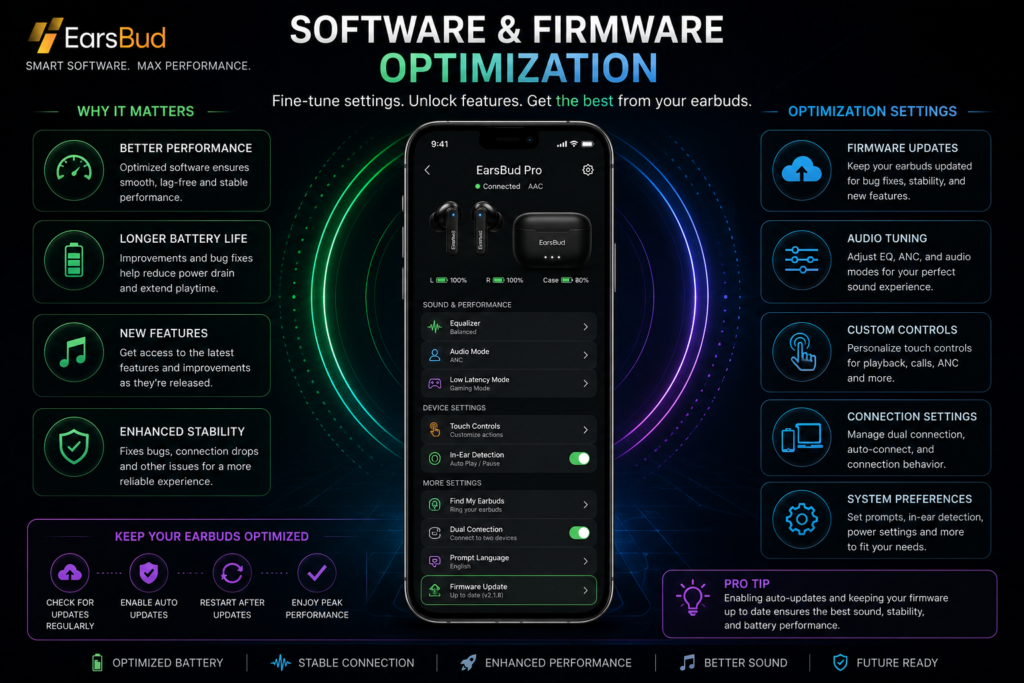
What Is Earbud Firmware (And Why It Controls Everything)
Firmware is the embedded software inside your earbuds that controls:
- audio processing (including ANC and EQ)
- Bluetooth connectivity stability
- battery management and charging behavior
- touch controls and smart features
Unlike mobile apps, firmware updates directly change how your earbuds function at a system level.
👉 When users search:
- “why are my earbuds draining fast”
- “how to fix Bluetooth earbuds lag”
- “ANC not working properly”
…the root cause is often outdated firmware.
Why Firmware Updates Matter
1. Improves Active Noise Cancellation (ANC)
Modern ANC earbuds rely on real-time algorithms. Firmware updates:
- refine noise filtering accuracy
- reduce background hiss
- improve adaptive noise response
2. Fixes Bugs, Glitches & Battery Drain
Many common issues originate from software conflicts:
- random disconnections
- audio stuttering
- uneven battery usage (left vs right earbud)
- case not charging properly
Firmware updates often include bug patches that stabilize performance.
3. Adds New Features Over Time
Premium earbuds evolve after purchase through updates:
- new EQ modes
- improved touch controls
- multipoint connectivity support
- voice assistant integration
- latency improvements for gaming
👉 This turns earbuds into upgradeable devices, not static hardware.
How to Update Earbud Firmware (Step-by-Step)
- Install the official app (brand-specific)
- Connect earbuds via Bluetooth
- Place both earbuds inside the charging case (if required)
- Check for firmware update notification
- Start update and do not interrupt
- Wait until completion (usually 5–15 minutes)
Important: Keep battery above 50% before updating.
Firmware Update vs No Update (Performance Comparison)
| Factor | Updated Firmware | Outdated Firmware |
|---|---|---|
| ANC Quality | Optimized, adaptive | Inconsistent |
| Connectivity | Stable | Drops & lag |
| Battery Life | Balanced | Drains faster |
| Features | Expanded | Limited |
| Bug Presence | Reduced | Frequent |
Signs You Need a Firmware Update
- Earbuds disconnect randomly
- One earbud drains faster
- ANC feels weaker than expected
- App shows update available
- Audio delay in videos or games
Refer to the complete guide, for detailed update procedures across different brands and models: How to update earbuds firmware.
6. Advanced Connectivity (Auracast)

What Is Auracast
Auracast is a next-generation Bluetooth LE Audio broadcast technology that allows a single device to transmit audio to multiple earbuds simultaneously.
Unlike traditional Bluetooth pairing (1-to-1 or limited multipoint), Auracast introduces a one-to-many audio ecosystem.

👉 In simple terms:
Instead of connecting your earbuds to a device, you can tune into a broadcast—similar to Wi-Fi or radio, but for personal audio.
How Auracast Works
Auracast operates through Bluetooth LE Audio using broadcast channels:

- A transmitter (phone, TV, airport system) sends audio
- Multiple receivers (earbuds, headphones) can join
- No repeated pairing required
Core components:
- Broadcast audio stream
- Public or private channels
- QR code or app-based access
This makes Auracast fundamentally different from:
- classic Bluetooth pairing
- multipoint connections
- device switching workflows
Auracast vs Multipoint Connection
| Feature | Auracast Bluetooth | Multipoint Connection |
|---|---|---|
| Connection Type | One-to-many | One-to-two |
| Pairing Required | No (broadcast-based) | Yes |
| Device Switching | Not required | Required |
| Use Case | Shared/public audio | Personal productivity |
| Scalability | Unlimited listeners | Limited devices |
| Latency | Optimized via LE Audio | Standard Bluetooth |
Interpretation:
- Multipoint = productivity tool
- Auracast = ecosystem-level transformation
Use Cases of Auracast Bluetooth Technology
Instead of traditional device switching, Auracast enables:
- Public audio access → Airports, gyms, waiting areas
- Shared listening → Multiple users hearing the same stream
- Silent environments → TVs without speakers, late-night listening, kids cartoons
- Assistive hearing → Direct audio streaming for clarity
- Events & venues → Stadium commentary directly in earbuds
Benefits of Auracast Technology
- No manual pairing loops
- Instant audio access across devices
- Reduced connection friction
- Scalable listening environments
- Improved audio efficiency via LE Audio
Current Limitations
Auracast is still in early adoption:
- Limited earbuds support (as of 2026)
- Requires Bluetooth LE Audio compatibility
- Infrastructure (airports, TVs) still expanding
- Not all smartphones support broadcast joining yet
👉 This positions Auracast as a future-forward feature, not a current standard.
Auracast-Compatible Ecosystem (Emerging)
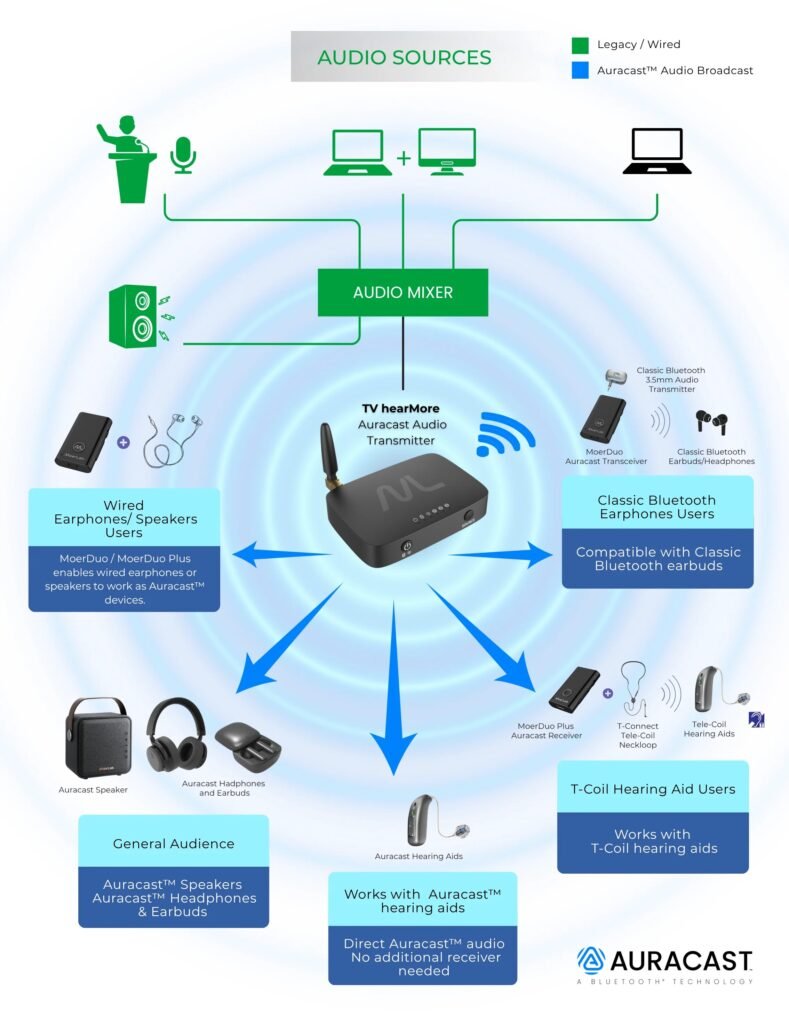
Early adoption is appearing in:
- Premium wireless earbuds
- Smart TVs with LE Audio support
- Public broadcast systems (pilot programs)
- Accessibility-focused audio solutions
Why Auracast Matters
If you’re choosing earbuds today:
- Multipoint improves daily workflow
- Auracast prepares you for next-gen audio environments
👉 The smartest buying decision combines both.
- Want multiple-device broadcast? → Check Auracast guide
Auracast isn’t just a feature—it shifts earbuds from private listening devices to connected audio receivers within a shared ecosystem.
7. Multipoint Bluetooth
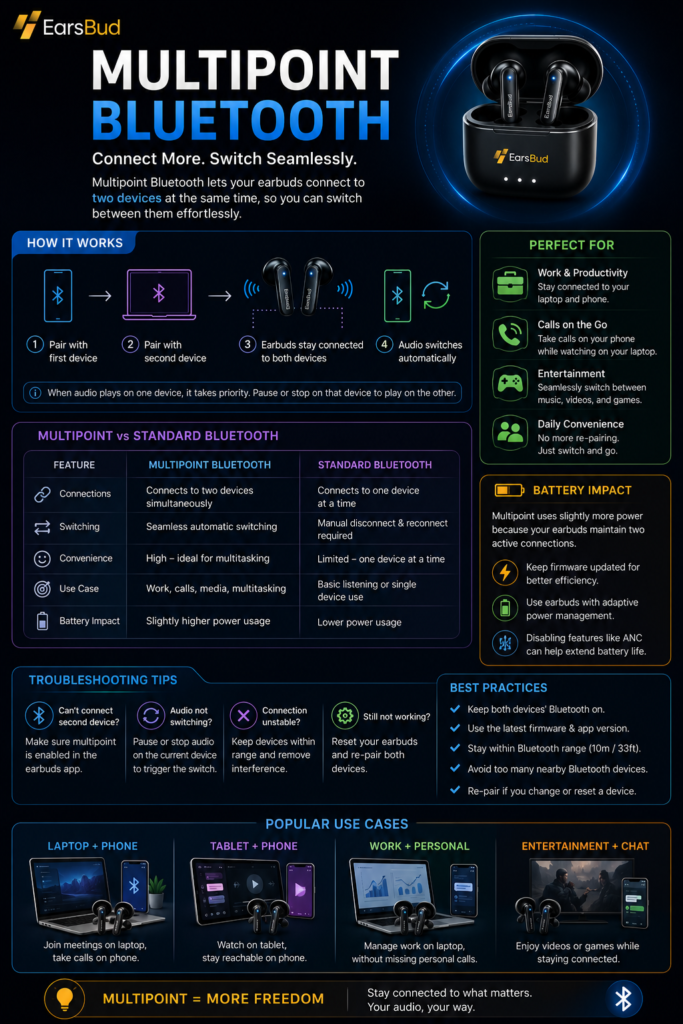
Many people switch between multiple devices throughout the day, such as a smartphone, laptop, tablet, or work computer. Multipoint Bluetooth makes this easier by allowing compatible earbuds to stay connected to two devices at the same time.
With multipoint enabled, you can listen to music on your laptop and automatically switch to a phone call without manually disconnecting and reconnecting your earbuds. This feature is especially useful for remote workers, students, frequent travelers, and anyone who regularly uses more than one device.
Not all multipoint implementations work the same way. Some earbuds support seamless automatic switching, while others require manual control through a companion app. Connection stability, switching speed, and compatibility can also vary between brands and operating systems.
For users who move between work, entertainment, and communication throughout the day, multipoint Bluetooth can be one of the most valuable wireless features available.
👉 Learn more: How to Use Multipoint Bluetooth
8. Comparison & Buying Intelligence
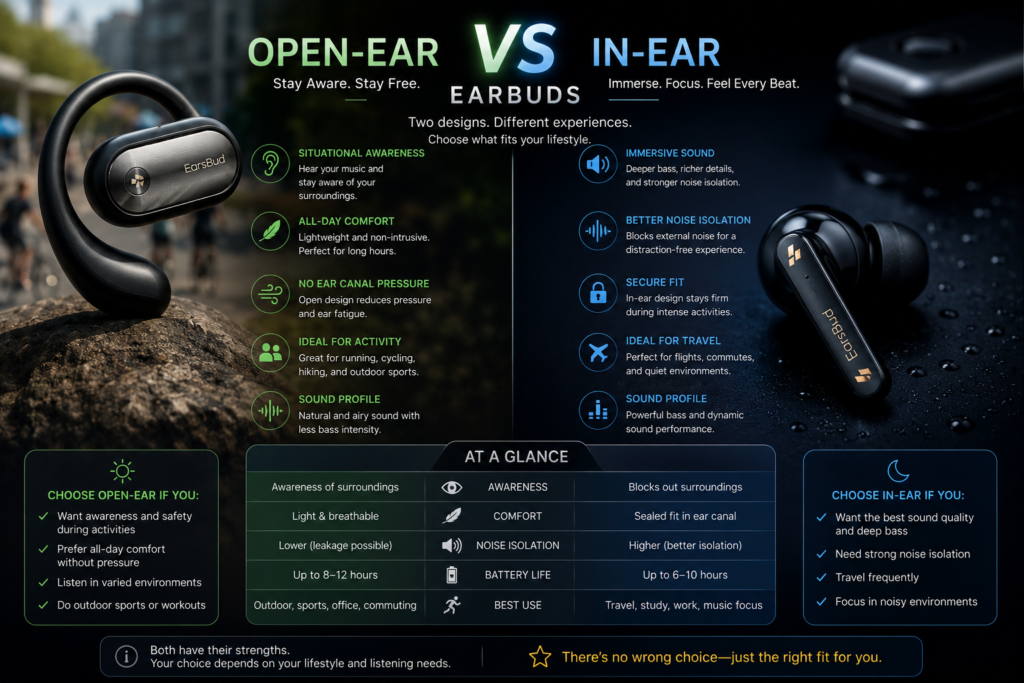
Open-Ear vs In-Ear Earbuds
| Feature | Open-Ear Earbuds | In-Ear Earbuds |
|---|---|---|
| Fit | Outside ear | Sealed inside canal |
| Noise Isolation | Low | High |
| Comfort | High (long use) | Moderate |
| Sound Quality | Moderate | High |
| Best For | Running, awareness | Music, travel |
| ANC Support | Rare | Common |
Verdict:
- Choose open-ear for safety & comfort
- Choose in-ear for sound & immersion
👉 Learn more: Open Ear vs In Ear Earbuds
9. Aesthetic Tech
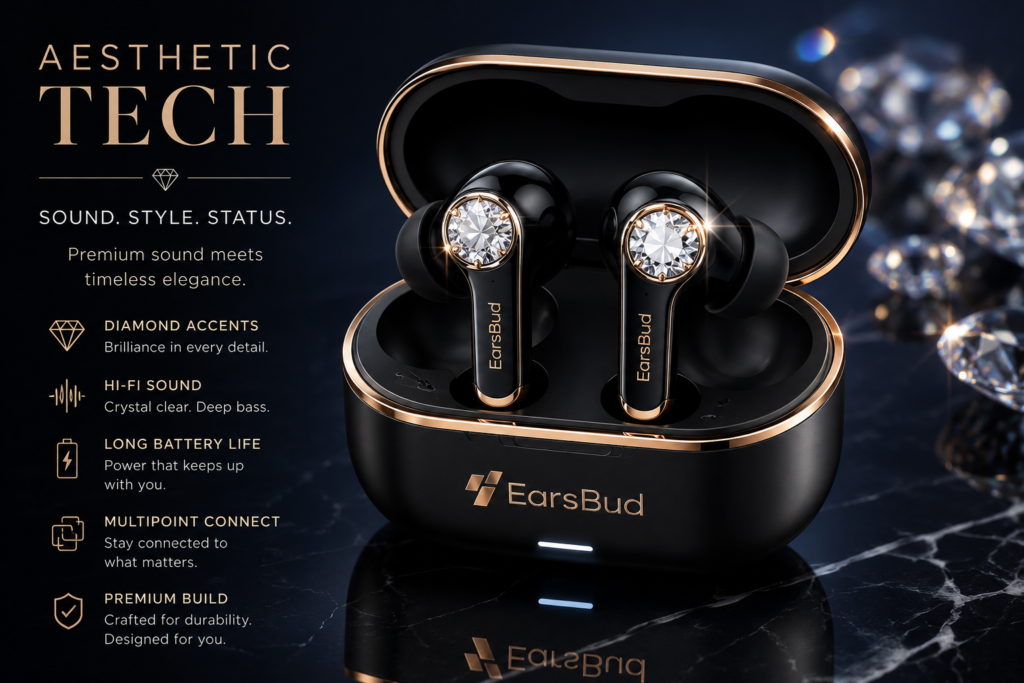
Earbuds are no longer judged by sound alone. Modern buyers also care about how earbuds look, feel, fit, and match their lifestyle. This is where aesthetic tech becomes important.
In wireless earbuds, aesthetic tech includes design features such as transparent cases, luxury black finishes, open-ear cuff styles, compact ANC bodies, smart case screens, better colorways, scratch-resistant materials, app-based customization, multipoint Bluetooth, and premium case hinge feel.
Good earbud design is not only visual. A smaller body can improve comfort, a better case can improve daily use, and open-ear designs can work better for runners, glasses wearers, and people who want awareness. For many users, the best earbuds are the ones that combine sound quality, comfort, design, and personal style.
👉 Learn more: Aesthetic Tech
Cost Perspective
| Action | Cost |
|---|---|
| Cleaning tools | $5–$15 |
| Replacement tips | $10–$20 |
| Repair (basic) | $20–$50 |
| New earbuds | $50–$300 |
👉 Most problems are solvable without replacement.
Cost vs Value
| Action | Cost |
|---|---|
| Firmware update | Free |
| App installation | Free |
| Ignoring update | Performance loss |
👉 Firmware updates deliver maximum performance gain at zero cost.
Risks & Mistakes to Avoid
- Interrupting update → can corrupt firmware
- Using unofficial apps → security risk
- Updating with low battery → failure risk
- Ignoring updates → long-term degradation
Trends in Earbud Software (2026)
- AI-driven adaptive sound tuning
- Real-time environment-based ANC adjustment
- Personalized hearing profiles
- App-controlled multi-device switching
- Continuous OTA (over-the-air) improvements
Future Outlook
Firmware will increasingly:
- auto-optimize audio based on ear shape
- predict battery usage patterns
- integrate with cross-device ecosystems
- enable Auracast & advanced connectivity features
👉 Software is becoming the core differentiator, not just hardware.
Care to clean your buds? → Earbuds Cleaning Guide
Want to optimize battery life? → Battery Performace tips
Want dual-device control? → Multipoint connection guide
Exploring new tech? → Auracast
Frequently Asked Questions
How do I fix one earbud not working after a firmware update without replacing the earbuds?
A firmware update can sometimes create synchronization conflicts between the left and right earbuds, causing one side to stop producing sound even though both earbuds appear connected. This issue is often software-related rather than hardware failure.
The most effective recovery process is:
- Fully charge both earbuds and the case.
- Remove the Bluetooth profile from all paired devices.
- Perform a factory reset.
- Re-pair the earbuds as a fresh device.
- Check for a secondary firmware patch.
One Earbud Not Working Recovery Matrix
| Symptom | Likely Cause | Success Rate of Reset |
|---|---|---|
| One side silent | Pairing desync | Very High |
| One side low volume | Mesh blockage | High |
| One side not charging | Contact contamination | High |
| One side missing after update | Firmware conflict | Very High |
| Random left/right switching | Device profile corruption | High |
Priority Troubleshooting Flow
| Step | Importance |
|---|---|
| Clean charging contacts | High |
| Forget Bluetooth device | High |
| Factory reset | Critical |
| Firmware verification | Critical |
| Hardware inspection | Medium |
Many users replace perfectly functional earbuds when a complete reset would have restored normal operation.
What is the best earbud maintenance routine to prevent muffled sound and charging problems?
Preventive maintenance is often more effective than troubleshooting after problems appear. Most cases of muffled audio, charging failures, reduced microphone quality, and battery imbalance begin with gradual debris accumulation.
Recommended Earbud Maintenance Schedule
| Task | Frequency |
|---|---|
| Wipe exterior surfaces | Daily |
| Clean ear tips | Weekly |
| Inspect speaker mesh | Weekly |
| Clean charging contacts | Every 2 weeks |
| Deep clean charging case | Monthly |
| Check firmware updates | Monthly |
Performance Impact of Maintenance
| Component | Neglected | Maintained |
|---|---|---|
| Volume output | Gradually reduced | Consistent |
| Charging reliability | Unpredictable | Stable |
| Call quality | Degrades over time | Clear |
| Battery consistency | Variable | More reliable |
| Earbud lifespan | Shorter | Longer |
Proper cleaning protects both performance and long-term durability.
Why does one earbud battery drain faster than the other even when both are new?
Battery imbalance is one of the most common true wireless earbud complaints.
Several factors contribute:
- One earbud often acts as the primary Bluetooth relay.
- Microphone usage may be uneven.
- ANC processing loads may differ.
- Firmware may distribute workload unevenly.
- Charging contacts may not seat equally.
Common Causes of Uneven Battery Drain
| Cause | Battery Impact |
|---|---|
| Primary Bluetooth connection | High |
| Frequent voice calls | High |
| ANC processing | Moderate |
| Poor charging contact | High |
| Firmware bug | Moderate |
| Dirty charging pins | High |
Drain Severity Guide
| Difference Between Earbuds | Assessment |
|---|---|
| 0–5% | Normal |
| 5–10% | Usually acceptable |
| 10–20% | Requires investigation |
| 20%+ | Potential issue |
Consistent imbalance above 20% often indicates charging or firmware problems.
Are multipoint Bluetooth earbuds worth buying for work-from-home and productivity setups?
For many users, multipoint Bluetooth provides a larger daily benefit than higher-end audio codecs.
Instead of disconnecting and reconnecting devices manually, multipoint allows earbuds to maintain simultaneous awareness of multiple devices.
Multipoint Productivity Benefits
| Scenario | Benefit |
|---|---|
| Laptop + Phone | Automatic call switching |
| Tablet + Phone | Seamless media transfer |
| Work PC + Mobile | Reduced interruptions |
| Travel setup | Easier device management |
Multipoint Value Scorecard
| User Type | Value |
|---|---|
| Remote worker | Excellent |
| Student | Excellent |
| Frequent traveler | Excellent |
| Office worker | High |
| Single-device user | Low |
Users managing multiple devices daily often consider multipoint Bluetooth one of the most useful earbud features available.
How long should true wireless earbuds last before battery replacement becomes necessary?
Battery lifespan depends on charge cycles, temperature exposure, charging habits, and feature usage.
Most true wireless earbuds begin showing noticeable capacity loss after several hundred charging cycles.
Typical Battery Aging Timeline
| Age | Expected Condition |
|---|---|
| 0–12 months | Near-original capacity |
| 1–2 years | Minor degradation |
| 2–3 years | Noticeable runtime reduction |
| 3–4 years | Significant wear |
| 4+ years | Replacement often justified |
Replace or Continue Using?
| Condition | Recommendation |
|---|---|
| Runtime reduced 10% | Continue using |
| Runtime reduced 25% | Monitor |
| Runtime reduced 40% | Consider replacement |
| Runtime reduced 50%+ | Upgrade likely justified |
Battery wear is normal and should be evaluated alongside overall earbud condition.
People Also Ask
How does Auracast compare to traditional Bluetooth for public listening and shared audio?
Traditional Bluetooth was designed primarily for individual device connections. Auracast introduces a broadcast model that allows many listeners to receive the same audio stream simultaneously.
Connectivity Comparison
| Feature | Traditional Bluetooth | Auracast |
|---|---|---|
| Pairing required | Yes | No |
| Multiple listeners | Limited | Unlimited |
| Public venue support | Weak | Excellent |
| Shared listening | Limited | Excellent |
| Accessibility applications | Moderate | Strong |
Auracast is especially useful in airports, conferences, lecture halls, gyms, museums, and assistive listening environments.
What are the most common reasons wireless earbuds keep disconnecting randomly?
Random disconnects are often caused by environmental factors rather than defective earbuds.
Disconnect Cause Ranking
| Cause | Frequency |
|---|---|
| Bluetooth interference | Very High |
| Firmware issues | High |
| Low battery | High |
| Device compatibility problems | Medium |
| Physical obstructions | Medium |
| Hardware failure | Low |
Stability Improvement Checklist
| Action | Expected Improvement |
|---|---|
| Update firmware | High |
| Remove old pairings | High |
| Reset earbuds | High |
| Reduce wireless congestion | Moderate |
| Re-pair device | Moderate |
Most recurring disconnect issues can be solved without replacing hardware.
What is the difference between open-ear and in-ear earbuds for everyday use?
The choice depends more on lifestyle than sound quality alone.
Open-Ear vs In-Ear Daily Use
| Category | Open-Ear | In-Ear |
|---|---|---|
| Situational awareness | Excellent | Limited |
| Sound isolation | Low | High |
| Running safety | Excellent | Moderate |
| ANC compatibility | Limited | Excellent |
| Travel use | Moderate | Excellent |
| Office awareness | Excellent | Moderate |
Open-ear designs prioritize awareness, while in-ear designs prioritize immersion.
Can firmware updates really improve ANC, battery life, and call quality?
Modern earbuds rely heavily on software algorithms. Firmware updates can significantly alter performance without changing hardware.
Areas Commonly Improved by Firmware
| Feature | Improvement Potential |
|---|---|
| ANC performance | High |
| Battery management | High |
| Connectivity stability | High |
| Call processing | High |
| Touch controls | Moderate |
| Latency | Moderate |
Update Impact Chart
| Category | Before Update | After Update |
|---|---|---|
| Connection stability | Variable | More consistent |
| Battery efficiency | Lower | Improved |
| ANC adaptation | Basic | Refined |
| Call clarity | Good | Better |
Many premium earbuds become noticeably better after several generations of firmware updates.
What features matter most when buying future-proof true wireless earbuds in 2026?
Future-proofing is increasingly about software and connectivity rather than raw hardware specifications.
Future-Proof Earbud Buying Checklist
| Feature | Importance |
|---|---|
| Bluetooth LE Audio | Essential |
| Auracast support | Essential |
| Multipoint Bluetooth | Essential |
| Strong firmware support | Essential |
| ANC customization | High |
| Battery life | High |
| Companion app controls | High |
| Hearing personalization | High |
Priority Ranking
| Buying Factor | Future Value |
|---|---|
| Software ecosystem | Very High |
| Connectivity features | Very High |
| Battery endurance | High |
| Audio quality | High |
| Design aesthetics | Moderate |
The most future-ready earbuds combine strong hardware with long-term software support, Bluetooth LE Audio compatibility, Auracast readiness, and reliable firmware updates.
Editorial Insights
Most people approach earbuds reactively. A problem appears—a silent earbud, weak battery life, muffled sound, random disconnects, or charging failures—and only then do they start searching for answers. The reality is that earbuds function as small computing devices rather than simple audio accessories. Sound quality, battery performance, connectivity, active noise cancellation, firmware behavior, charging reliability, and long-term durability are all connected.
This is why isolated fixes often produce temporary results. Cleaning may restore volume, but outdated firmware can continue causing connectivity issues. Resetting earbuds may solve pairing problems, but poor charging habits can still reduce battery lifespan. Replacing ear tips may improve comfort and sound isolation, yet neglected maintenance can eventually affect microphones, sensors, and charging contacts. Understanding how these systems interact creates a far more reliable ownership experience.
One of the biggest misconceptions in the wireless audio market is that hardware alone determines performance. In reality, software increasingly controls the experience. Firmware updates can improve ANC algorithms, battery efficiency, Bluetooth stability, latency, call quality, and even unlock entirely new features. Technologies such as Multipoint Bluetooth, Bluetooth LE Audio, Auracast, adaptive codecs, AI-assisted audio processing, and personalized hearing profiles demonstrate how earbuds are evolving into software-defined devices.
The most effective long-term strategy is preventative ownership rather than constant troubleshooting. Regular cleaning, occasional firmware updates, healthy charging practices, and understanding advanced features often prevent many of the problems that eventually lead users to replace otherwise functional earbuds. In many cases, performance loss attributed to aging hardware is actually caused by maintenance neglect, software conflicts, or charging-related issues.
Looking ahead, the distinction between earbuds, hearing devices, communication tools, and wearable computing platforms will continue to blur. Features that were considered premium only a few years ago—ANC, transparency mode, multipoint connectivity, adaptive EQ, and app-controlled customization—are rapidly becoming standard. Emerging technologies such as Auracast and Bluetooth LE Audio are likely to reshape how people interact with audio in public spaces, workplaces, transportation systems, educational environments, and home entertainment setups.
The most informed buyers and owners will increasingly evaluate earbuds through a broader lens: not just sound quality, but maintainability, software support, battery longevity, connectivity flexibility, ecosystem compatibility, and future-readiness. The earbuds that provide the greatest value are rarely the ones with the highest specifications on paper; they are the ones that continue delivering a reliable experience years after purchase.
Ultimately, successful earbud ownership follows a simple progression:
Maintain → Diagnose → Optimize → Recover → Upgrade
Users who follow this framework typically spend less on replacements, experience fewer technical frustrations, achieve better battery longevity, and get significantly more value from every pair of earbuds they own.