
Auracast: The Complete Guide to Bluetooth Broadcast Audio
Amazon Affiliate Disclosure
Some links on this page may be affiliate links. This means we may earn a small commission if you purchase through them, at no extra cost to you.
Wireless audio is shifting from one-to-one connections to one-to-many broadcasting. Auracast sits at the center of that shift, turning Bluetooth into something closer to Wi-Fi for sound.
Instead of pairing your earbuds to a single device, Auracast lets a single source broadcast audio to unlimited listeners simultaneously. Think airports, gyms, TVs, classrooms—or even your own home setup.
If you’ve already explored Main Guides Hub, how-to guides like How to clean earbuds and the emerging Earbuds Aesthetic Tech, this page builds on that foundation and moves into next-generation audio connectivity.
Quick Navigation
- What is Auracast →
- How it works →
- Types of Aurcast Transmitters →
- Best Auracast transmitters →
- Which Auracast Transmitter do i need →
- Supported earbuds & devices →
- Auracast vs Bluetooth →
- Costs →
- Risks & limitations →
- Future trends →
What is the Guide For
This guide breaks down Auracast in practical terms:
- How it works in real life
- Which devices support it
- How to set up an auracast transmitter
- Whether it’s worth upgrading your earbuds
Who Needs Auracast
Auracast isn’t niche—it’s expanding fast. It’s especially useful for:
- Travelers (airport announcements directly in earbuds)
- Remote workers (shared office audio streams)
- Gamers & streamers (low-latency group listening)
- Hearing assistance users (public accessibility streams)
- Families (multiple listeners on one TV)
What is Auracast
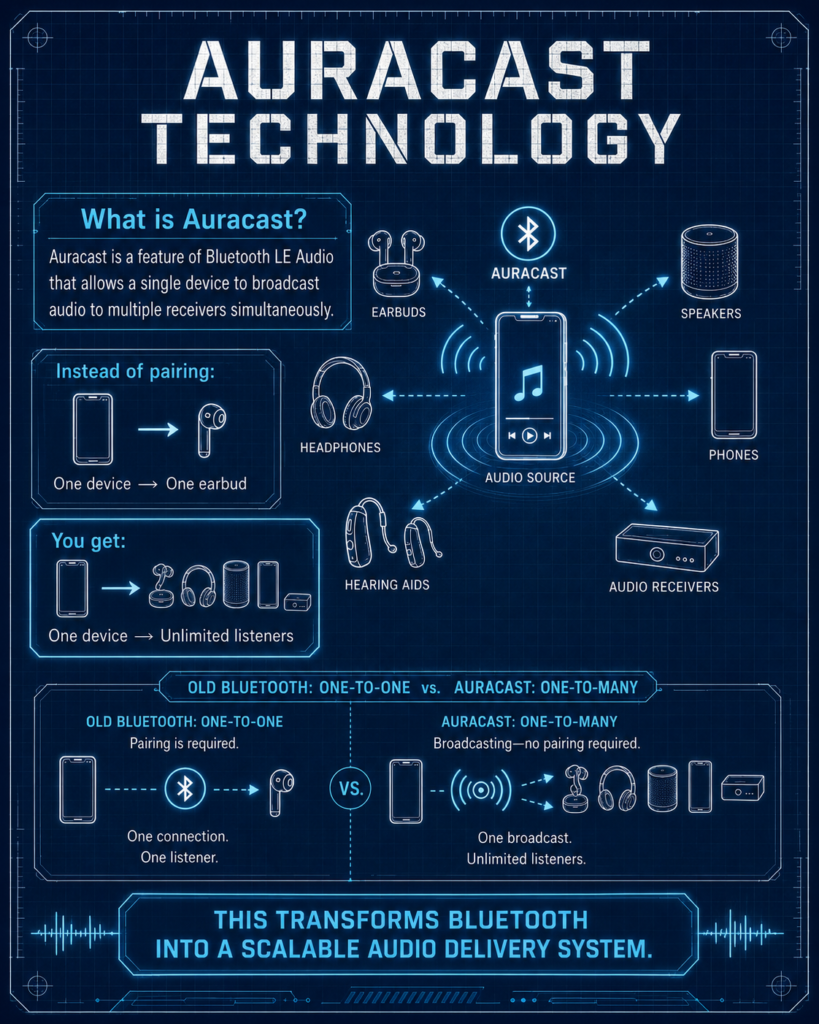
Auracast is a feature of Bluetooth LE Audio that allows a single device to broadcast audio to multiple receivers simultaneously.
Instead of pairing:
- One device → One earbud
You get:
- One device → Unlimited listeners
This transforms Bluetooth into a scalable audio delivery system.
How Auracast Works
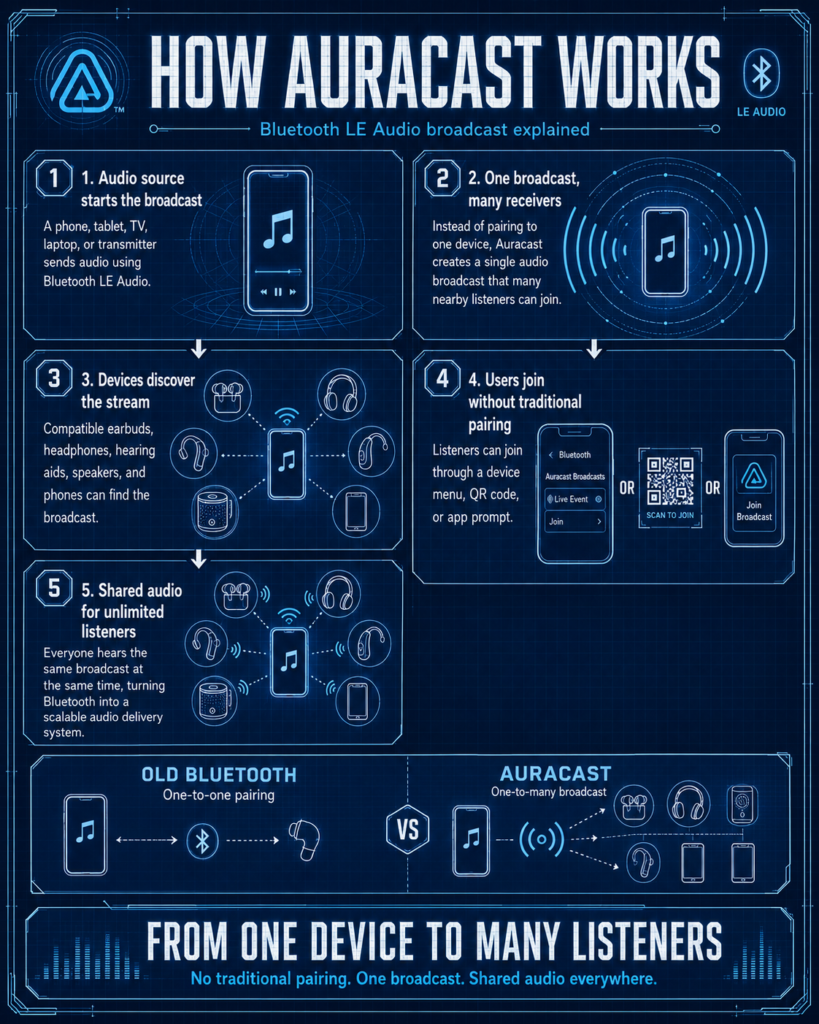
Auracast relies on three core components:
1. Broadcaster
The source device (TV, phone, or auracast transmitter)
2. Receiver
Your earbuds, headphones, or hearing aids
3. Assistant
A UI (usually your phone) to scan and join broadcasts
Process Flow
- Broadcaster sends encrypted audio stream
- Devices scan available streams
- User selects and connects instantly
No pairing. No device switching headaches
Types of Auracast Transmitters
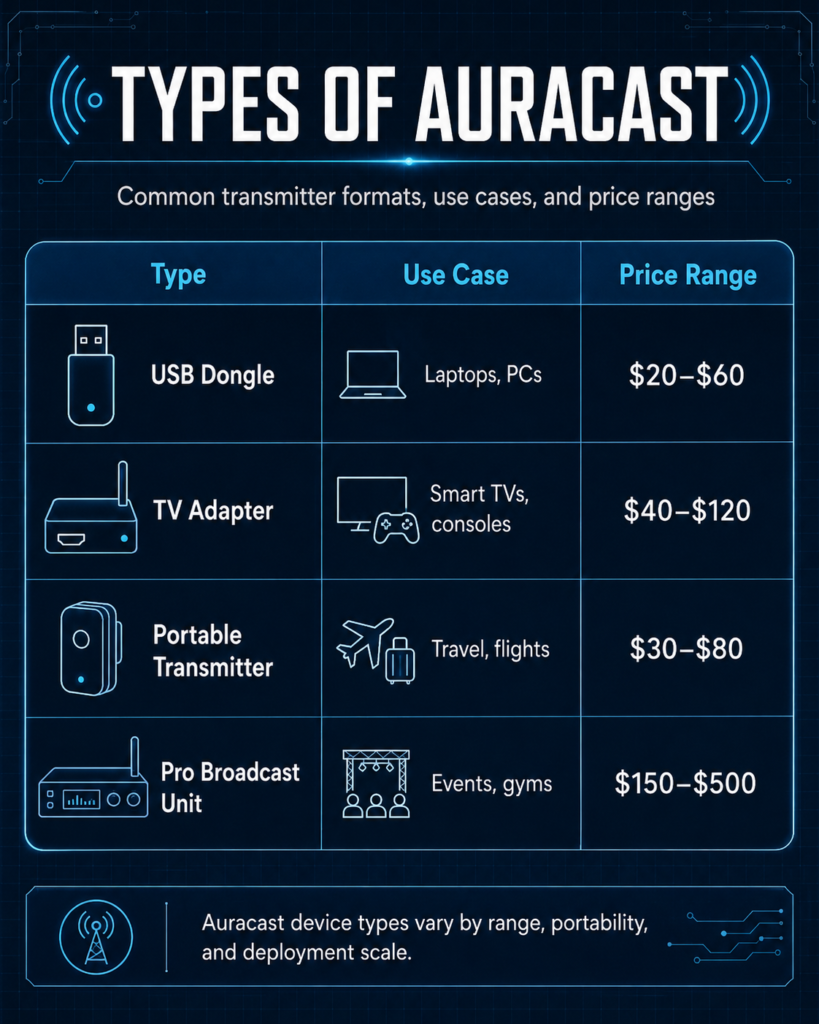
➡️ Upgrade your setup with a reliable Auracast transmitter
Which Auracast Setup do you need?
Choose Your Scenario
Answer a few quick questions to see whether traditional Bluetooth or Auracast makes more sense for your audio-sharing setup.
What do you want to share audio from?
Best Auracast Transmitters
Latest Auracast Transmitters to Consider
Compare Auracast transmitter options by use case, connection type, compatibility, and the type of listener each product is best suited for.
Compatible Devices
Auracast requires Bluetooth LE Audio support.
Current Support
- New flagship earbuds (2024+)
- Select smartphones with updated chipsets
- Some TVs and laptops (limited but growing)
Not Yet Widely Supported
- Older Bluetooth devices
- Budget earbuds (most still use classic Bluetooth)
For a broader look at wireless audio innovation, explore EarsBud to compare how modern earbuds, Bluetooth LE Audio, and Auracast are changing everyday listening.
Benefits of Auracast
- No pairing required
- Multiple listeners on one source
- Lower battery usage (LE Audio)
- Improved audio quality (LC3 codec)
- Accessibility support (hearing enhancement systems)
Auracast vs Traditional Bluetooth
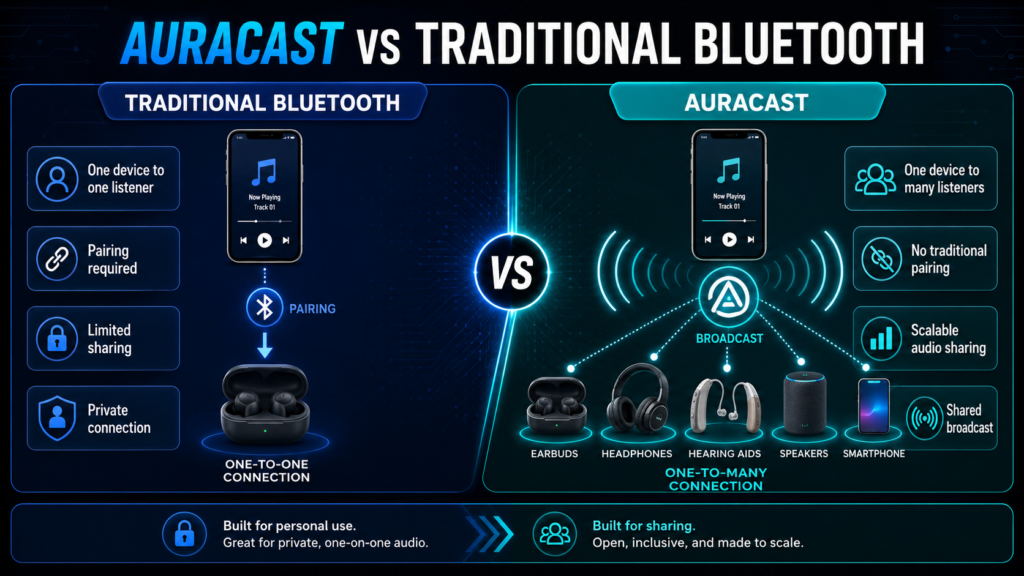
Comparison Chart
| Feature | Auracast | Traditional Bluetooth |
|---|---|---|
| Connection Type | Broadcast | Pairing |
| Number of Users | Unlimited | 1–2 |
| Setup Time | Instant | Manual pairing |
| Use Case | Public & shared audio | Personal listening |
| Battery Efficiency | High | Moderate |
| Range | Extended (LE Audio) | Limited |
Real-World Use Cases
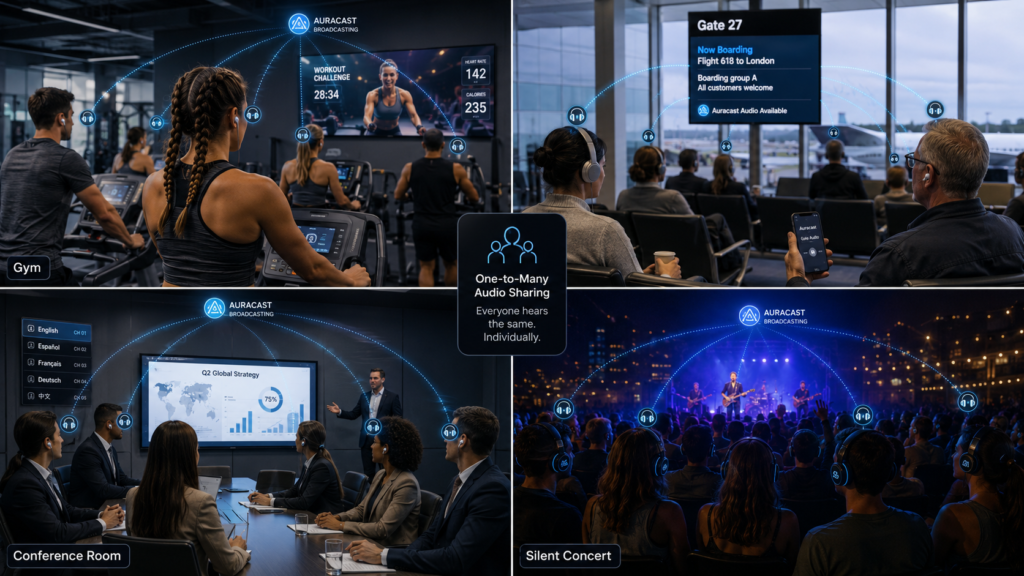
Airport announcements streamed directly to earbuds
Auracast could make airport listening more personal by sending gate updates, boarding calls, and delay announcements straight to compatible earbuds. This also connects with the rise of aesthetic tech, where earbuds are becoming smarter, more adaptive, and more integrated into daily environments.
Gym TVs without shared speakers
In gyms, Auracast can let users listen to TV audio privately without loud shared speakers. For active users, this makes design more important too — especially when choosing earbuds that stay secure, look stylish, and support modern wireless features.
Conference audio in large halls
At conferences, Auracast can help attendees receive clearer audio directly through their earbuds, even in large or noisy rooms. As earbuds become part of professional life, aesthetic tech matters because users want devices that look polished while offering advanced connectivity.
Silent TV watching at home
Auracast can make silent TV watching easier by streaming audio to multiple earbuds at the same time. This is especially useful for families, couples, and shared spaces where stylish, comfortable, and best looking earbuds can blend better into everyday routines.
Language translation broadcasts
Future Auracast setups may support language translation broadcasts in airports, museums, events, and public venues.
Where Auracast Audio Sharing Makes Sense
Explore how Auracast can transform public listening, private audio access, group experiences, assistive hearing, and shared entertainment across real environments.
Gym
In gyms, Auracast can let members hear TV screens, workout classes, personal training instructions, or shared fitness content directly through compatible earbuds, headphones, or hearing aids.
Fitness screens, group classes, treadmills, bikes, and shared workout zones.
Members can listen clearly without loud speakers or one-to-one Bluetooth pairing.
Earbuds, headphones, hearing aids, gym screens, phones, and broadcast transmitters.
➡️ Explore Auracast-enabled earbuds for seamless audio sharing
Costs & Investment
Auracast is still an emerging wireless audio technology, so the cost depends on how advanced the setup needs to be. A simple home setup may only require compatible earbuds and a basic Auracast transmitter, while public venues may need multi-channel broadcast hardware, professional installation, signage, and access management.
Because Auracast works through Bluetooth LE Audio and uses the newer LC3 codec, users should not only look at price. They should check whether the earbuds, smartphone, TV, transmitter, or broadcast system actually supports LE Audio and Auracast broadcast audio. Bluetooth SIG describes LE Audio as the newer Bluetooth audio platform that includes LC3, multi-stream audio, hearing aid support, and Auracast broadcast audio.
Entry-Level Setup
Estimated cost: $110–$300
An entry-level Auracast setup is usually designed for personal use, small rooms, or basic shared listening.
Typical cost range:
| Item | Estimated Cost |
|---|---|
| Auracast-ready earbuds | $80–$200 |
| Basic Auracast transmitter | $30–$100 |
This setup is useful for users who want to test Auracast earbuds, LE Audio earbuds, or Bluetooth audio sharing at home. For example, a user may want to stream TV audio to earbuds without disturbing others, share music with another listener, or explore next-generation Bluetooth audio features before investing in premium equipment.
However, buyers should be careful. Not every product labeled “Bluetooth 5.3,” “Bluetooth 5.4,” or “LE Audio” automatically supports Auracast broadcasting or receiving. Auracast is a specific broadcast audio feature within the broader LE Audio ecosystem. Compatibility should be verified before purchase.
Advanced Setup
Estimated cost: $350–$700+
An advanced setup is better for users who want stronger performance, better controls, and more future-proof hardware.
Typical cost range:
| Item | Estimated Cost |
|---|---|
| Premium Auracast earbuds | $200–$400 |
| Multi-channel Auracast transmitter | $150+ |
This level makes sense for home theater users, content creators, small offices, classrooms, studios, gaming rooms, and shared family entertainment setups. A multi-channel transmitter may support more flexible audio routing, private broadcasts, improved signal control, and multiple listening groups.
Premium earbuds may also provide better active noise cancellation, transparency mode, app-based EQ, multipoint Bluetooth, lower latency modes, and better battery efficiency. These features matter because Auracast is not only about connecting more people. It is about building a cleaner, more flexible wireless audio experience.
Enterprise Deployment
Estimated cost: $500–$5000+
Enterprise Auracast deployment is designed for public or commercial spaces such as airports, gyms, lecture halls, churches, conference centers, museums, retail stores, hotels, healthcare facilities, and transport systems.
Typical cost range:
| Item | Estimated Cost |
|---|---|
| Professional broadcast systems | $500–$5000+ |
A public Auracast system may require broadcast transmitters, network planning, audio source integration, signage, QR-code access, authentication settings, support for hearing devices, and ongoing maintenance. The cost can increase depending on venue size, number of broadcast zones, audio channels, privacy requirements, and installation complexity.
The long-term value is significant. A venue can use Auracast to deliver assistive listening, multilingual audio, public announcements, silent TV audio, guided tours, event commentary, and private audio streams without requiring visitors to borrow dedicated receivers. Hearing Loss Association of America notes that Auracast has potential for public assistive listening because a single enabled source can broadcast to many compatible receivers without traditional pairing.
Risks & Limitations
Auracast is promising, but it is not yet universal. Users should treat it as a future-forward feature rather than a guarantee that every device will work instantly.
Limited Device Compatibility
The biggest limitation is compatibility. Auracast requires the right combination of source device, transmitter, receiver, software support, and sometimes app or operating-system support.
A phone, TV, laptop, or pair of earbuds may support Bluetooth but still not support Auracast. Some devices support LE Audio but not broadcast audio. Others may require firmware updates before Auracast features become available.
For buyers, the safest approach is to check for phrases such as:
Auracast compatible
Bluetooth LE Audio
LC3 codec support
Broadcast audio support
Auracast transmitter
Auracast receiver
Auracast-ready earbuds
Requires Bluetooth LE Audio Support
Auracast is built on Bluetooth LE Audio, not classic Bluetooth audio. That means older Bluetooth earbuds, speakers, TVs, laptops, and phones usually cannot join Auracast broadcasts unless a compatible transmitter or adapter is used.
This is important for users comparing Auracast vs Bluetooth, Auracast vs multipoint, or LE Audio vs classic Bluetooth. Classic Bluetooth is still useful for normal one-to-one listening, but Auracast changes the model by enabling one source to broadcast audio to multiple compatible receivers.
Public Streams May Require Authentication
Not every Auracast broadcast will be open. Some venues may use public broadcasts, while others may use private or restricted streams. Access may require:
QR code scanning
app-based joining
password authentication
venue-specific instructions
device menu selection
hearing accessibility settings
This is especially relevant in airports, gyms, cinemas, hospitals, conference rooms, and classrooms where audio privacy and channel management matter.
Potential Latency in Crowded Environments
Auracast is designed for efficient broadcast audio, but real-world performance can still depend on the environment. In crowded spaces with many wireless signals, users may experience occasional latency, dropouts, or connection delays.
Factors that can affect performance include:
distance from transmitter
walls or physical barriers
number of nearby wireless devices
quality of transmitter hardware
earbud chipset quality
firmware maturity
venue setup and signal planning
For basic listening, this may not matter much. For gaming, live performance monitoring, or professional video production, users should look for low-latency specifications and test the setup before relying on it.
Trends & Latest Tech
Auracast is part of a much larger shift in wireless audio. The industry is moving away from basic one-device pairing and toward smarter, more flexible, lower-power audio networks.
Bluetooth LE Audio
Bluetooth LE Audio is the foundation of this change. It is designed to improve efficiency, audio quality, accessibility, and connection flexibility. Unlike classic Bluetooth audio, LE Audio is built around newer architecture that supports features such as multi-stream audio, hearing aid support, and broadcast listening.
This matters because future earbuds will not only connect to phones. They may connect to TVs, laptops, airports, gyms, lecture halls, cars, museums, and public audio systems.
LC3 Codec
The LC3 codec is one of the most important parts of LE Audio. Bluetooth SIG states that LC3 is designed to deliver high-quality audio even at low data rates, giving developers more flexibility when balancing audio quality, battery life, and performance.
For users, this can mean:
better sound at lower bitrates
more efficient battery use
improved performance for compact earbuds
better support for hearing devices
more flexible wireless audio products
LC3 is important because earbuds are getting smaller, smarter, and more battery-sensitive. A more efficient codec helps manufacturers design better true wireless earbuds without relying only on larger batteries.
Multi-Stream Audio
Multi-stream audio allows synchronized audio streams between a source device and one or more receivers. This improves how true wireless earbuds handle left and right channels, device switching, and shared audio experiences.
For users, this can support:
more stable true wireless earbuds
better left-right synchronization
improved audio sharing
cleaner multipoint behavior
future public broadcast listening
Accessibility-First Design
One of the strongest use cases for Auracast is accessibility. Instead of relying on venue-specific hearing loops or borrowed receivers, users with compatible hearing aids, cochlear implants, earbuds, or headphones may be able to join audio broadcasts more discreetly.
This can improve listening in:
airports
theaters
classrooms
churches
lecture halls
transport hubs
museums
conference venues
Auracast has the potential to make assistive listening more mainstream because the same broadcast can serve everyday earbuds and accessibility-focused hearing devices.
Smart Device Integration
Major technology brands are gradually adding LE Audio and broadcast audio features into phones, earbuds, computers, and TVs. Recent examples include phone-based shared audio features, Windows LE Audio sharing previews, and TV firmware upgrades that enable Auracast listening on compatible models.
This trend matters because Auracast adoption depends on both ends of the connection. Users need compatible transmitters and compatible listening devices. As more smartphones, TVs, laptops, earbuds, and hearing devices support the standard, Auracast becomes more useful.
Upcoming Models & Future
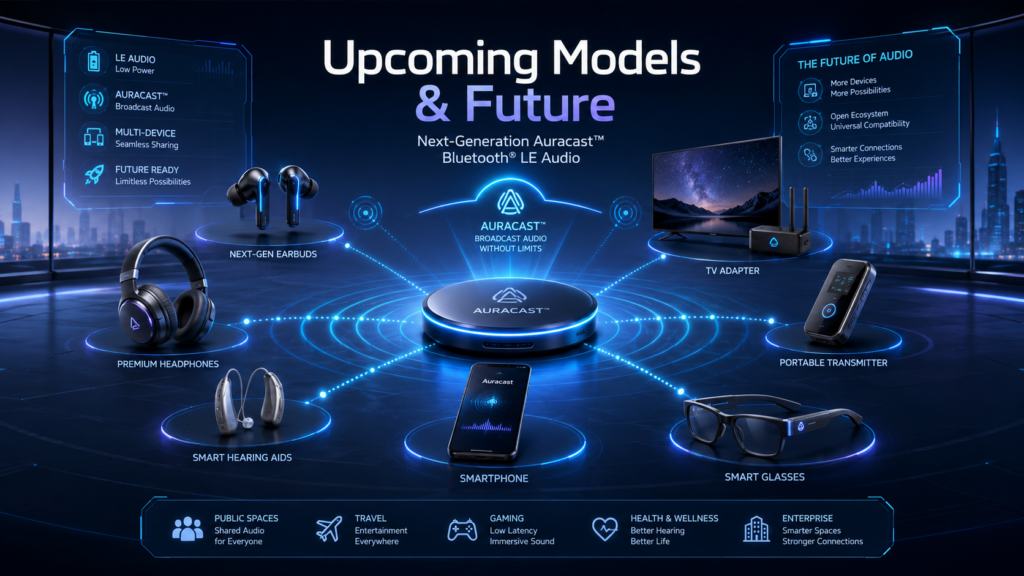
Auracast is expected to grow from a premium feature into a normal part of the wireless audio ecosystem. The transition will likely happen gradually as more devices include Bluetooth LE Audio support by default.
Native Auracast TVs
Future TVs are likely to include built-in Auracast broadcast controls, allowing multiple people to listen privately through compatible earbuds or hearing devices.
This could make silent TV watching easier for:
families
couples
late-night viewers
shared apartments
care homes
people with hearing difficulty
gamers who want private audio
Instead of pairing one headset at a time, a TV could broadcast audio like a private listening channel.
Smartphones with Built-In Broadcast Controls
Smartphones may become personal Auracast transmitters. That means users could start a private audio broadcast from their phone and let friends join through compatible earbuds.
Possible use cases include:
sharing music without splitting earbuds
watching videos together on a train
group listening during travel
private fitness instruction audio
language translation streams
audio sharing during presentations
This could make Bluetooth audio feel more like Wi-Fi: users join a broadcast instead of constantly pairing and unpairing devices.
Public Infrastructure
Auracast could become especially powerful in public spaces. Airports, malls, gyms, museums, transport systems, hospitals, universities, and conference centers may use broadcast audio for announcements, accessibility, entertainment, and multilingual listening.
Examples include:
airport gate announcements streamed to earbuds
gym TVs without shared speakers
museum tours in multiple languages
conference translation channels
train station announcements
silent waiting-room TVs
church or lecture-hall assistive listening
This is where Auracast becomes more than a personal audio feature. It becomes part of public sound infrastructure.
Smart Homes with Multi-Room Audio Broadcasting
Auracast may also become useful inside smart homes. A compatible TV, speaker hub, laptop, or phone could broadcast audio to multiple earbuds or devices in different rooms.
Possible future home uses include:
multi-room podcast listening
private TV audio in shared spaces
family movie audio to multiple earbuds
home workout audio streams
low-volume listening at night
personalized audio zones
For smart homes, Auracast could reduce the need for complicated pairing and allow audio to move more naturally between people and rooms.
Frequently Asked Questions
What is Auracast used for in Bluetooth LE Audio earbuds and headphones?
Auracast is a Bluetooth LE Audio broadcasting technology that allows a single audio source to transmit sound to multiple compatible earbuds, headphones, hearing aids, and speakers simultaneously. Unlike traditional Bluetooth connections that require one-to-one pairing, Auracast creates a broadcast stream that nearby users can join.
Common uses include:
- Airport gate announcements
- Gym and fitness center TVs
- Silent conference presentations
- Museum audio guides
- Classroom audio distribution
- Shared TV listening at home
- Public transportation information systems
- Hearing accessibility environments
Auracast Use Cases
| Environment | Traditional Bluetooth | Auracast |
|---|---|---|
| Airport announcements | Individual speakers only | Unlimited listeners |
| Home TV viewing | One device connection | Multiple listeners |
| Conferences | Separate audio systems | Shared broadcast stream |
| Museums | Dedicated rental devices | Personal earbuds |
| Gyms | Silent televisions | Multiple members connect |
The biggest advantage is scalability. One transmitter can serve many listeners without repeated pairing requests or complex setup procedures.
Do I need special Bluetooth LE Audio earbuds to use Auracast broadcasts?
Yes. Auracast requires earbuds, headphones, hearing aids, smartphones, and transmitters that support Bluetooth LE Audio.
Older Bluetooth Classic audio products generally cannot receive Auracast streams because the technology uses a newer Bluetooth architecture built around the LC3 codec and Bluetooth Low Energy framework.
Device Compatibility Overview
| Device Type | Auracast Compatible |
|---|---|
| Legacy Bluetooth earbuds | No |
| Bluetooth LE Audio earbuds | Yes |
| Auracast-enabled hearing aids | Yes |
| Modern LE Audio smartphones | Yes |
| Traditional Bluetooth speakers | Usually No |
When shopping for future-proof earbuds, verify support for:
- Bluetooth LE Audio
- LC3 codec
- Auracast Broadcast Audio
- Ongoing firmware support
Many earbuds advertise LE Audio support, but not all currently enable every Auracast feature through firmware.
Can I use Auracast with my smart TV for shared listening at home?
Yes. Home entertainment is expected to become one of the most popular Auracast use cases.
Instead of increasing television volume for everyone in a room, compatible users can connect their own earbuds and adjust volume independently.
For example:
| Listener | Preferred Volume |
|---|---|
| Parent | 30% |
| Child | 50% |
| Grandparent | 80% |
| Hearing aid user | Personalized |
This creates a more comfortable viewing experience while reducing household noise and improving accessibility.
Future televisions, streaming devices, gaming consoles, and sound systems are expected to integrate Auracast broadcasting directly.
Is Auracast better than traditional Bluetooth audio for everyday listening?
It depends on how you use wireless audio.
For a single person listening to music on one device, traditional Bluetooth remains highly effective.
For environments where multiple people need access to the same audio source, Auracast provides major advantages.
Auracast vs Traditional Bluetooth
| Feature | Traditional Bluetooth | Auracast |
|---|---|---|
| One-to-one connection | Excellent | Excellent |
| Multiple listeners | Limited | Excellent |
| Public audio systems | Difficult | Excellent |
| Hearing accessibility | Limited | Strong |
| Conference audio | Complex | Simplified |
| Shared TV listening | Limited | Excellent |
Auracast is not replacing Bluetooth listening. It expands Bluetooth into broadcast and shared-listening scenarios that previously required dedicated hardware.
People Also Ask
How will Auracast change airport, train station, and public venue audio systems?
Auracast could significantly improve how public announcements are delivered.
Today, many announcements are difficult to hear because of:
- Background noise
- Echo
- Poor speaker placement
- Hearing limitations
- Language barriers
With Auracast, travelers can receive announcements directly through compatible earbuds, headphones, hearing aids, or mobile devices.
Public Audio Improvement Comparison
| Challenge | Traditional PA System | Auracast Solution |
|---|---|---|
| Crowded terminals | Hard to hear | Direct audio feed |
| Hearing difficulties | Limited support | Personalized volume |
| Multiple languages | Difficult | Multiple broadcasts possible |
| Noisy environments | Reduced clarity | Direct transmission |
This makes public communication more accessible, private, and reliable.
Can Auracast help people with hearing loss and hearing aids?
Yes. Accessibility is one of Auracast’s most important applications.
Many hearing aid manufacturers are integrating Bluetooth LE Audio because it enables users to receive audio directly from compatible broadcasts.
Potential benefits include:
- Clearer speech understanding
- Reduced background noise interference
- Personalized volume control
- Better conference participation
- Improved classroom accessibility
- Easier public venue communication
Accessibility Benefits
| Feature | Benefit |
|---|---|
| Direct audio streaming | Improved clarity |
| Personalized volume | Better comfort |
| Reduced environmental noise | Easier speech understanding |
| Public venue compatibility | Greater independence |
Auracast is expected to become an important accessibility tool across education, transportation, healthcare, and entertainment environments.
Will Auracast work for gaming, esports tournaments, and live events?
Gaming and esports environments may become major adopters of Auracast.
Potential applications include:
- Live tournament commentary
- Multi-language broadcasts
- Spectator audio feeds
- Training sessions
- Exhibition halls
- Convention demonstrations
Gaming Event Applications
| Scenario | Auracast Benefit |
|---|---|
| Esports arena | Shared commentary |
| Gaming expo | Product demonstrations |
| LAN events | Broadcast instructions |
| Training centers | Coach communication |
As LE Audio latency improves, Auracast could become a powerful supplement to existing event audio infrastructure.
Is Auracast secure and private compared to traditional Bluetooth pairing?
Auracast broadcasts can be configured in different ways depending on the environment.
Some broadcasts may be:
- Open and publicly accessible
- Password protected
- QR-code enabled
- Venue restricted
- App-controlled
Broadcast Types
| Broadcast Type | Example |
|---|---|
| Public | Airport announcements |
| Restricted | Corporate meeting |
| Ticketed | Live event audio |
| Private | Home entertainment |
Users choose which broadcasts to join, similar to selecting a Wi-Fi network, creating flexibility for both public and private listening scenarios.
What should buyers look for when choosing future-proof Auracast earbuds?
Consumers interested in next-generation wireless audio should evaluate more than sound quality alone.
Auracast Buying Checklist
| Feature | Importance |
|---|---|
| Bluetooth LE Audio | Essential |
| Auracast support | Essential |
| LC3 codec | Essential |
| Multipoint Bluetooth | High |
| Firmware update support | High |
| ANC performance | Medium |
| Battery life | High |
| Hearing accessibility features | Medium-High |
| Companion app controls | Medium |
The best Auracast earbuds will combine strong battery life, reliable LE Audio implementation, regular firmware updates, and broad device compatibility rather than simply advertising Auracast support on the packaging.
👉 Ready to experience next-gen audio?
➡️ Upgrade to Auracast-compatible earbuds and transmitters today