
Battery Life Tips for Earbuds: Complete Guide to Longer Wireless Earbud Runtime
Amazon Affiliate Disclosure
Earsbud.com may earn a commission when readers buy products through qualifying affiliate links. This does not increase the price you pay. Any earbuds, accessories, charging cables, cleaning tools, replacement cases, or product recommendations mentioned on this page should be evaluated for compatibility, real-world usefulness, warranty support, and long-term value.
Updated on July, 2026.
Wireless earbuds are small power machines. Inside each tiny shell, a battery has to run Bluetooth, audio drivers, microphones, noise cancellation, transparency mode, touch controls, voice assistant wake features, app communication, sensors, and sometimes spatial audio or head tracking. That is a lot of work for something smaller than a coin.
That is why good battery life tips for earbuds are not just about “charging them more.” The real goal is to reduce unnecessary battery drain, protect long-term battery health, understand which features use the most power, and know when fast battery loss means a setting problem, charging problem, firmware issue, or aging battery.
This earbuds guide explains how to improve earbud battery life, why earbuds drain fast, what settings matter most, how charging habits affect longevity, when replacement makes sense, and what buyers should watch as newer earbuds move toward smarter power management, LE Audio, adaptive codecs, AI noise processing, and more advanced charging cases.
Quick Jump
| Goal / Question | Jump To | What You’ll Learn |
|---|---|---|
| Want the fastest ways to extend earbud runtime? | How to Improve Earbud Battery Life | The most effective battery-saving settings and habits. |
| Want a quick summary of the best battery-saving habits? | Battery Habit Scorecard ⚡️ | The highest-impact habits for extending runtime and preserving long-term battery health. |
| Unsure whether your battery life is normal? | Claimed vs Real-World Earbud Battery Life | How advertised battery figures compare with everyday use. |
| Want to understand how earbud batteries actually work? | How Earbud Batteries Work | The components that consume power and affect runtime. |
| Wondering why your earbuds drain so quickly? | Why Earbuds Drain Fast | The most common causes of rapid battery loss. |
| Using ANC and seeing shorter battery life? | ANC, Transparency and Spatial Audio Battery Drain | How advanced audio features impact battery performance. |
| One earbud always dies before the other? | One Earbud Drains Faster Than the Other | Causes of battery imbalance and how to fix it. |
| Charging case losing power too fast? | Why the Earbud Case Battery Drains Fast | Common charging case battery issues and solutions. |
| Earbuds losing battery while sitting in the case? | Why Earbuds Lose Battery When Not in Use | Sleep mode, case detection, and standby drain problems. |
| Battery dropping rapidly during phone calls? | Why Calls Drain Earbud Battery Faster | How microphones and call processing affect runtime. |
| Want a side-by-side battery drain comparison? | Battery Life Comparison Section | Feature-by-feature battery impact rankings. |
| Interested in future battery technology? | Trends & Latest Tech in Earbud Battery Life | LE Audio, adaptive codecs, AI processing, and smart cases. |
| Shopping for earbuds with better battery life? | Upcoming Models: What to Look For Before Buying | Battery features that matter most before purchasing. |
| Need a troubleshooting chart for battery issues? | Charts & Tables: Earbud Battery Drain Diagnostic Matrix | Symptoms, causes, tests, and fixes in one place. |
| Wondering whether to repair or replace your earbuds? | Cost Section: What It Costs to Improve Earbud Battery Life | Cost-effective fixes versus replacement decisions. |
| Not sure when replacement makes sense? | When Replacement Makes Financial Sense | Signs that battery wear has reached the end of practical life. |
| Want to avoid damaging your battery? | Risks: Battery Mistakes to Avoid | Common charging and storage mistakes that shorten battery lifespan. |
| Looking for answers to common battery questions? | FAQ: Battery Life Tips for Earbuds | Detailed solutions to frequently asked battery concerns. |
| Want additional expert insights? | People Also Ask | Expanded answers to popular battery-life questions. |
| Need the key takeaways? | Editorial Insights | A complete summary of the best battery-life strategies. |
What Is This Guide For?
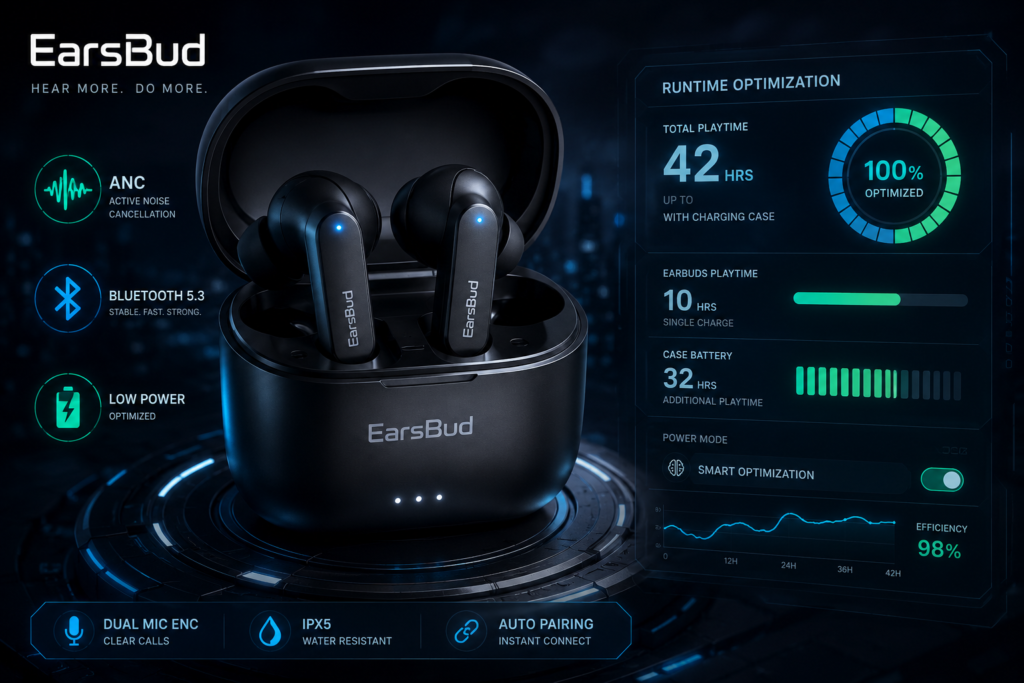
This guide is for anyone trying to get longer daily runtime and better long-term battery health from wireless earbuds.
It covers:
- Battery life tips for earbuds
- How to improve earbud battery life
- Why earbuds drain fast
- Wireless earbuds battery life settings
- Earbuds battery draining quickly
- One earbud battery draining faster
- Charging case battery draining fast
- ANC battery drain
- Spatial audio battery drain
- Bluetooth codec battery drain
- Earbuds losing battery while not in use
- Battery drain after firmware update
- When to replace earbuds because of battery wear
- What battery features to look for in new earbuds
Who Needs This Guide?
You need this guide if:
- Your earbuds no longer last as long as they used to.
- Your earbuds die before your commute, workout, or workday ends.
- One earbud drains faster than the other.
- The charging case loses power while sitting unused.
- Your earbuds drain faster with noise cancellation on.
- Battery life became worse after a firmware update.
- You use earbuds for calls, gaming, gym, travel, sleep, or work.
- You are deciding whether to replace old earbuds.
- You want to preserve battery health before the earbuds become weak.
Earbud battery life is not only a product spec. It is a daily reliability issue. If your earbuds die halfway through a meeting or flight, the problem is not theoretical — it interrupts your day.
Benefits of Better Earbud Battery Habits
Better battery habits can help you:
- Get longer listening time per charge
- Reduce sudden low-battery warnings
- Improve call reliability
- Prevent one-earbud battery imbalance
- Reduce charging case drain
- Preserve long-term battery capacity
- Delay replacement
- Avoid unnecessary upgrades
- Choose better earbuds next time
- Understand realistic battery claims
The most useful battery strategy is not extreme. You do not need to baby your earbuds every minute. You need to identify the few features and habits that create the most drain, then control them.
Claimed vs Real-World Earbud Battery Life
Earbud brands often advertise battery life under controlled conditions: moderate volume, ANC off, stable connection, limited features, no calls, no high-resolution codec, and no device switching.
Real life is different.
You may be using:
- ANC
- Transparency mode
- Spatial audio
- High volume
- LDAC or high-bitrate codec
- Gaming mode
- Multipoint Bluetooth
- Voice assistant listening
- Phone calls
- Wind noise reduction
- App controls
- Outdoor use
- Weak signal environments
Those features can reduce runtime significantly.
Realistic Battery Life Expectations
| Earbud Type | Realistic Per-Charge Runtime | Total With Case | Notes |
|---|---|---|---|
| Budget earbuds | 4–8 hours | 18–32 hours | Often fewer advanced features |
| Mid-range earbuds | 5–9 hours | 24–40 hours | Good balance of features and battery |
| Premium ANC earbuds | 5–8 hours with ANC | 20–36 hours | ANC, spatial audio, calls reduce runtime |
| Open-ear earbuds | 6–12 hours | 24–40+ hours | Larger form factor may allow bigger battery |
| Sleep earbuds | 6–10+ hours | Varies | Low volume helps, but small size limits battery |
| Gaming earbuds | 3–7 hours | 15–30 hours | Low-latency mode can drain faster |
Recent earbud coverage continues to show a trade-off between advanced processing and battery life. When choosing between open ear vs in ear earbuds, form factor drastically impacts these specs. For example, newer Soundcore Liberty 5 Pro models added stronger AI-powered noise processing and case features, while reported earbud battery life sits around 6.5 hours per charge and up to 28 hours with the case, showing how advanced processing can compete with runtime.(The Verge)
How Earbud Batteries Work
Most true wireless earbuds use small lithium-based batteries. These batteries are compact, rechargeable, and powerful enough for daily use, but they age over time.
Each earbud battery powers:
- Bluetooth radio
- Audio driver
- DAC/amplification
- Microphones
- ANC processing
- Transparency mode
- Touch controls
- Voice prompts
- Sensors
- Firmware
- Left/right synchronization
The charging case has a larger battery that recharges the earbuds several times. The case battery also powers LEDs, pairing mode, firmware transfer, and sometimes wireless charging or touchscreen controls.
Earbud Battery System
| Component | Battery Role | Common Drain Cause |
|---|---|---|
| Left earbud | Audio, Bluetooth, mic, sensors | Primary bud role, ANC, calls |
| Right earbud | Audio, sync, mic, sensors | Battery imbalance, weak charging |
| Charging case | Stores extra charges | Case lid sensor, old battery, wireless charging loss |
| Companion app | Controls features | Background sync, firmware, diagnostics |
| Source device | Sends audio | Weak Bluetooth signal, codec demand |
Battery life is not controlled by the earbuds alone. Your phone, laptop, app, codec, signal strength, and listening mode all matter.
How to Improve Earbud Battery Life
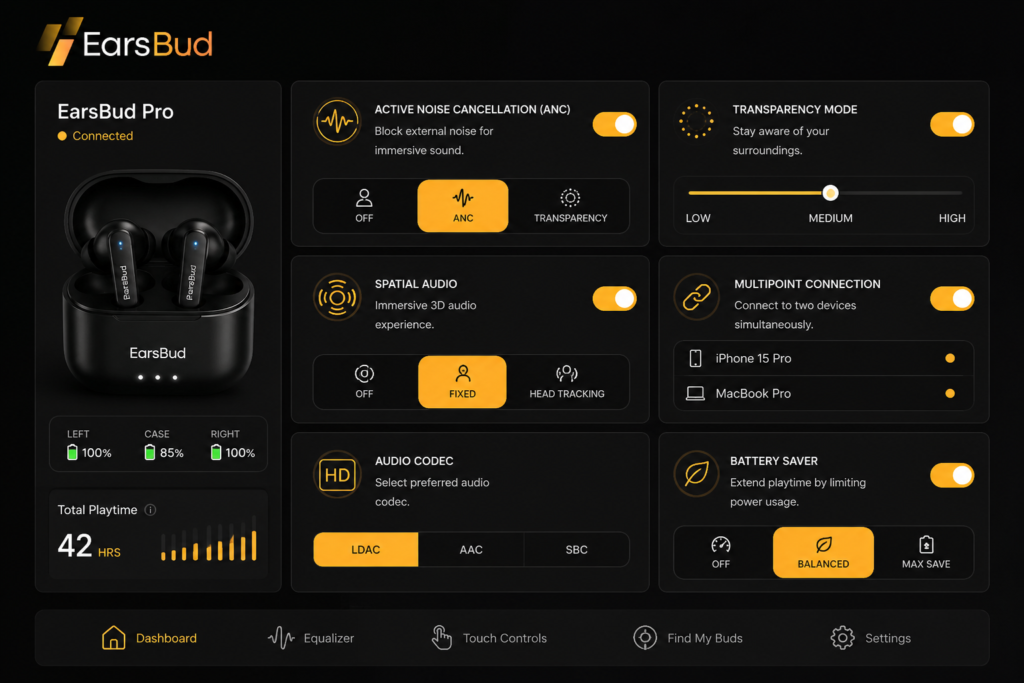
1. Lower the Volume Slightly
Volume is one of the easiest battery wins. Earbuds use more power when driving louder audio, especially with bass-heavy music or noisy environments.
You do not need to listen quietly. Even reducing volume from very high to moderate-high can improve runtime and reduce listening fatigue.
Practical Rule
If you need very high volume to hear clearly, fix the seal, fit, or noise mode first. Poor fit often causes users to raise volume unnecessarily.
2. Turn Off ANC When You Do Not Need It
Active Noise Cancellation relies on external and internal microphones, continuous environmental monitoring, and real-time signal processing. These systems consume additional power, so leaving ANC enabled in a quiet environment can shorten playback time without providing a meaningful benefit.
Use ANC when:
- Commuting through busy streets
- Flying or waiting in airports
- Working near conversations or machinery
- Riding buses, trains, or subways
- Studying in loud cafés, libraries, or shared spaces
Turn ANC off when:
- Sitting in a quiet room
- Listening at home
- Walking through calm surroundings
- Maximum battery life matters more than noise isolation
Switching to normal listening mode during quieter periods can add valuable playback time between charges. This is particularly useful for travelers, professionals, and heavy listeners comparing the best wireless earbuds with long battery life, because efficient feature management can matter almost as much as the battery capacity itself.
ANC Battery Impact Chart
| Mode | Battery Use | Best Use |
|---|---|---|
| ANC off | Lowest | Quiet rooms, long listening |
| Transparency mode | Medium | Awareness, walking, office |
| Adaptive ANC | Medium–High | Changing environments |
| Strong ANC | Highest | Flights, trains, loud spaces |
3. Use Transparency Mode Selectively
Transparency mode is useful, but it also uses microphones and processing. Some earbuds drain almost as much in transparency mode as ANC mode.
Use it when you need awareness. Turn it off when you do not.
4. Disable Spatial Audio and Head Tracking When Battery Matters
Spatial audio, head tracking, and 3D sound modes require extra processing. They can be enjoyable for movies and immersive content, but they are not necessary for podcasts, audiobooks, calls, or casual listening.
Turn them off for:
- Long flights
- Workdays
- Study sessions
- Long walks
- Battery-critical use
5. Avoid High-Resolution Codec Modes During Long Sessions
High-quality codecs can improve sound, but they may use more power, especially when the connection has to work harder.
Common modes that may affect battery include:
- LDAC high quality
- LHDC high bitrate
- aptX Adaptive high quality
- Gaming low-latency mode
- Lossless or near-lossless wireless modes
Qualcomm describes Snapdragon Sound and aptX Lossless as technologies designed to scale wireless audio depending on link quality and device support, which reflects a broader trend: earbuds increasingly adjust quality and stability dynamically instead of locking into one fixed mode. (The Verge)
Battery-Saving Codec Strategy
| Situation | Better Setting |
|---|---|
| Long workday | Standard or adaptive mode |
| Short music session | High-res mode if desired |
| Walking outdoors | Stable/adaptive mode |
| Gaming | Low-latency only while gaming |
| Calls | Standard call mode |
| Poor signal area | Lower-bitrate stable mode |
6. Keep the Phone Close to the Earbuds
Weak Bluetooth signal can increase power demand because earbuds and source devices must maintain a stable connection. If your phone is buried in a bag, back pocket, or across the room, your earbuds may work harder.
For better battery and stability:
- Keep the phone close.
- Avoid back pockets.
- Use same-side pocket placement.
- Avoid placing the phone behind metal objects.
- Keep the phone outside thick bags.
- Reduce distance when using high-quality codecs.
7. Turn Off Multipoint When You Do Not Need It
Multipoint Bluetooth is useful, but keeping earbuds connected to two devices can increase connection management and switching behavior.
Turn off multipoint when:
- You only need one device
- Battery life is the priority
- Audio keeps switching
- You are traveling
- You are using one long listening session
- The companion app shows device switching issues
Battery life is often affected by connection behavior, especially when earbuds remain connected to more than one device. Learn how multipoint Bluetooth works.
8. Use One Earbud at a Time for Long Calls or Podcasts
For very long calls, podcasts, or audiobooks, using one earbud at a time can extend practical listening time.
Example:
- Use right earbud while left charges.
- Switch when battery drops.
- Keep the case charged.
- Use mono audio if needed.
This is especially useful for drivers, remote workers, call-heavy users, and people who listen to spoken audio for hours.
9. Keep Earbuds Clean So They Charge Fully
Battery life problems often begin as charging problems. If the contacts are dirty, one earbud may not fully charge before use.
Clean:
- Earbud charging pads
- Case charging pins
- Ear tips
- Sensor areas
- Case wells
- USB-C or Lightning port
Battery issues are sometimes caused by dirt, earwax or debris rather than battery failure. Read how to clean earbuds.
10. Update Firmware, But Reset After Major Battery Glitches
Firmware can improve battery reporting, standby behavior, case communication, and ANC efficiency. It can also introduce temporary bugs.
If battery life worsens after an update:
- Fully charge the earbuds and case.
- Update the companion app.
- Check for another firmware update.
- Forget and re-pair the earbuds.
- Reset the earbuds.
- Test battery life with ANC off and standard audio.
For detailed firmware update procedures across different brands and models, refer to the complete guide here: Earbuds Firmware Update.
Why Earbuds Drain Fast
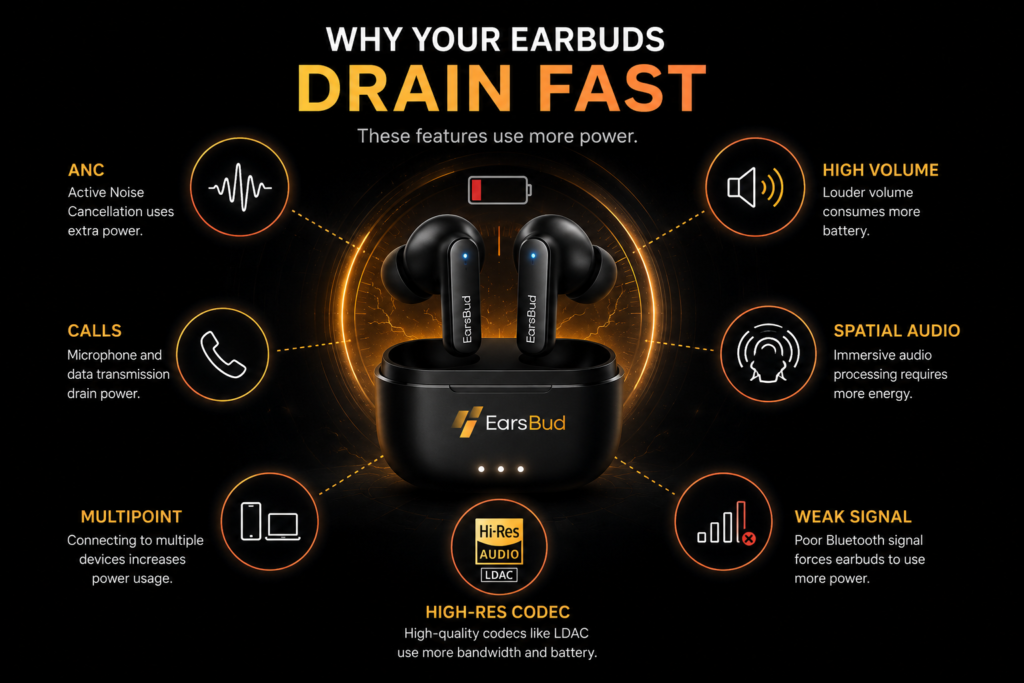
1. ANC Is Always Running
ANC is one of the biggest battery drains because it uses microphones and processing constantly. If you leave ANC on all day, shorter runtime is normal.
2. High Volume Uses More Power
High volume makes the tiny drivers work harder. If you always listen near maximum volume, battery drain will be faster.
3. Calls Drain Faster Than Music
Calls use microphones, voice processing, background noise reduction, Bluetooth uplink, and often lower-latency behavior. Earbuds usually drain faster during calls than music playback.
4. One Earbud Acts as the Primary Bud
Some earbuds use one side as the main connection point. That side may handle more Bluetooth communication and drain faster.
5. Multipoint Keeps More Connections Active
When connected to a phone and laptop at the same time, earbuds may spend more energy managing two devices.
6. High-Resolution Audio Demands More
High-bitrate audio can increase processing and radio activity. It may also become less efficient in weak signal environments.
7. Poor Fit Makes You Raise Volume
If the seal is weak, bass disappears and outside noise enters. Many people raise the volume to compensate, which drains more battery.
8. The Case Is Not Charging the Earbuds Fully
Dirty contacts, loose seating, or a weak case battery can leave earbuds partially charged even when they appear docked.
9. The Battery Is Aging
All rechargeable batteries degrade. Tiny earbud batteries have limited physical capacity, and after years of charging cycles, runtime naturally declines.
10. Firmware or App Bugs Can Cause Standby Drain
A firmware bug, app sync issue, or case detection problem can keep earbuds awake when they should be sleeping.
ANC, Transparency and Spatial Audio Battery Drain
These features are valuable, but they cost power.
| Feature | Battery Impact | Why It Drains |
|---|---|---|
| ANC | High | Microphones and anti-noise processing |
| Transparency mode | Medium–High | Microphones pass outside sound through |
| Spatial audio | Medium | Extra processing |
| Head tracking | Medium–High | Motion sensors and processing |
| Wind reduction | Medium | Microphone filtering |
| Voice assistant wake | Low–Medium | Listening for trigger |
| Wear detection | Low | Sensors stay active |
| Touch controls | Low | Minimal but active |
The best approach is not disabling everything forever. Use premium features when they improve the experience, and turn them off when runtime matters more.
One Earbud Drains Faster Than the Other
One-earbud battery imbalance is common.
Normal Causes
- One side acts as the primary Bluetooth bud.
- One side uses the microphone more often.
- One side has a slightly older or weaker cell.
- One side was not fully charged.
- One earbud handles more touch/sensor activity.
Problem Causes
- Dirty charging contact
- Poor case seating
- Weak battery in one earbud
- Firmware sync issue
- Earbud not entering sleep mode
- One bud connected separately
- Case pin damage
Fix
- Clean both earbuds and case pins.
- Fully charge the case.
- Fully charge both earbuds.
- Check battery levels after 30 minutes of use.
- Forget and re-pair earbuds.
- Reset if imbalance is extreme.
- Test again with ANC off.
Why the Earbud Case Battery Drains Fast
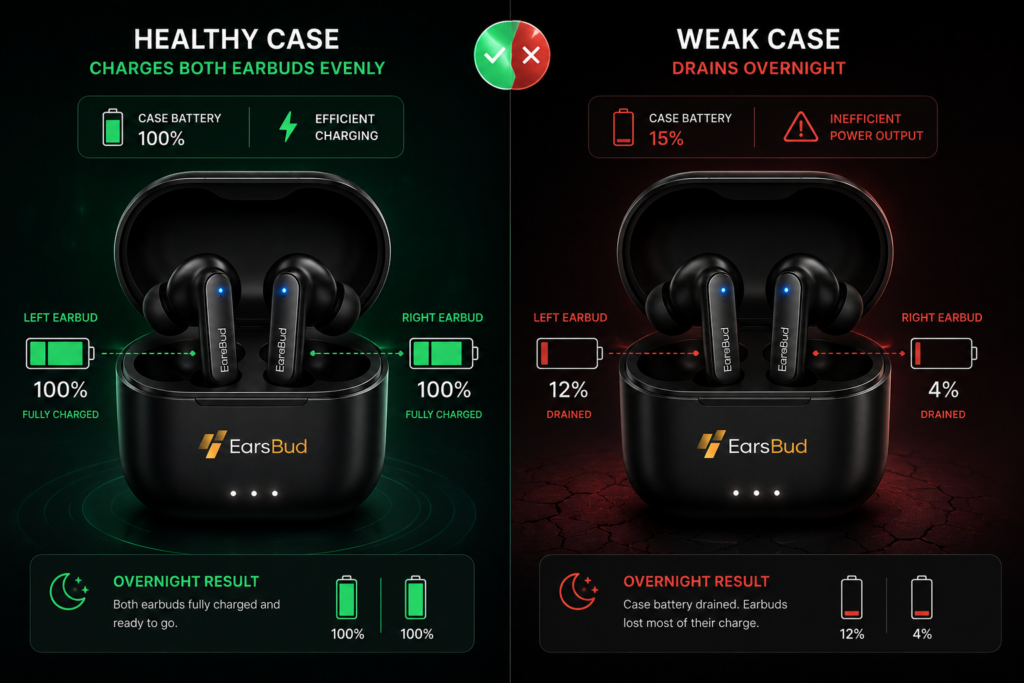
The charging case may drain quickly for reasons separate from earbud battery life.
Common Causes
| Case Battery Problem | Likely Cause | Fix |
|---|---|---|
| Case drains while unused | Earbuds not sleeping | Reseat buds, clean contacts |
| Case loses charge overnight | Lid sensor or firmware issue | Reset/update |
| Case charges earbuds unevenly | Dirty pins or weak case battery | Clean contacts |
| Case battery drops quickly | Aging battery | Replacement case/new earbuds |
| Wireless charging heats case | Charging inefficiency | Use cable when possible |
| Case keeps LEDs active | Lid/pairing button issue | Inspect case |
A case that cannot hold charge will make healthy earbuds feel unreliable.
Why Earbuds Lose Battery When Not in Use
Earbuds should enter low-power mode when stored in the case. If they drain while unused, something is keeping them awake.
Possible causes:
- Case lid not closing fully
- Ear tips blocking proper seating
- Dirty charging contacts
- Earbuds connected while in case
- Bluetooth profile glitch
- Case battery dead
- Firmware bug
- Wake sensor issue
Quick Test
Put earbuds in the case and close the lid. Check your phone’s Bluetooth settings. If the earbuds stay connected, they may not be sleeping properly.
Why Calls Drain Earbud Battery Faster
Calls use more power than music because earbuds must capture your voice, reduce background noise, transmit microphone audio, receive incoming audio, and often run real-time processing.
Calls become more draining when:
- You are in noisy environments
- ANC or transparency is active
- Wind reduction is active
- Multipoint is active
- Your phone is far away
- Signal is weak
- The call app uses extra processing
- You are using video conferencing on a laptop
For long calls, keep the phone close, use one earbud at a time, disable unnecessary modes, and avoid weak Bluetooth environments.
Battery Life Comparison Section
Common Feature Drain Comparison
| Feature / Behavior | Battery Drain Level | Best Use |
|---|---|---|
| Low volume music | Low | Long listening |
| Medium volume music | Low–Medium | Daily use |
| High volume music | Medium–High | Short sessions |
| ANC on | High | Loud environments |
| Transparency mode | Medium–High | Awareness |
| Calls | High | Meetings, phone calls |
| Gaming mode | Medium–High | Gaming only |
| LDAC/high-res mode | Medium–High | Focused listening |
| Multipoint | Medium | Work switching |
| Spatial audio/head tracking | Medium–High | Movies and immersive content |
| Standby outside case | Medium | Avoid when not using |
| Case wireless charging | Medium loss | Convenience, not efficiency |
Battery Habit Scorecard
| Habit | Battery Benefit | Long-Term Health Benefit |
|---|---|---|
| Lower volume slightly | High | Medium |
| Turn ANC off in quiet rooms | High | Medium |
| Keep phone close | Medium | Low |
| Use standard codec for long sessions | Medium | Low |
| Clean charging contacts | Medium | High |
| Avoid heat | Medium | High |
| Don’t store fully drained | Medium | High |
| Update firmware | Medium | Medium |
| Use one bud at a time for calls | High | Medium |
| Replace poor-fitting tips | Medium | Low–Medium |
Trends & Latest Tech in Earbud Battery Life
1. Smarter Chips and More Processing
New earbuds are using more advanced chips for ANC, voice isolation, adaptive sound, and case-based controls. This can improve user experience, but it creates a battery trade-off. Recent Soundcore Liberty 5 Pro coverage shows stronger AI noise processing and call performance paired with around 6.5 hours of earbud runtime and up to 28 hours with the case, illustrating that smarter processing does not always mean longer battery life. (The Verge)
2. Touchscreen and Smart Charging Cases
Charging cases are becoming more interactive. JBL’s Live 4 series continued the trend of touchscreen-equipped charging cases, adding new earbuds with case-based controls and improved feature access. Smart cases can make controls easier, but they also add another component that needs power management. (TechRadar)
3. LE Audio and LC3
LE Audio is one of the biggest shifts in Bluetooth audio. The Bluetooth SIG describes LE Audio as a newer Bluetooth audio architecture operating over Bluetooth Low Energy, with LC3 as its codec and Auracast broadcast audio as a major feature. In practice, the battery benefit will depend on the earbuds, phone, codec implementation, firmware, and listening mode, so users should not assume every LE Audio product automatically doubles battery life. (Tech Comparison Pro)
4. Adaptive Codecs
Adaptive audio systems can scale quality based on connection strength. This matters because stable wireless audio can be more efficient than a high-bitrate mode struggling in a weak signal environment.
5. More Sensors, More Power Decisions
Future earbuds are adding more sensors, stronger microphones, voice features, and sometimes unusual experimental capabilities. For example, recent research explored low-power camera-integrated earbuds for visual intelligence, showing how earbuds may become broader wearable computing platforms — but such features will make power management even more important. (arXiv)
Upcoming Models: What to Look For Before Buying
When shopping for future earbuds, do not only look at “total hours with case.” Look deeper.
Battery Features That Matter
| Feature | Why It Matters |
|---|---|
| Per-charge runtime with ANC on | Most realistic daily metric |
| Total case battery life | Travel and workday convenience |
| Fast charging | Useful emergency feature |
| USB-C charging | Easier cable compatibility |
| Wireless charging | Convenient, but less efficient |
| Separate left/right battery reporting | Helps diagnose imbalance |
| Battery health optimization | May reduce long-term wear |
| Adaptive ANC | Can save power versus always-max ANC |
| LE Audio support | Future compatibility |
| Codec controls | Lets users balance quality and runtime |
| Replaceable case availability | Extends product life |
| Clear firmware history | Shows long-term support |
Buying Rule
A good battery-life earbud is not the one with the biggest advertised number. It is the one that gives strong real-world runtime with the features you actually use.
If you use ANC all day, buy based on ANC-on runtime.
If you take calls all day, look for call endurance.
If you travel, prioritize case capacity and fast charge.
If you use Android high-res audio, look for stable codec controls.
If you switch between phone and laptop, look for efficient multipoint.
Charts & Tables: Earbud Battery Drain Diagnostic Matrix
| Symptom | Likely Cause | Quick Test | Best Fix |
|---|---|---|---|
| Battery drains fast with ANC | ANC processing | Turn ANC off for one session | Use adaptive/off mode |
| One side drains faster | Primary bud or weak battery | Compare left/right levels | Clean, reset, monitor |
| Case drains overnight | Buds not sleeping | Check if earbuds stay connected | Reseat, clean, reset |
| Battery worse after update | Firmware/app issue | Test after reset | Update, reset, re-pair |
| Calls drain battery | Mic processing | Compare call vs music runtime | Use one bud, reduce modes |
| Outdoor battery worse | Weak signal/body blocking | Keep phone close | Change phone placement |
| High-res mode drains fast | Codec demand | Use standard mode | Use adaptive codec |
| Battery percentage jumps | Calibration/software issue | Full charge/discharge test | Reset/update |
| Earbuds die at 20–30% | Battery wear | Test on another device | Replace/upgrade |
| Case charges slowly | Cable/adapter/contact issue | Try new cable | Clean port, replace cable |
For broader troubleshooting and buyer education, visit Earsbud for practical wireless audio guides.
Cost Section: What It Costs to Improve Earbud Battery Life
Many battery improvements cost nothing. Replacement should come after settings and charging checks.
| Fix | Estimated Cost | When Needed |
|---|---|---|
| Turn off ANC/spatial audio | $0 | Battery-critical use |
| Lower volume | $0 | Daily battery improvement |
| Disable high-res codec | $0 | Stuttering or fast drain |
| Reset earbuds | $0 | Firmware or battery reporting issue |
| Firmware update | $0 | Known battery bug |
| Clean contacts | $0–$10 | Partial charging or imbalance |
| New ear tips | $5–$25 | Poor seal causing high volume |
| New cable | $5–$25 | Case not charging fully |
| New wall adapter | $10–$30 | Slow or unreliable charging |
| Replacement case | $40–$120+ | Case battery weak |
| Single earbud replacement | $50–$120+ | One side battery failure |
| New earbuds | $30–$300+ | Old battery or poor runtime |
When Replacement Makes Financial Sense
Replace instead of repair if:
- Earbuds are more than 3 years old.
- Runtime has dropped below half of original performance.
- One side dies much faster even after reset.
- The case battery is also weak.
- Replacement parts cost more than half a new pair.
- The earbuds lack features you now need.
- Battery swelling, heat, or water damage is present.
Risks: Battery Mistakes to Avoid
Do Not Charge Wet Earbuds
Sweat, rain, and moisture can damage charging contacts. Let earbuds dry before placing them in the case.
Do Not Store Earbuds Fully Drained for Long Periods
A deeply discharged battery may become harder to recover. Charge before long storage.
Avoid Excessive Heat
Heat accelerates battery wear. Avoid leaving earbuds in hot cars, direct sun, or near heaters.
Do Not Use Damaged Chargers
A low-quality or damaged cable can cause unreliable charging. Use reputable cables and adapters.
Do Not Ignore Swelling or Heat
Stop using earbuds if the case or earbuds swell, smell burnt, get unusually hot, or show melted plastic.
Do Not Assume Wireless Charging Is Always Best
Wireless charging is convenient but can create more heat and energy loss than cable charging. Use cable charging when battery health or speed matters.
FAQ: Battery Life Tips for Earbuds
How can I make my wireless earbuds battery last longer?
To make wireless earbuds battery last longer, lower the volume slightly, turn off ANC when you do not need it, disable spatial audio for long sessions, use standard or adaptive codec modes, keep the phone close, turn off multipoint when using one device, and clean the charging contacts so both earbuds charge fully. Battery life also improves when you avoid heat, update firmware, and store earbuds in the case when not in use.
Why do my earbuds battery drain so fast with noise cancellation on?
Noise cancellation drains battery because the earbuds use microphones and signal processing to detect outside sound and create anti-noise. Strong ANC uses more power than normal playback. If battery life matters more than silence, use adaptive ANC, lower ANC strength if available, or turn ANC off in quiet rooms. Transparency mode can also drain battery because it uses microphones to pass outside sound through.
Why does one earbud battery drain faster than the other?
One earbud may drain faster because it acts as the primary Bluetooth connection, handles more microphone activity, was not fully charged, has a weaker battery, or is not seating properly in the case. Clean the charging contacts, fully charge both earbuds, check left/right levels in the app, reset the earbuds, and test with ANC off. If the same side keeps draining much faster, the battery may be aging.
Is it bad to leave earbuds in the charging case all the time?
For daily use, it is normal to store earbuds in the charging case. The case is designed to protect and recharge them. The bigger risks are heat, moisture, damaged charging contacts, and long-term storage at a completely drained state. If you will not use earbuds for weeks, charge them partially first and store them in a cool, dry place.
Does high volume reduce earbuds battery life?
Yes. Higher volume makes the earbud drivers work harder and can reduce runtime. High volume often happens because the ear tips do not seal well or outside noise is too loud. Improving fit, using ANC in noisy places, and listening at a moderate level can help preserve battery life while improving sound quality and comfort.
People Also Ask
How long should wireless earbuds battery last?
Most modern wireless earbuds provide several hours of listening per charge, with the case adding multiple recharges. Real-world runtime depends on ANC, volume, codec, calls, signal strength, and battery age. Premium ANC earbuds often last less with all features enabled than their advertised maximum. Judge earbuds by real-use battery life with the features you actually use, not only the highest claimed number.
Why do earbuds lose battery when not in use?
Earbuds lose battery when not in use if they are not entering sleep mode, the case lid is not closing properly, the charging contacts are dirty, the case battery is low, or the earbuds remain connected to your phone while inside the case. Remove oversized ear tips, clean the case pins, close the lid fully, and check whether the earbuds disconnect from Bluetooth when stored.
Does Bluetooth codec affect earbud battery life?
Yes, codec choice can affect battery life. High-resolution or high-bitrate modes may use more power and require a stronger connection. Standard or adaptive codec modes are often better for long sessions, commuting, and weak signal environments. If your earbuds drain fast or stutter in high-res mode, switch to a more stable codec setting and compare runtime.
Can firmware updates improve earbud battery life?
Firmware updates can improve battery reporting, standby behavior, ANC efficiency, case communication, and connection stability. They can also occasionally introduce bugs. If battery life worsens after an update, update the companion app, check for another firmware release, reset the earbuds, and re-pair them. Test battery life with ANC off to separate feature drain from software problems.
When should I replace earbuds because of battery life?
Replace earbuds when runtime has dropped far below your daily needs, one side drains much faster after cleaning and reset, the case battery no longer holds charge, or the earbuds show heat, swelling, moisture damage, or unreliable charging. If replacement parts cost close to a new pair, buying newer earbuds with better battery management may be more practical.
Editorial Conclusion
Earbud battery life depends on more than the size of the battery. It is shaped by volume, ANC, transparency mode, calls, codec settings, multipoint Bluetooth, signal strength, charging contacts, case behavior, firmware, temperature, and battery age.
Start with the simple wins: lower volume slightly, use ANC only when needed, turn off spatial audio for long sessions, keep your phone close, clean the contacts, update firmware, and monitor one-earbud battery imbalance. If the earbuds still drain fast after those steps, look deeper into case battery health, software bugs, or aging lithium cells.
The best battery habit is not fearfully avoiding every charge. It is using the features you enjoy while knowing which ones cost runtime. Strong battery life comes from smart settings, clean charging, stable connection, and realistic expectations.