
Best Budget Gaming Earbuds in 2026: Low-Latency Picks That Actually Make Sense
Amazon Affiliate Disclosure
Earsbud may earn a commission from qualifying purchases made through affiliate links. This does not change what you pay, and it does not influence the editorial ranking. Product placement is based on gaming relevance, latency behavior, platform fit, comfort, microphone usefulness, and overall value.
Updated on July, 2026.
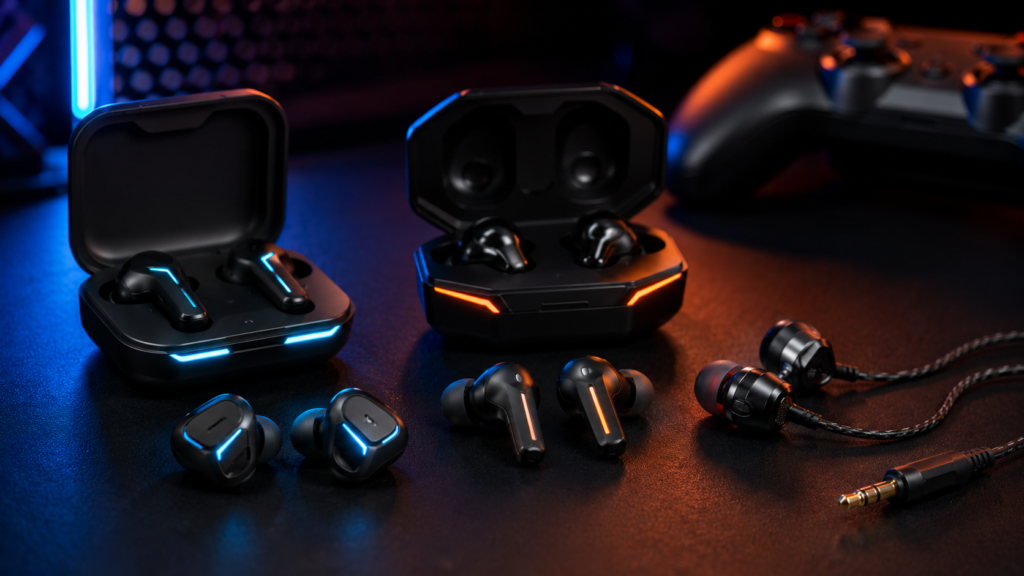
The best budget gaming earbuds are not always the ones with the deepest bass, the flashiest RGB, or the longest spec sheet. For gaming, the real test is timing. A footstep that arrives late, a voice chat mic that sounds thin, or a Bluetooth delay that makes gunfire feel detached from the screen can ruin the experience faster than mediocre music tuning ever could.
That is why budget gaming earbuds need a different kind of judgment. A normal cheap earbud can sound pleasant for playlists and podcasts, but gaming demands speed, positional clarity, stable connection, microphone quality, comfort, and platform compatibility. A good gaming earbud does not need to feel luxurious. It needs to disappear during play and keep the audio locked o the action.
If you are comparing everyday affordable options, start with our wider guide to Best budget wireless earbuds. You can also explore the full Earsbud Homepage for more earbud guides, reviews and comparison pages.
Quick Picks
Use these jump links to move directly to the section you need.
| Section | Jump Link |
|---|---|
| Why Budget Gaming Earbuds Are Different in 2026 | Go to overview |
| Best Budget Earbuds for Gaming of 2026 | Go to product reviews |
| Budget Gaming Earbuds Comparison Table | Go to comparison table |
| How We Ranked the Best Cheap Gaming Earbuds | Go to ranking framework |
| Wired vs Wireless Gaming Earbuds | Go to wired vs wireless |
| Best Budget Gaming Earbuds by Platform | Go to platform guide |
| Latency Explained for Budget Gaming Earbuds | Go to latency guide |
| Sound Quality Priorities for Gaming | Go to sound guide |
| Microphone Quality and Voice Chat | Go to mic guide |
| Comfort, Fit, and Long Gaming Sessions | Go to comfort guide |
| Best Budget Earbuds for Gaming by Use Case | Go to use cases |
| Budget Gaming Earbuds vs Regular Budget Earbuds | Go to comparison |
| Setup Tips for Better Gaming Audio | Go to setup tips |
| Common Mistakes to Avoid | Go to mistakes |
| FAQs | Go to FAQs |
| People Also Ask | Go to PAA |
| Editorial Insights | Go to conclusion |
Why Budget Gaming Earbuds Are Different in 2026
Gaming earbuds have moved beyond the old idea of “small headphones with a mic.” In 2026, the category is split into three very different lanes: wired 3.5mm earbuds, Bluetooth earbuds with a low-latency game mode, and 2.4GHz wireless earbuds with a USB-C dongle.
That split matters because each connection behaves differently.
Wired earbuds are the simplest. They plug into a controller, handheld, laptop, phone adapter, or console accessory and avoid wireless delay almost entirely. They are not always the most convenient, but they remain the safest budget option for timing-sensitive games.
Bluetooth gaming earbuds are convenient and often cheaper than dedicated gaming models. They can work well for mobile gaming, RPGs, racing games, casual shooters, YouTube, and handheld entertainment. But Bluetooth game modes still depend on phone hardware, app settings, codec behavior, and signal stability.
2.4GHz wireless gaming earbuds are the most interesting middle ground. They use a small dongle to reduce delay and improve reliability compared with standard Bluetooth. For a person who wants wireless gaming without spending premium headset money, this is the sweet spot.
The mistake many people make is judging gaming earbuds by music standards. Bass-heavy tuning sounds exciting at first, but too much low-end can bury footsteps, reload cues, ability sounds, and directional detail. A good budget gaming earbud should not just make explosions louder. It should separate the chaos.
For a broader ranking beyond gaming, see our full list of the Best budget earbuds of 2026.
Best Budget Gaming Earbuds of 2026
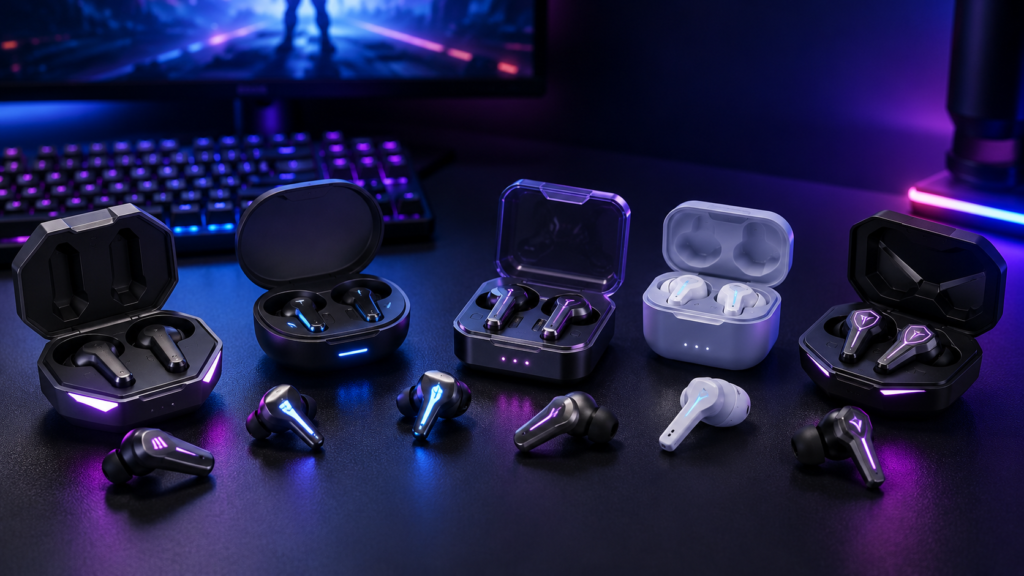
These six picks cover the most useful budget lanes: low-latency wireless, USB-C dongle gaming, wired boom-mic earbuds, ultra-cheap console earbuds, simple wired plug-and-play earbuds, and Bluetooth ANC earbuds for casual gaming.
1. Razer Hammerhead V3 X HyperSpeed: Best Overall Budget Wireless Gaming Earbuds
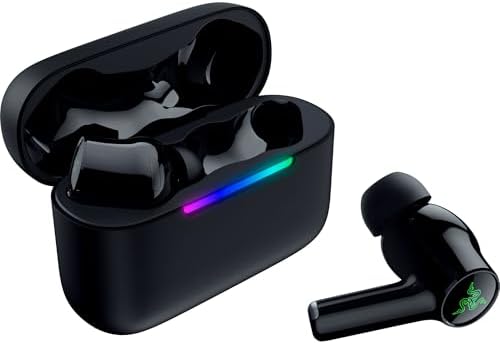
- MULTI‑PLATFORM WIRELESS FREEDOM — Experience ultra‑low‑latency gaming audio using 2.4 GHz Razer HyperSpeed Wireless on m…
- HYPERSPEED CASE — Unlock dedicated 2.4 GHz performance by connecting the charging case directly to a PC or mobile gaming…
- UP TO 35 HOURS BATTERY — Game longer with up to 10 hours on the earbuds plus 25 hours from the compact charging case, an…
The Razer Hammerhead V3 X HyperSpeed is the strongest overall choice for a person who wants budget-friendly gaming earbuds without giving up a proper wireless gaming connection. It supports both Bluetooth 5.3 and Razer HyperSpeed Wireless, with the HyperSpeed connection designed for low-latency multi-platform play. Razer positions this model as a streamlined version of its more premium Hammerhead V3 HyperSpeed line, which makes it especially relevant for people who want the core gaming features without paying for every top-end extra. (Razer)
The best thing about the V3 X HyperSpeed is that it understands the gaming problem clearly. Standard Bluetooth can feel delayed when timing matters, but a 2.4GHz-style gaming connection gives the earbud a more serious role on PC, PS5, Steam Deck, mobile devices, and tablets. It is not just a lifestyle earbud pretending to be a gaming product.
Razer’s support documentation lists 11mm drivers, 20Hz–20kHz frequency response, IPX4 resistance, remappable touch controls, auto pause, and a cardioid microphone pickup pattern. Retail listings also describe up to 35 hours of total battery life, with up to 10 hours on the earbuds plus additional charge from the case. (Razer Support)
Where it wins:
The Razer Hammerhead V3 X HyperSpeed is the best pick when wireless gaming is the priority. It is more modern than many cheap Bluetooth gaming earbuds because it gives you a gaming-first wireless path instead of relying only on a phone-style connection.
Where it may fall short:
It is still a budget-focused gaming earbud, not an audiophile monitor. If you mainly care about music texture, natural vocals, or premium ANC, this is not the most refined option. Its advantage is gaming responsiveness, not studio-grade tuning.
Best for:
PC gaming, PS5 gaming, Steam Deck, mobile gaming, tablet gaming, casual competitive play, and anyone who wants wireless freedom without relying only on Bluetooth.
Editorial verdict:
The Razer Hammerhead V3 X HyperSpeed is the safest “one pair for most gaming setups” choice in this list. It combines wireless convenience with the kind of connection design that actually matters for games.
2. AOC ACT3512 Wireless Gaming Earbuds: Best Cheap 20ms Gaming Earbuds for PS5, PC and Switch

- DUAL-MODE 2.4GHZ & BLUETOOTH GAMING EARBUDS Effortlessly switch between high-performance gaming and daily use. Comes wit…
- 20MS ULTRA-LOW LATENCY FOR COMPETITIVE GAMING Experience true immersive gameplay. When connected via the 2.4GHz dongle, …
- PREMIUM AUDIO WITH BUILT-IN AMPLIFIER Engineered for audiophiles and gamers alike. Featuring a dedicated hardware audio …
The AOC ACT3512 is a strong budget gaming earbud option for players who want the speed of a 2.4GHz USB-C dongle without giving up Bluetooth for everyday use. It is designed around dual-mode connectivity, pairing a dedicated 2.4GHz Type-C dongle with Bluetooth 5.3, which makes it more gaming-focused than standard cheap wireless earbuds that rely only on Bluetooth. The listing also mentions a USB-C to USB-A adapter, giving it practical plug-and-play flexibility for PC, Mac, PS5, Nintendo Switch, VR headsets, and Bluetooth mobile devices. It does not support Xbox Series consoles, so Xbox players should choose a wired 3.5mm option instead. (Amazon)
The biggest selling point is the claimed 20ms ultra-low latency when connected through the 2.4GHz dongle. That places the ACT3512 in the same practical lane as other budget low-latency gaming earbuds: fast enough for shooters, handheld gaming, action games, and PS5 sessions where normal Bluetooth delay can feel disconnected from the screen. In real-world terms, this is the kind of earbud you would consider if you want wireless freedom but still care about footsteps, reload cues, impact timing, and quick reaction audio. (Amazon)
AOC also gives the ACT3512 a more aggressive audio pitch than many budget earbuds. The product description references a built-in hardware amplifier, large-magnet single-diaphragm drivers, clearer highs, and punchy bass. That combination should suit gaming better than soft, overly warm tuning, especially when the goal is to hear directional cues without losing cinematic weight. It will not replace a premium gaming headset for wide soundstage, but for a compact in-ear setup, the feature set is unusually strong at the budget level.
The microphone system is another reason the ACT3512 deserves attention. Its noise-cancelling microphone is designed to reduce background noise so voice chat stays clearer during multiplayer sessions, calls, and team communication. That matters because many cheap true wireless earbuds sound acceptable to the person wearing them but weak to everyone on the other end of the chat. AOC’s mic approach makes the ACT3512 more suitable for Discord, party chat, and casual competitive play than ordinary lifestyle earbuds.
Battery life is also competitive for the category, with up to 32 hours total playtime listed across the earbuds and charging case. That gives it enough endurance for long gaming sessions, travel, handheld play, and daily switching between gaming and phone use. The case-based battery design is especially useful for Switch, Steam Deck-style handheld use, and laptop gaming because the earbuds can move between devices without becoming a desk-only accessory. (Desertcart)
Where it wins:
The AOC ACT3512 gives budget gamers the right kind of wireless connection: 2.4GHz for gaming, Bluetooth 5.3 for daily use, and USB-C compatibility for modern devices. The 20ms latency claim, noise-cancelling mic, and 32-hour battery package make it a serious value pick for PS5, PC, Switch, VR, and mobile gaming.
Where it may fall short:
The main limitation is Xbox support. Since it does not support Xbox Series consoles, it is not the right choice for Xbox players unless they are using a separate compatible setup. Also, like most budget wireless gaming earbuds, its built-in microphone may be good for game chat but should not be expected to match a dedicated boom mic for streaming or recording.
Best for:
PS5 players, PC gamers, Nintendo Switch users, VR players, mobile gamers, handheld gaming setups, and anyone who wants cheap gaming earbuds with a proper low-latency USB-C dongle.
Editorial verdict:
The AOC ACT3512 is one of the more complete cheap gaming earbud options if the product is available at a competitive price. Its value comes from solving the exact problem that ordinary Bluetooth earbuds struggle with: delay. For PS5, PC, Switch, and USB-C gaming, it deserves a spot among the best cheap gaming earbuds for people who want wireless convenience without giving up responsive sound.
3. Linsoul KZ ZS10 Pro: Best Cheap Wired IEM Gaming Earbuds for Detail and Positional Clarity
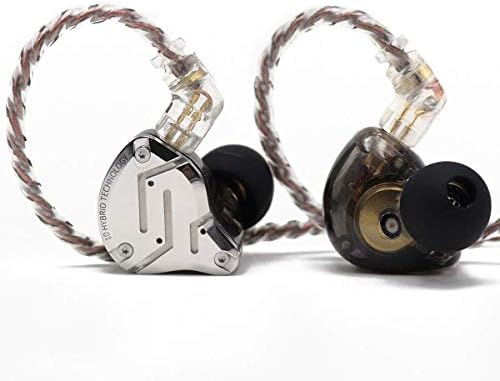
- 【Upgraded 4BA+1DD Hybrid Earphones &Magnetic Dynamic Unit]】As an upgraded version of K2 ZS10, the Pro features self-cust…
- 【 Exquisite Craft】 The faceplate is made of 304 stainless steel while the cavity is made from imported resin. The two di…
- 【PCB Dividing Board】The PCB board is added to give full play to all the drivers, displaying a smooth, sensible, detailed…
The Linsoul KZ ZS10 Pro is not a normal “gaming earbud” in the usual RGB-and-dongle sense. It is a wired hybrid IEM built for high-detail listening, but that actually makes it interesting for budget gaming. Instead of relying on Bluetooth game modes or wireless latency claims, the ZS10 Pro uses a simple wired connection, which gives it the biggest advantage serious gaming audio can have: immediate sound with no wireless delay.
Its driver setup is the main reason it stands out. The ZS10 Pro uses a 4BA+1DD hybrid configuration, meaning four balanced armature drivers work alongside one dynamic driver inside each earpiece. Linsoul describes the model as a 5-driver in-ear HiFi earphone with a stainless steel faceplate, ergonomic design, noise-isolating fit, PCB frequency dividing board, and 2-pin detachable cable. The black “without mic” version is usually positioned around the budget IEM range, making it a strong option for players who care more about sound detail than wireless convenience. (Linsoul Audio)
For gaming, the ZS10 Pro’s real strength is clarity. Many cheap gaming earbuds push bass too hard because explosions sound impressive in the first few minutes. The ZS10 Pro is more revealing. It can separate footsteps, reload sounds, environmental details, dialogue, and background effects with more precision than many typical budget earbuds. That makes it especially useful for tactical shooters, battle royale games, RPGs, horror games, and open-world titles where small audio cues matter.
The hybrid driver design gives it a different feel from single-driver budget earbuds. The dynamic driver helps with punch and low-end impact, while the balanced armatures help bring out sharper details in the mids and highs. Linsoul’s product information specifically notes two 30095 balanced armature drivers for highs and two 50060 drivers for mids, along with a second-generation Tesla double magnetic dynamic unit. (Amazon)
The stainless steel faceplate also gives the ZS10 Pro a more premium feel than its price suggests. It does not look like a toy gaming accessory. It looks more like an entry-level audiophile IEM, which may appeal to players who want budget gaming earbuds that also work well for music, movies, editing, and everyday wired listening.
The biggest limitation is important: this version is without a microphone. That means it is not ideal for multiplayer voice chat unless you use a separate mic, a controller mic solution, a USB desk mic, or swap to a compatible mic cable. For solo gaming, immersive gaming, handheld play, and PC setups with a separate microphone, that is not a major issue. For Discord-heavy gaming, ranked team play, or console party chat, it is a clear drawback.
Where it wins:
The Linsoul KZ ZS10 Pro is excellent for players who want wired gaming earbuds with strong detail, good passive isolation, no Bluetooth delay, and better sound separation than most cheap gaming-branded earbuds. It is especially strong for people who already use a separate microphone.
Where it may fall short:
The “without mic” version is not the right choice for someone who needs built-in voice chat. It is also more IEM-like than casual earbud-like, so fit matters. Some people may find the brighter tuning energetic, while others may prefer a smoother, warmer sound for long sessions.
Best for:
PC gaming with a separate mic, Steam Deck, Nintendo Switch, PS5 controller wired use, single-player games, competitive players who prioritize audio cues, music listeners, and anyone who wants cheap wired gaming earbuds with HiFi-style detail.
Editorial verdict:
The Linsoul KZ ZS10 Pro is one of the best cheap wired IEM options for gaming if microphone support is not required. It does not win because of flashy gaming features. It wins because wired audio, hybrid drivers, passive isolation, and strong detail retrieval are exactly what many budget gaming earbuds lack. For players who want to hear more of the game and do not need an integrated mic, the ZS10 Pro is a serious value pick.
4. SteelSeries Tusq: Best Budget Wired Gaming Earbuds with Boom Mic

- Note : If the size of the earbud tips does not match the size of your ear canals or the headset is not worn properly in …
- Dual microphone system with detachable boom microphone and built-in mic
- Ergonomic design with 3 sizes of best-in class silicone ear tips
The SteelSeries Tusq is a wired in-ear gaming headset built around a detachable boom microphone and a backup built-in mic. SteelSeries highlights the dual-mic system, ergonomic design, three sizes of silicone ear tips, and lightweight fit. (SteelSeries)
This is the pick for the person who cares more about voice chat than wireless freedom. Many true wireless earbuds have acceptable microphones for calls, but gaming voice chat is different. Discord, party chat, multiplayer coordination, and late-night team communication all expose weak microphones quickly. A detachable boom mic has a physical advantage because it sits closer to the mouth and can capture speech more directly.
The Tusq also avoids the biggest budget wireless issue: delay. Since it uses a wired connection, it is naturally better suited for timing-sensitive play than many cheap Bluetooth earbuds. For competitive titles, rhythm games, and console play through a controller jack, that simplicity is valuable.
Where it wins:
The microphone system is the reason to choose the Tusq. It feels more like a compact gaming headset than a repurposed music earbud.
Where it may fall short:
It is wired, and wired earbuds are less convenient for walking around, mobile multitasking, or switching between devices. The sound is functional for games, but not as immersive as more expensive dedicated gaming earbuds.
Best for:
Voice chat, Discord, multiplayer console gaming, controller use, laptops with 3.5mm jacks, and people who want clear speech without spending much.
Editorial verdict:
The SteelSeries Tusq is the best budget choice when your teammates need to hear you clearly. It is not the most modern-looking option, but it is practical in exactly the way gaming gear should be.
5. RYR Wireless Gaming Earbuds: Cheapest Budget Gaming Earbuds with 2.4GHz, Bluetooth and 20ms Low Latency
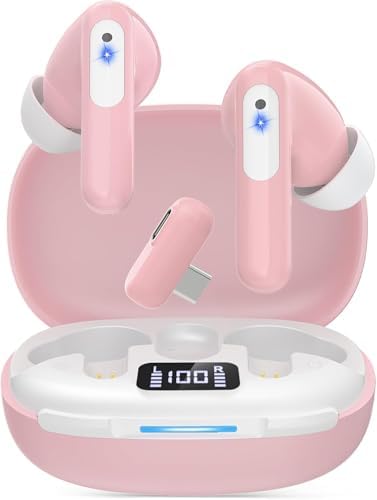
- 【Ultra-Low Latency Under 20ms】 Enjoy real-time audio sync with RYR Neo100 gaming earbuds. The 2.4G dongle delivers sub-2…
- 【Dual Connection and Multi-Platform Compatibility】RYR Neo100 gaming earbuds wireless connect your phone, VR, Steam Deck,…
- 【Immersive Gaming & Clear Calls】Designed for gaming, these noise-cancelling wireless gaming earbuds feature 12mm drivers…
The RYR Wireless Gaming Earbuds are the cheapest option in this lineup at around $24.99, making them one of the most aggressive value picks for anyone who wants wireless gaming earbuds without spending close to headset money. What makes them interesting is that they are not just ordinary Bluetooth earbuds with a gaming label. They include both 2.4GHz wireless connectivity and Bluetooth, which gives them a more serious gaming foundation than many ultra-cheap earbuds in this price range.
The headline feature is the claimed 20ms low latency through the 2.4GHz connection. At this price, that is the main reason to pay attention. Standard Bluetooth earbuds can feel delayed during shooters, racing games, VR movement, or fast handheld play, but a dedicated 2.4GHz mode is designed to keep audio closer to the action on screen. For budget gamers using Meta Quest 3/2, PS5, PS4, Nintendo Switch, Steam Deck, PC, or a phone, that makes the RYR earbuds a practical entry-level option.
The dual-connection setup also gives them more flexibility. The 2.4GHz mode is the gaming connection, while Bluetooth is useful for phone pairing, casual media, music, calls, and everyday use. That matters because many cheap gaming earbuds are either too gaming-specific or too lifestyle-focused. The RYR model sits in the middle: cheap enough to be a backup pair, but feature-rich enough to work across multiple gaming devices.
The noise cancelling mic is another important feature for the price. It is designed to reduce background noise during voice chat, which can help with Discord calls, multiplayer lobbies, VR chat, and team communication. It should not be expected to match a dedicated boom mic or premium headset microphone, but for a $24.99 wireless gaming earbud, having any form of noise-reducing mic support is a useful advantage.
Battery life is also strong on paper, with up to 36 hours of total playtime using the charging case. That gives the earbuds enough endurance for weekend gaming, travel, handheld sessions, and casual daily use. The LED display is a small but useful touch because it makes battery checking easier, especially for people who dislike guessing how much charge is left in the case.
Where it wins:
The RYR Wireless Gaming Earbuds win on pure price-to-feature value. For around $24.99, they offer 2.4GHz wireless, Bluetooth, claimed 20ms low latency, a noise cancelling mic, LED battery display, and up to 36 hours of total playtime. That is a lot for an ultra-budget gaming earbud.
Where it may fall short:
At this price, expectations need to stay realistic. The audio tuning, microphone clarity, build quality, app support, and long-term durability may not match more established options like Razer, Soundcore, or EarFun. The noise cancelling mic is useful for casual chat, but serious streamers or ranked team players may still prefer a boom mic or separate microphone.
Best for:
Budget-conscious gamers, Meta Quest 3/2 users, PS5 and PS4 players, Nintendo Switch owners, Steam Deck users, PC gamers, mobile gamers, students, backup gaming setups, and anyone who wants the cheapest wireless gaming earbuds with 2.4GHz low-latency support.
Editorial verdict:
The RYR Wireless Gaming Earbuds are the best “cheapest option” pick because they bring real gaming-focused features into the ultra-budget range. They are not the most premium, most polished, or most proven earbuds in the category, but at around $24.99, the combination of 2.4GHz wireless, Bluetooth, 20ms low latency, noise cancelling mic, LED display, and 36-hour battery life makes them difficult to ignore. For a first pair of budget gaming earbuds or a low-cost backup for handheld and console gaming, they offer impressive value.
6. EarFun Air Pro 4: Best Budget ANC Gaming Earbuds for Mobile, Calls and Hi-Res Bluetooth Audio

- CNET Editor’s Choice Award–“Earfun’s flagship Air Pro 4 noise-canceling earbuds deliver surprisingly good performance a…
- Adaptive Hybrid Active Noise Canceling up to 50dB. Premium noise cancelling powered by adaptive ANC technology and Quiet…
- Qualcomm Snapdragon Sound with aptX Lossless. Featuring Qualcomm QCC3091 SoC with aptX Lossless Audio, Certified Snapdra…
The EarFun Air Pro 4 is not a dedicated gaming earbud in the same way as a 2.4GHz dongle model, but it is one of the strongest budget-friendly wireless earbuds for people who want gaming, music, calls, ANC, and daily use in one pair. It sits in the “premium budget” lane: affordable enough for a budget earbuds list, but loaded with features usually associated with higher-priced true wireless models.
Its biggest strength is the combination of Qualcomm Snapdragon Sound, aptX Lossless, LDAC, Bluetooth 5.4, adaptive hybrid ANC, and a low-latency gaming mode. EarFun lists the Air Pro 4 with a Qualcomm QCC3091 chip, Bluetooth 5.4, Hi-Res Audio and Snapdragon Sound certifications, LDAC codec support, QuietSmart 3.0 adaptive noise cancellation up to 50dB, six microphones with AI and cVc 8.0 call processing, in-ear detection, wireless charging, and up to 52 hours of total battery life with ANC off.
For gaming, the key feature is its sub-50ms low-latency mode. That makes the Air Pro 4 much better for gaming than ordinary Bluetooth earbuds with no game mode. It can feel responsive enough for mobile games, cloud gaming, handheld sessions, racing games, RPGs, casual shooters, and video streaming. It is not the same as a wired earbud or a 2.4GHz USB-C dongle earbud, but for a Bluetooth ANC model, it is a serious crossover pick.
The audio feature set is unusually strong for the price. aptX Lossless and LDAC support make the Air Pro 4 more attractive for Android users who care about higher-quality wireless audio. The 10mm composite dynamic drivers are designed to deliver a fuller, cleaner sound profile, while the EarFun app gives users EQ control, sound personalization, and different sound modes. That matters because gaming sound is not one-size-fits-all. A person playing shooters may want sharper upper-mid clarity, while someone playing open-world or story games may prefer a warmer, more cinematic sound.
The ANC system also gives it an advantage over many cheap gaming earbuds. EarFun’s QuietSmart 3.0 adaptive noise cancellation can automatically adjust based on ambient noise and fit, with manual ANC levels available as well. For gaming in a noisy room, dorm, café, shared apartment, or travel setting, that can make a real difference. It will not improve latency, but it can make the game world easier to hear by lowering background distractions.
Call quality is another major selling point. The six-microphone system with AI noise reduction and cVc 8.0 processing is designed to separate voice from background noise during calls. For casual multiplayer chat, mobile gaming, Discord calls, and work calls, this gives the Air Pro 4 more flexibility than many budget gaming earbuds. However, it still uses built-in earbud microphones, so it should not be expected to match a dedicated boom mic like wired gaming earbuds offer.
Battery life is excellent for the category. EarFun lists up to 11 hours on a single charge with ANC off, up to 52 hours total with the charging case, and up to 7.5 hours per charge with ANC on. The company also notes that LDAC and ANC reduce total playback time, which is important because high-resolution codecs and noise cancellation naturally use more power.
Where it wins:
The EarFun Air Pro 4 is one of the best cheap wireless earbuds for people who want gaming mode, ANC, strong codec support, long battery life, app EQ, multipoint connectivity, wireless charging, and solid call performance in one package. It is especially attractive for Android users because aptX Lossless, aptX Adaptive, LDAC, and Snapdragon Sound support give it more audio flexibility than most budget Bluetooth earbuds.
Where it may fall short:
The Air Pro 4 is still a Bluetooth gaming earbud, not a 2.4GHz dongle gaming earbud. For serious competitive FPS gaming, wired earbuds or USB-C dongle earbuds remain better choices. It is also not the best option for Xbox users, and its built-in mics are better for calls and casual chat than professional streaming or ranked team communication.
Best for:
Mobile gaming, Android gaming, casual PC gaming, cloud gaming, music, calls, commuting, travel, study use, noisy rooms, and players who want one affordable pair of earbuds for both gaming and everyday listening.
Editorial verdict:
The EarFun Air Pro 4 is the best kind of crossover budget earbud: it does not pretend to be a pure esports product, but it gives casual gamers a polished mix of low-latency Bluetooth, ANC, strong audio codecs, long battery life, and everyday comfort. If gaming is your only priority, choose a wired or 2.4GHz dongle model. But if you want budget gaming earbuds that also feel premium for music, calls, and daily use, the Air Pro 4 is one of the most complete options in its price class.
For more Hi-Res Wireless Earbuds option, visit our main High Resolution Earbuds guide.
Budget Gaming Earbuds Comparison Table
If gaming performance matters more than price ceiling, visit our main Best gaming earbuds guide.
How We Ranked the Best Cheap Gaming Earbuds
Budget gaming earbuds should not be ranked only by price. A $25 earbud that gives delayed audio, weak mic pickup, and poor comfort is not a bargain if it makes every match worse. The ranking needs to measure gaming usefulness.
Our scoring logic weighs five areas.
| Ranking Factor | Weight | Why It Matters |
|---|---|---|
| Latency and connection stability | 35% | The sound must arrive close to the action on screen |
| Platform compatibility | 25% | A good budget pick should work with the device you actually use |
| Microphone usefulness | 15% | Voice chat is central to multiplayer gaming |
| Comfort and fit | 15% | Earbuds must survive long sessions without pressure pain |
| Battery, build, and controls | 10% | Convenience matters, but not more than timing and compatibility |
Gaming Value Formula:
| Earbud Type | Latency Confidence | Convenience | Voice Chat Potential | Best Use |
|---|---|---|---|---|
| Wired 3.5mm | Excellent | Medium | High with boom mic | Competitive and console gaming |
| 2.4GHz dongle wireless | Very strong | High | Medium to high | PC, handheld, mobile, PS5 |
| Bluetooth game mode | Moderate | Very high | Medium | Casual mobile gaming |
| Standard Bluetooth only | Weak to moderate | High | Medium | Music, calls, light gaming |
The core idea is simple: gaming earbuds should be judged by what they protect. They protect timing, awareness, communication, and comfort. Everything else comes after.
Wired vs Wireless Gaming Earbuds
The most important comparison in this category is wired vs wireless gaming earbuds. Budget shoppers often want wireless earbuds because it feels modern, but wired can still be better for pure performance.
Wired earbuds are like a direct road. There are fewer stops between the device and your ears. That makes them naturally strong for timing-sensitive play. They also do not need charging, pairing, firmware updates, or codec support.
Wireless gaming earbuds are more convenient, but the connection type matters. A 2.4GHz dongle model is built for gaming delay reduction. A Bluetooth model with game mode is built for convenience first and gaming second. A normal Bluetooth earbud without game mode is usually the weakest choice for gaming.
| Choice | Choose It If | Avoid It If |
|---|---|---|
| Wired 3.5mm | You play competitive games, use a controller jack, or want the lowest risk | Your device has no jack and you dislike cables |
| 2.4GHz wireless | You want wireless freedom with better timing than Bluetooth | You do not want to carry a dongle |
| Bluetooth game mode | You mostly play casual mobile games and want one daily earbud | You play competitive shooters seriously |
| ANC Bluetooth earbuds | You need noise reduction for daily use too | Gaming is the main priority |
For most people, the best answer is not simply wired or wireless. It is platform-specific. Console controller players can save money with wired earbuds. Steam Deck and USB-C handheld players should strongly consider dongle earbuds. Mobile gamers can choose Bluetooth game mode if they are not highly sensitive to delay.
Best Budget Gaming Earbuds by Platform
Different platforms treat earbuds differently. A gaming earbud that works beautifully on a phone may be awkward on a console. A wired earbud that works instantly through a controller may need an adapter on a modern smartphone.
| Platform | Best Budget Style | Recommended Picks | Why These Fit Best |
|---|---|---|---|
| PC | 2.4GHz wireless, wired IEM, or wired boom-mic earbuds | Razer Hammerhead V3 X HyperSpeed, AOC ACT3512, Linsoul KZ ZS10 Pro, SteelSeries Tusq | PC gives you the widest flexibility. Use Razer or AOC for low-latency wireless gaming, KZ ZS10 Pro for detailed positional audio, and SteelSeries Tusq if voice chat clarity matters most. |
| PS5 | 2.4GHz wireless USB-C dongle or wired 3.5mm through controller | Razer Hammerhead V3 X HyperSpeed, AOC ACT3512, SteelSeries Tusq, RYR Wireless Gaming Earbuds | PS5 works best with USB-C dongle earbuds for lower latency. AOC and RYR are strong cheap 20ms-style picks, while SteelSeries Tusq is better if you want a wired boom mic for party chat. |
| Xbox | Wired 3.5mm through controller | SteelSeries Tusq, Linsoul KZ ZS10 Pro | Xbox is more restrictive with wireless earbuds, so budget buyers are better off using wired 3.5mm earbuds through the controller. SteelSeries Tusq is better for chat, while KZ ZS10 Pro is better for sound detail if you use a separate mic. |
| Nintendo Switch | USB-C dongle wireless, Bluetooth, or wired 3.5mm | Razer Hammerhead V3 X HyperSpeed, AOC ACT3512, RYR Wireless Gaming Earbuds, Linsoul KZ ZS10 Pro | Switch users can go wireless with a USB-C dongle for lower latency or wired for simple plug-and-play audio. Razer and AOC are better for polished wireless play, RYR is the cheapest, and KZ is best for wired clarity. |
| Steam Deck | 2.4GHz USB-C dongle wireless or wired IEM | Razer Hammerhead V3 X HyperSpeed, AOC ACT3512, RYR Wireless Gaming Earbuds, Linsoul KZ ZS10 Pro | Steam Deck pairs especially well with compact USB-C dongle earbuds. Razer is the most complete pick, AOC offers strong cheap low-latency value, RYR is the lowest-cost wireless option, and KZ gives zero-latency wired sound. |
| Mobile Gaming | Bluetooth game mode, ANC Bluetooth, or USB-C dongle wireless | EarFun Air Pro 4, Razer Hammerhead V3 X HyperSpeed, AOC ACT3512, RYR Wireless Gaming Earbuds | Mobile gamers should choose EarFun Air Pro 4 for ANC, calls, codecs, and daily use. Razer, AOC, and RYR are better when low-latency gaming matters more than ANC or music features. |
| Meta Quest / VR | 2.4GHz USB-C dongle wireless | AOC ACT3512, RYR Wireless Gaming Earbuds, Razer Hammerhead V3 X HyperSpeed | VR gaming benefits from 2.4GHz wireless because Bluetooth latency can feel more noticeable in immersive play. AOC and RYR are strong budget VR picks, while Razer is the more polished overall option. |
| Calls / Discord / Team Chat | Wired boom mic or stronger built-in mic system | SteelSeries Tusq, Razer Hammerhead V3 X HyperSpeed, EarFun Air Pro 4 | SteelSeries Tusq is the best budget choice for clear voice chat because of its detachable boom mic. Razer is better for wireless gaming chat, while EarFun is better for mobile calls and everyday communication. |
| Music + Gaming Hybrid Use | ANC Bluetooth earbuds or detailed wired IEM | EarFun Air Pro 4, Linsoul KZ ZS10 Pro, Razer Hammerhead V3 X HyperSpeed | EarFun Air Pro 4 is the best daily-use option because it adds ANC, Hi-Res codec support, and strong call features. KZ ZS10 Pro is better for wired sound quality, while Razer gives the best gaming-first wireless balance. |
Quick platform rule: choose Razer Hammerhead V3 X HyperSpeed for the best overall wireless budget gaming setup, AOC ACT3512 for cheap 20ms-style dongle gaming, KZ ZS10 Pro for wired positional clarity, SteelSeries Tusq for boom-mic chat, RYR for the cheapest 2.4GHz wireless setup, and EarFun Air Pro 4 for mobile gaming, ANC, calls, and music.
Latency Explained for Budget Gaming Earbuds
Latency is the delay between an action happening on screen and the sound reaching your ears. In music listening, latency rarely matters. In gaming, it can change how connected the game feels.
Imagine tapping a glass and hearing the sound a fraction of a second late. Even if the delay is small, the brain notices. Games work the same way. Gunshots, footsteps, button presses, vehicle engines, menu clicks, and impact sounds all become less convincing when audio lags.
A useful way to think about latency:
| Latency Range | Gaming Feel | Typical Connection |
|---|---|---|
| Near-zero to very low | Feels immediate | Wired 3.5mm |
| Very low | Strong for gaming | 2.4GHz dongle wireless |
| Low to moderate | Good for casual play | Bluetooth game mode |
| Moderate to high | Noticeable delay risk | Standard Bluetooth |
Latency Sensitivity Chart:
| Game Type | Latency Importance | Why |
|---|---|---|
| Competitive FPS | Very High | Footsteps, shots, reload cues, reaction timing |
| Battle royale | High | Directional cues and distance judgment |
| Racing | Medium to High | Engine timing, collisions, gear shifts |
| Fighting games | High | Hit confirmation and rhythm |
| RPGs | Medium | Immersion matters more than reaction timing |
| Puzzle and strategy | Low to Medium | Timing is less critical |
| Casual mobile games | Medium | Delay can matter, but usually less punishing |
This is why Bluetooth game mode can be acceptable for casual mobile play but less convincing for competitive shooters. The issue is not whether Bluetooth is “bad.” The issue is whether the game punishes delay.
Sound Quality Priorities for Gaming
Good gaming sound is not the same as good music sound. For music, people often enjoy warmth, bass weight, vocal texture, and instrument richness. For gaming, the first priority is separation.
You want to hear layers:
footsteps under explosions
dialogue over background score
reloads behind movement
enemy direction in cluttered scenes
voice chat without drowning game sound
Budget earbuds often try to impress with bass. That can work for cinematic games, but it can hurt competitive clarity. Heavy bass can mask footstep detail, especially in shooters. The better budget gaming earbuds keep enough bass for impact but avoid turning every match into a low-frequency cloud.
Gaming Sound Priority Table:
| Sound Trait | Why It Matters | Ideal Budget Tuning |
|---|---|---|
| Bass control | Explosions should hit without covering detail | Punchy, not bloated |
| Upper-mid clarity | Footsteps, reloads, and voices live here | Clear but not sharp |
| Treble detail | Helps with air, direction, and small cues | Present but not piercing |
| Soundstage impression | Helps space feel wider | Open enough for positioning |
| Imaging | Helps locate sounds | More important than bass quantity |
For story games, bass and atmosphere matter more. For multiplayer shooters, clarity and imaging matter more. A good budget gaming earbud should not only sound exciting for five minutes; it should help you play better for two hours.
Microphone Quality and Voice Chat
Microphone quality is one of the most overlooked parts of budget gaming earbuds. A person may spend time comparing drivers and latency, then end up with a mic that makes every Discord call sound distant or compressed.
There are three common mic types in budget gaming earbuds.
| Mic Type | Strength | Weakness |
|---|---|---|
| Detachable boom mic | Better mouth placement, clearer voice pickup | Less discreet, more fragile |
| Inline mic | Simple and easy on wired earbuds | Can rub against clothing |
| Built-in true wireless mics | Convenient and compact | More exposed to noise and distance |
For multiplayer gaming, the boom mic usually wins. This is why SteelSeries Tusq and Turtle Beach Battle Buds remain relevant despite being wired and inexpensive. The mic is physically closer to your mouth, and that simple advantage matters.
For casual mobile gaming, built-in true wireless mics are fine. For team-based ranked play, a weak mic becomes everyone’s problem. Clear communication is not just comfort. It is performance.
Voice Chat Priority Chart:
| Use Case | Mic Requirement | Best Pick Type |
|---|---|---|
| Solo gaming | Low | Any comfortable earbud |
| Casual party chat | Medium | Inline or built-in mic |
| Ranked multiplayer | High | Boom mic or strong gaming wireless mic |
| Streaming/recording | Very high | Dedicated mic preferred |
| Late-night quiet gaming | High | Boom mic with controlled voice pickup |
If the microphone is important, do not judge earbuds only from product photos. Check where the mic sits, how it handles background noise, and whether mute control is easy to reach.
Comfort, Fit and Long Gaming Sessions
Gaming sessions expose comfort problems slowly. An earbud can feel fine for ten minutes and painful after ninety. Budget earbuds often save money on materials, nozzle shape, tip quality, or housing design, so fit deserves careful attention.
Comfort depends on four things:
ear tip seal
housing size
cable or stem weight
pressure distribution
A secure seal improves bass and isolation, but too much pressure causes fatigue. A loose fit feels comfortable at first but weakens sound and microphone consistency. The goal is not the tightest fit. The goal is stable comfort.
Comfort Comparison Table:
| Design | Comfort Strength | Comfort Risk |
|---|---|---|
| Small wired earbuds | Lightweight, low battery worry | Cable tug |
| Boom-mic wired earbuds | Better chat, gaming feel | Larger housings |
| True wireless gaming earbuds | Cable-free, portable | Battery and touch control sensitivity |
| ANC Bluetooth earbuds | Good for noisy rooms | Pressure sensation for some ears |
For long gaming sessions, tip size matters more than many specs. If earbuds include multiple tip sizes, test them properly. A better seal can make a cheap earbud sound more expensive, while a poor seal can make a good earbud feel broken.
Best Budget Earbuds for Gaming by Use Case
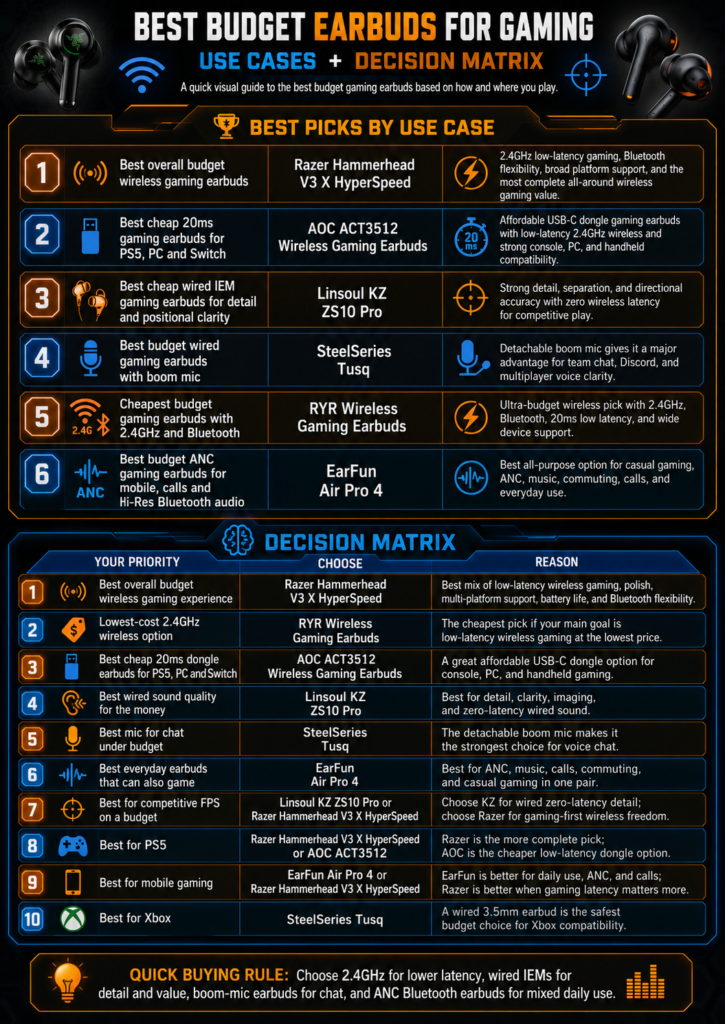
Not every person needs the same gaming earbud. A competitive FPS player, a mobile gamer, a console user, and a Steam Deck owner are solving different problems.
| Use Case | Best Pick | Why |
|---|---|---|
| Best overall budget wireless gaming earbuds | Razer Hammerhead V3 X HyperSpeed | The strongest all-around budget wireless gaming pick because it combines 2.4GHz low-latency gaming, Bluetooth flexibility, broad platform support, and a more polished gaming-first design than most cheap earbuds. |
| Best cheap 20ms gaming earbuds for PS5, PC and Switch | AOC ACT3512 Wireless Gaming Earbuds | A strong value pick for players who want low-latency 2.4GHz wireless without spending much. The USB-C dongle setup makes it especially useful for PS5, PC, Switch, Steam Deck, and other USB-C gaming devices. |
| Best cheap wired IEM gaming earbuds for detail and positional clarity | Linsoul KZ ZS10 Pro | The best sound-focused budget option if you care about detail, separation, footsteps, and positional cues. Since it is wired, it avoids wireless latency completely, but you may need a separate mic for voice chat. |
| Best budget wired gaming earbuds with boom mic | SteelSeries Tusq | The best choice for clear team chat because the detachable boom mic gives it a major voice advantage over normal built-in earbud microphones. It is especially useful for Discord, party chat, and competitive team games. |
| Cheapest budget gaming earbuds with 2.4GHz and Bluetooth | RYR Wireless Gaming Earbuds | The lowest-cost pick for buyers who still want gaming-style features such as 2.4GHz wireless, Bluetooth, 20ms low latency, LED case display, and broad device compatibility. |
| Best budget ANC gaming earbuds for mobile, calls and Hi-Res Bluetooth audio | EarFun Air Pro 4 | The best hybrid pick for users who want earbuds that can game casually but also work well for music, calls, commuting, ANC, and daily Bluetooth use. It is better as an all-purpose earbud than a pure competitive gaming earbud. |
Decision Matrix
| Your Priority | Choose | Reason |
|---|---|---|
| Best overall budget wireless gaming experience | Razer Hammerhead V3 X HyperSpeed | Best balance of low-latency wireless gaming, brand polish, multi-platform support, battery life, and everyday Bluetooth flexibility. |
| Lowest-cost 2.4GHz wireless option | RYR Wireless Gaming Earbuds | The cheapest pick if your main goal is to get 2.4GHz gaming, Bluetooth, and low-latency features at the lowest possible price. |
| Best cheap 20ms dongle earbuds for PS5, PC and Switch | AOC ACT3512 Wireless Gaming Earbuds | Better for buyers who want an affordable USB-C dongle gaming setup for console, PC, handheld, and Switch use. |
| Best wired sound quality for the money | Linsoul KZ ZS10 Pro | Best choice if you care more about detail, clarity, imaging, and zero-latency wired audio than wireless convenience. |
| Best mic for chat under budget | SteelSeries Tusq | The detachable boom mic makes it the strongest choice for voice chat, Discord, multiplayer communication, and party chat. |
| Best everyday earbuds that can also game | EarFun Air Pro 4 | Best for users who want ANC, call quality, Hi-Res codec support, music performance, and casual gaming in one pair. |
| Best for competitive FPS on a budget | Linsoul KZ ZS10 Pro or Razer Hammerhead V3 X HyperSpeed | Choose KZ for wired zero-latency sound and positional detail; choose Razer if you want wireless freedom with a gaming-first connection. |
| Best for PS5 | Razer Hammerhead V3 X HyperSpeed or AOC ACT3512 | Razer is the more complete wireless pick; AOC is the cheaper low-latency USB-C dongle option. |
| Best for mobile gaming | EarFun Air Pro 4 or Razer Hammerhead V3 X HyperSpeed | EarFun is better for daily mobile use, ANC, calls, and music. Razer is better if gaming latency matters more. |
| Best for Xbox | SteelSeries Tusq | Xbox is more restrictive for wireless earbuds, so a wired 3.5mm option through the controller is the safest budget choice. |
The best choice is the one that matches your main gaming environment. A great mobile earbud can be the wrong console earbud. A great wired console earbud can be annoying on a phone. Context decides value.
Budget Gaming Earbuds vs Regular Budget Earbuds
Regular budget earbuds are usually tuned for music, calls, workouts, or commuting. Budget gaming earbuds need to prioritize different things.
| Feature | Regular Budget Earbuds | Budget Gaming Earbuds |
|---|---|---|
| Main purpose | Music, calls, daily listening | Low delay, game cues, voice chat |
| Connection focus | Bluetooth convenience | Wired, dongle, or game mode |
| Mic design | Calls and voice assistants | Party chat and team communication |
| Sound tuning | Bass and entertainment | Clarity, direction, controlled impact |
| Controls | Play, pause, ANC, volume | Mute, volume, platform switching |
| Weak point | Delay may not matter | Delay matters immediately |
This is why some cheap music earbuds are poor gaming choices. They may have good bass and battery life, but if the delay is obvious, the experience feels disconnected.
For gaming, the best budget earbud is not the one with the most features. It is the one with the fewest deal-breaking weaknesses.
Setup Tips for Better Gaming Audio
Even a good budget gaming earbud can underperform if the setup is wrong. Before blaming the earbuds, check the basics.
| Setup Step | Why It Helps |
|---|---|
| Use the gaming dongle when available | Reduces delay compared with standard Bluetooth |
| Turn on game mode in the app | Lowers Bluetooth latency on supported earbuds |
| Use the correct ear tip size | Improves bass, isolation, and positional detail |
| Set voice chat and game audio levels separately | Prevents teammates or game effects from overpowering each other |
| Update firmware | Can improve stability and connection behavior |
| Disable unnecessary audio enhancements | Some virtual effects add delay or muddy positioning |
| Keep the dongle close to the earbuds | Reduces interference and dropouts |
| Clean ear tips and nozzles | Maintains clarity and channel balance |
Audio settings matter too. In competitive shooters, avoid extreme bass boosts. In story games, a cinematic preset may sound better. In voice-heavy games, reduce low-end rumble and lift dialogue clarity.
A simple tuning rule:
For competitive games, choose clarity.
For story games, choose immersion.
For casual mobile games, choose comfort and convenience.
Common Mistakes to Avoid
The most common mistake is buying ordinary Bluetooth earbuds and assuming “gaming mode” is automatic. Many earbuds need game mode turned on manually inside an app. Some reset to normal mode after reconnecting. Others reduce latency but also reduce connection range.
Another mistake is overvaluing ANC. Noise cancellation is helpful in shared rooms, buses, dorms, and offices, but ANC does not fix gaming delay. A budget ANC earbud with slow Bluetooth can still feel worse for gaming than a cheap wired earbud.
A third mistake is ignoring the microphone. Earbuds can sound good to you while sounding poor to everyone else. If multiplayer chat matters, mic placement is not optional.
Mistake Avoidance Table:
| Mistake | What Happens | Better Choice |
|---|---|---|
| Choosing bass-heavy earbuds for FPS | Footsteps get buried | Choose clearer tuning |
| Buying Bluetooth-only for competitive play | Delay may be noticeable | Choose wired or 2.4GHz |
| Ignoring platform compatibility | Earbuds may not connect properly | Check device connection first |
| Choosing ANC over latency | Noise drops, delay remains | Prioritize connection type |
| Skipping fit tests | Sound feels thin or uneven | Try all ear tip sizes |
| Trusting mic claims blindly | Voice chat sounds poor | Prefer boom mic for serious chat |
Budget gaming audio is about avoiding the wrong compromise. Spend where the weakness would hurt you most.
FAQs
What are the best budget earbuds for gaming in 2026?
The best budget earbuds for gaming in 2026 are the Razer Hammerhead V3 X HyperSpeed for overall wireless gaming, Soundcore VR P10 for USB-C dongle low-latency play, SteelSeries Tusq for voice chat, Turtle Beach Battle Buds for ultra-cheap wired gaming, JBL Quantum 50 for simple plug-and-play use, and EarFun Air 2 NC for casual Bluetooth gaming with ANC.
| Need | Best Match | Why |
|---|---|---|
| Overall wireless gaming | Razer Hammerhead V3 X HyperSpeed | The best all-around budget wireless gaming earbuds because they combine 2.4GHz low-latency gaming, Bluetooth flexibility, broad platform support, and a more polished gaming-first design. |
| Lowest-latency cheap wireless gaming | AOC ACT3512 Wireless Gaming Earbuds | A strong cheap 20ms-style pick with a USB-C dongle, 2.4GHz wireless, and strong compatibility for PS5, PC, Switch, Steam Deck, and handheld gaming devices. |
| Best wired sound detail | Linsoul KZ ZS10 Pro | The best budget wired IEM choice for detail, separation, positional clarity, and zero wireless latency, especially for players who care about footsteps and directional cues. |
| Best mic clarity under budget | SteelSeries Tusq | The detachable boom mic gives it the clearest voice-chat advantage, making it the best choice for Discord, multiplayer communication, party chat, and team-based games. |
| Lowest price with wireless gaming features | RYR Wireless Gaming Earbuds | The cheapest pick that still offers 2.4GHz wireless, Bluetooth, 20ms low latency, broad device support, and gaming-style features at an ultra-budget price. |
| Daily use + casual gaming | EarFun Air Pro 4 | The best everyday option because it adds ANC, strong call quality, Hi-Res Bluetooth codec support, app controls, music performance, and casual gaming support in one pair. |
| Best for competitive FPS on a budget | Linsoul KZ ZS10 Pro | Wired IEMs avoid wireless delay and give stronger detail for footsteps, reloads, movement cues, and positional awareness. |
| Best for PS5, PC and Switch | AOC ACT3512 Wireless Gaming Earbuds | The USB-C dongle and 2.4GHz connection make it a practical budget pick for console, PC, and handheld setups where Bluetooth latency can be a problem. |
| Best for mobile gaming, calls and music | EarFun Air Pro 4 | Better than pure gaming earbuds for users who also need ANC, commuting comfort, call quality, codec support, and daily listening features. |
| Best cheap Xbox-friendly option | SteelSeries Tusq | Xbox is more restrictive with wireless earbuds, so a wired 3.5mm earbud through the controller is the safest and most reliable budget choice. |
Performance Chart:
Here is the updated version using your selected earbuds only:
| Factor | Most Important Pick | Why |
|---|---|---|
| Latency | AOC ACT3512 Wireless Gaming Earbuds | The best cheap low-latency pick for PS5, PC, Switch, Steam Deck, and handheld gaming because it uses a 2.4GHz USB-C dongle instead of relying only on Bluetooth. |
| Wireless flexibility | Razer Hammerhead V3 X HyperSpeed | The strongest all-around wireless option because it combines 2.4GHz gaming audio, Bluetooth flexibility, broad platform support, and a more polished gaming-first experience. |
| Voice chat | SteelSeries Tusq | The detachable boom mic makes it the best option for Discord, team chat, party chat, and multiplayer communication under budget. |
| Wired sound detail | Linsoul KZ ZS10 Pro | The best pick for detail, separation, positional clarity, footsteps, and zero wireless latency if you do not need built-in wireless features. |
| Console controller use | SteelSeries Tusq | The safest budget choice for controllers with a 3.5mm jack, especially Xbox and PlayStation users who want reliable wired audio and better mic clarity. |
| Cheapest wireless gaming setup | RYR Wireless Gaming Earbuds | The lowest-cost option that still offers 2.4GHz wireless, Bluetooth, 20ms low latency, and broad gaming-device support. |
| Everyday comfort and daily use | EarFun Air Pro 4 | The best non-gaming-first option for users who also want ANC, music quality, calls, commuting use, app controls, and Hi-Res Bluetooth audio. |
| Competitive FPS value | Linsoul KZ ZS10 Pro / Razer Hammerhead V3 X HyperSpeed | Choose KZ for wired zero-latency positional detail; choose Razer if you want a wireless gaming-first setup with better freedom of movement. |
The best choice depends on your main device. PC and handheld gamers should look closely at dongle wireless. Console controller users can save money with wired earbuds. Mobile gamers can use Bluetooth game mode if they are not highly competitive.
Are cheap gaming earbuds good for competitive gaming?
Cheap gaming earbuds can be good for competitive gaming if they use wired 3.5mm or a proper low-latency wireless dongle. They are weaker when they rely only on standard Bluetooth. Competitive gaming is not about price alone; it is about timing, sound separation, and microphone reliability.
| Connection | Competitive Gaming Rating | Reason |
|---|---|---|
| Wired 3.5mm | Excellent | Minimal delay and simple setup |
| 2.4GHz dongle | Very Good | Low latency with wireless freedom |
| Bluetooth game mode | Acceptable | Better than normal Bluetooth but variable |
| Standard Bluetooth | Weak | Delay can feel disconnected |
Competitive Use Chart:
| Game Type | Cheap Wired Earbuds | Cheap Bluetooth Earbuds |
|---|---|---|
| FPS | Strong | Risky |
| Battle royale | Strong | Mixed |
| Fighting games | Strong | Risky |
| Racing | Good | Acceptable |
| RPG | Good | Good |
| Casual mobile | Good | Good |
A cheap wired gaming earbud with a boom mic can outperform a more expensive Bluetooth earbud in competitive play because timing and voice pickup matter more than lifestyle features.
Should I buy wired or wireless budget gaming earbuds?
Choose wired budget gaming earbuds if you want the lowest delay, easiest console controller setup, and no battery concerns. Choose wireless budget gaming earbuds if you want freedom of movement, portable gaming convenience, and a cleaner setup. For serious wireless gaming, choose 2.4GHz dongle earbuds over standard Bluetooth when possible.
| Situation | Better Choice |
|---|---|
| You play ranked shooters | Wired or 2.4GHz wireless |
| You use Xbox or PlayStation controller jack | Wired |
| You use Steam Deck or USB-C handheld | 2.4GHz USB-C dongle |
| You play casual mobile games | Bluetooth game mode |
| You hate charging accessories | Wired |
| You hate cables | Wireless |
Decision Chart:
| Priority | Wired | 2.4GHz Wireless | Bluetooth Game Mode |
|---|---|---|---|
| Lowest delay | 5/5 | 4.5/5 | 3/5 |
| Convenience | 3/5 | 4/5 | 5/5 |
| Price value | 5/5 | 4/5 | 4/5 |
| Platform flexibility | 4/5 | 4/5 | 3.5/5 |
| Voice chat | 4/5 | 3.5/5 | 3/5 |
For most budget gamers, the best split is wired for console controllers and 2.4GHz wireless for handhelds, PC, and USB-C gaming devices.
Do budget gaming earbuds have good microphones?
Some budget gaming earbuds have good microphones, especially wired models with detachable boom mics. SteelSeries Tusq and Turtle Beach Battle Buds are strong examples because the mic sits closer to the mouth than a typical true wireless earbud microphone. Built-in Bluetooth earbud mics are convenient, but they usually struggle more with background noise, distance, and voice compression.
| Mic Design | Voice Chat Quality | Best For |
|---|---|---|
| Detachable boom mic | High | Team chat and multiplayer |
| Inline wired mic | Medium | Casual calls and simple chat |
| Built-in wireless mics | Medium | Mobile gaming and convenience |
| Laptop/controller mic fallback | Low | Emergency use only |
Mic Quality Chart:
| Use Case | Minimum Mic Standard |
|---|---|
| Solo gaming | Any working mic |
| Casual party chat | Inline or built-in mic |
| Ranked play | Boom mic preferred |
| Streaming | Dedicated external mic recommended |
| Noisy room | Boom mic or strong noise handling |
If voice chat is a major part of your gaming, choose microphone placement before choosing ANC or extra bass.
What are the best budget gaming earbuds for mobile?
The best budget gaming earbuds for mobile are EarFun Air 2 NC for casual Bluetooth gaming, Soundcore VR P10 for low-latency USB-C dongle gaming, and Razer Hammerhead V3 X HyperSpeed for a more gaming-focused wireless experience. The right pick depends on whether you value convenience or responsiveness more.
| Mobile Gaming Style | Best Pick | Reason |
|---|---|---|
| Casual mobile games | EarFun Air Pro 4 | Best for casual mobile gaming because it also gives you ANC, strong call quality, Hi-Res Bluetooth codec support, app controls, music performance, and daily-use comfort. |
| Competitive mobile shooters | Razer Hammerhead V3 X HyperSpeed | Better for latency-sensitive mobile gaming because it is a gaming-first wireless earbud with 2.4GHz HyperSpeed support and Bluetooth flexibility. |
| Cheap low-latency mobile gaming | AOC ACT3512 Wireless Gaming Earbuds | A strong budget option if your phone or tablet supports USB-C dongle use. The 2.4GHz connection is better for gaming latency than standard Bluetooth. |
| Cheapest mobile gaming setup | RYR Wireless Gaming Earbuds | Best for buyers who want the lowest-cost wireless gaming earbuds with 2.4GHz, Bluetooth, 20ms low latency, and broad device support. |
| Best mobile sound detail | Linsoul KZ ZS10 Pro | Best for wired mobile players who care about detail, separation, footsteps, and positional clarity, but it may require a USB-C to 3.5mm adapter. |
| Best mobile voice chat | SteelSeries Tusq | Best if voice clarity matters more than wireless freedom, thanks to its detachable boom mic, but it also needs a 3.5mm jack or adapter on most modern phones. |
| Best mobile gaming + calls + music | EarFun Air Pro 4 | The best all-purpose mobile pick because it works well for gaming, calls, ANC, commuting, YouTube, music, and everyday Bluetooth use. |
| Best mobile gaming with less cable hassle | Razer Hammerhead V3 X HyperSpeed | A better fit than wired IEMs if you want portable gaming earbuds that can switch between gaming sessions and normal Bluetooth listening. |
Mobile Gaming Chart:
| Priority | Recommended Connection |
|---|---|
| Lowest delay | USB-C dongle |
| No cable | Bluetooth game mode |
| Best daily use | ANC Bluetooth |
| Best gaming focus | 2.4GHz wireless |
| Lowest cost | Wired with adapter |
For mobile gaming, Bluetooth game mode is usually enough for casual play, but a USB-C dongle is better when reaction timing matters.
What Are the Best Budget Gaming Headphones Under $100 for FPS, Multiplayer and Everyday Gaming?
The best budget gaming headphones under $100 should make important in-game sounds easy to identify without sacrificing microphone clarity, comfort or platform compatibility. A strong budget gaming headset does not need exaggerated bass, decorative lighting or a long list of software effects. It needs to reproduce positional information clearly and remain comfortable during extended sessions.
For competitive first-person shooters, the best budget gaming headphones should emphasize directional clarity. Footsteps, reloads, doors, movement through grass and distant gunfire must remain distinguishable when explosions and music enter the mix. Heavy bass can make games feel dramatic, but too much low-frequency energy may cover quieter positioning cues.
For multiplayer gaming, the microphone becomes equally important. A budget gaming headset should capture speech clearly without making the user sound excessively thin, distant or compressed. A removable or flip-to-mute microphone is useful, but consistent voice pickup matters more than microphone styling.
For single-player games, movies and casual use, a slightly fuller sound can be desirable. The best budget gaming headphones for everyday gaming should still deliver clear dialogue, controlled bass and enough soundstage width to make environmental audio feel spacious.
Best Budget Gaming Headphones Priority Chart
The scores below are editorial buying priorities rather than laboratory measurements.
Feature Importance for Budget Gaming Headphones

Positional audio clarity     ██████████  10/10
Long-session comfort         ██████████  10/10
Microphone intelligibility   █████████    9/10
Platform compatibility       █████████    9/10
Connection stability         ████████     8/10
Build quality                ████████     8/10
Balanced bass response       ███████      7/10
Software customization       █████        5/10
RGB lighting                 ██           2/10
Luxury materials             ██           2/10
A headset that scores highly in the first five categories will usually provide a better gaming experience than a flashy model with aggressive bass and extensive RGB lighting.
Best Budget Gaming Headphones by Game Type
| Gaming use | Most important audio quality | Microphone priority | Recommended connection | What to avoid |
|---|---|---|---|---|
| Competitive FPS | Accurate imaging and controlled bass | High | Wired or low-latency USB wireless | Overpowering bass that masks footsteps |
| Battle royale | Wide directional presentation | High | USB wireless or wired | Unstable Bluetooth-only connections |
| Multiplayer RPG | Dialogue clarity and comfort | High | Wired or wireless | Heavy clamping pressure |
| Racing games | Engine detail and immersive bass | Medium | Wired or USB wireless | Sharp treble at high volume |
| Single-player adventures | Soundstage and cinematic balance | Medium | Any stable connection | Thin dialogue reproduction |
| Strategy games | Comfort and voice clarity | Medium | Wired or wireless | Excessive weight |
| Mobile gaming | Portability and low latency | Medium | USB-C, wired or compatible wireless | High-latency Bluetooth modes |
The best budget gaming headphones for FPS should normally have a relatively controlled low end and a clean upper-midrange. This does not mean that bass must be weak. It means that bass should stop quickly enough for quieter sounds to remain audible.
The physical design also deserves attention. Large earcups are not automatically more comfortable. Earcup depth, cushion softness, headband padding, weight distribution and clamping force determine whether the headset remains usable after several hours.
Budget Gaming Headphone Buying Checklist
Before purchasing, check whether the headset offers:
- A 3.5 mm cable, USB receiver or both
- Explicit compatibility with the intended console or computer
- A microphone that works on that platform
- Accessible volume and mute controls
- Replaceable or durable ear cushions
- Enough headband adjustment for the user
- A return policy in case the fit is uncomfortable
- Reliable connection without frequent audio interruptions
The best budget gaming headphones are therefore not always the cheapest models. A slightly more expensive headset with better comfort, a clearer microphone and wider compatibility may cost less over time than repeatedly replacing poorly built headphones.
Are Budget Wireless Gaming Headphones Good Enough for PS5, PC and Console Gaming?
Budget wireless gaming headphones can be good enough for PS5, PC and everyday console gaming when they use a stable USB wireless receiver and provide suitable platform support. The important distinction is between gaming-grade wireless and ordinary Bluetooth.
Many wireless gaming headsets use a dedicated 2.4 GHz USB transmitter. This connection is designed to reduce delay and maintain a more stable audio link during gaming. Ordinary Bluetooth headphones may work well for music and mobile video, but Bluetooth compatibility, microphone support and latency can vary when used with consoles.
The best budget wireless gaming headphones should provide:
- A dedicated USB wireless dongle
- Clear PS5 or PC compatibility information
- Low enough latency for action games
- Reliable microphone transmission
- Physical volume and mute controls
- At least enough battery life for several long gaming sessions
- The ability to continue working while charging, when supported
- A wired backup connection, when possible
Budget Wireless Gaming Headphones Compatibility Table
| Connection type | PS5 suitability | PC suitability | Typical latency | Microphone support | Best use |
|---|---|---|---|---|---|
| 3.5 mm wired | Excellent through compatible controller/headset ports | Excellent | Very low | Usually supported with four-pole cable | Competitive and budget gaming |
| USB wired | Strong when supported | Excellent | Very low | Usually supported | Desktop gaming and streaming |
| 2.4 GHz USB wireless | Excellent when PS5-compatible | Excellent | Low | Usually supported | Wireless competitive gaming |
| Standard Bluetooth | Requires an alternative connection method on PS5 | Good on most modern PCs | Variable | Can reduce audio quality or vary by device | Casual listening and mobile use |
| Bluetooth with USB transmitter | Potentially useful when the transmitter supports PS5 USB audio | Good | Depends on transmitter and headphones | Not always supported | Reusing existing Bluetooth headphones |
| HDMI TV Bluetooth | Can deliver PS5 game audio through the television | Depends on display setup | Often higher | Usually unavailable | Casual single-player gaming |
For PS5, Sony’s documented wireless-headset setup uses a USB adapter plugged into the console. Sony also advises users to check the headset manufacturer’s instructions for third-party compatibility.
This makes a PS5-compatible USB receiver one of the most valuable features when searching for the best budget gaming headphones for PS5. It reduces the uncertainty associated with generic Bluetooth adapters and usually gives the console a recognizable USB audio device.
Budget wireless gaming headphones are particularly worthwhile for players who:
- Sit far from the display
- Frequently move during play
- Dislike controller-connected cables
- Switch between PC and PS5
- Play cooperative games requiring voice chat
- Want greater freedom without paying flagship prices
However, wired headphones may remain the better value for competitive users. Wired models do not require charging, generally introduce minimal delay and can devote more of the purchase price to drivers, cushions and microphone quality rather than batteries and wireless hardware.
People Also Ask
Are budget gaming earbuds better than gaming headsets?
Budget gaming earbuds are better than gaming headsets for portability, heat control, travel, and low-profile gaming. Gaming headsets are usually better for large soundstage, stronger microphones, and long-session comfort for people who prefer over-ear designs. Earbuds are not automatically better or worse; they solve a different problem.
| Category | Gaming Earbuds | Gaming Headsets |
|---|---|---|
| Portability | Excellent | Weak |
| Heat buildup | Low | Higher |
| Mic quality | Mixed | Usually stronger |
| Soundstage | Smaller | Larger |
| Travel use | Excellent | Less convenient |
| Long comfort | Depends on ear fit | Usually strong if padded well |
| Price floor | Very low | Low to high |
Comparison Chart:
| Best For | Choose |
|---|---|
| Portable gaming | Earbuds |
| Desk-only gaming | Headset |
| Hot climates | Earbuds |
| Streaming voice quality | Headset or external mic |
| Handheld gaming | Earbuds |
| Cinematic immersion | Headset |
Budget gaming earbuds are ideal when you want something small, private, and easy to carry. Headsets still win when microphone size and large acoustic space matter most.
Can I use normal earbuds for gaming?
You can use normal earbuds for gaming, but they may not be ideal. Normal earbuds are usually designed for music and calls, not latency-sensitive play. If they are wired, they can work well. If they are standard Bluetooth without game mode, delay may be noticeable.
| Normal Earbud Type | Gaming Suitability |
|---|---|
| Wired music earbuds | Good if the mic is acceptable |
| Bluetooth earbuds with game mode | Good for casual play |
| Bluetooth earbuds without game mode | Mixed to poor |
| ANC lifestyle earbuds | Good for comfort, not always timing |
| Studio IEMs | Strong for wired clarity, may lack mic |
Normal Earbuds Gaming Chart:
| Feature | Needed for Gaming? | Often Found in Normal Earbuds? |
|---|---|---|
| Low latency | Yes | Sometimes |
| Good mic | Yes | Sometimes |
| Directional clarity | Yes | Mixed |
| Strong bass | Optional | Often |
| ANC | Optional | Sometimes |
| App game mode | Helpful | Sometimes |
Normal earbuds are acceptable for casual gaming, but dedicated gaming earbuds are safer when timing, mic quality, and device compatibility matter.
Are Bluetooth earbuds bad for gaming?
Bluetooth earbuds are not bad for all gaming, but they are risky for timing-sensitive games. Bluetooth adds more processing and transmission delay than wired or 2.4GHz dongle audio. Game mode can reduce this delay, but performance still depends on the earbud, phone, codec, app, and connection environment.
| Bluetooth Type | Gaming Experience |
|---|---|
| Standard Bluetooth | Can feel delayed |
| Bluetooth with game mode | Better for casual gaming |
| Bluetooth multipoint | Convenient but not always lowest latency |
| Bluetooth with ANC on | Useful in noise, but may affect processing |
| 2.4GHz dongle wireless | Better for gaming than normal Bluetooth |
Bluetooth Gaming Chart:
| Game Genre | Bluetooth Game Mode |
|---|---|
| Casual mobile | Good |
| RPG | Good |
| Racing | Acceptable to good |
| FPS | Mixed |
| Fighting games | Risky |
| Rhythm games | Risky |
Bluetooth is fine when convenience matters more than reaction timing. For serious play, choose wired or 2.4GHz wireless.
What should I look for in cheap gaming earbuds?
Look for low latency, platform compatibility, a usable microphone, comfortable ear tips, and controls that make sense during play. Do not focus only on bass, ANC, or battery life. Those features are useful, but they do not fix delay or poor voice chat.
| Feature | Why It Matters | What to Look For |
|---|---|---|
| Connection | Controls delay | Wired, 2.4GHz, or game mode |
| Mic | Affects team chat | Boom mic or strong built-in system |
| Fit | Affects sound and comfort | Multiple ear tip sizes |
| Controls | Helps during matches | Volume and mute access |
| Compatibility | Prevents setup problems | Works with your platform |
| Sound tuning | Helps awareness | Clear mids and controlled bass |
Priority Chart:
| Priority Level | Feature |
|---|---|
| Must-have | Low-latency connection |
| Must-have | Device compatibility |
| Very important | Comfortable fit |
| Very important | Usable microphone |
| Helpful | App EQ |
| Helpful | ANC |
| Optional | RGB or gaming styling |
The best cheap gaming earbuds are not the ones with the longest feature list. They are the ones with the right features in the right order.
Are noise cancelling earbuds good for gaming?
Noise cancelling earbuds can be good for gaming in noisy environments, but ANC should not be your first priority for gaming performance. ANC helps reduce external noise, while low latency helps match sound to action. A budget ANC earbud with slow Bluetooth may still feel worse for gaming than a cheap wired earbud.
| Gaming Situation | ANC Value |
|---|---|
| Noisy dorm room | High |
| Public transport gaming | High |
| Quiet bedroom | Low |
| Competitive FPS | Medium |
| Story games | Medium to high |
| Voice chat in noise | Depends on mic noise handling |
ANC vs Gaming Performance Chart:
| Feature | Helps Immersion | Helps Competitive Timing |
|---|---|---|
| ANC | High | Low |
| Wired connection | Medium | High |
| 2.4GHz wireless | High | High |
| Game mode | Medium | Medium |
| Boom mic | Low | High for team play |
Noise cancellation is useful, but it is not a replacement for a gaming-ready connection. Choose ANC when your room is noisy. Choose low latency when the game is fast.
Are Wired or Wireless Headphones Better for Competitive Gaming on a Budget?
Wired headphones are often the strongest value for competitive gaming because they offer a direct connection, minimal latency and no battery management. Wireless gaming headphones are better for movement and convenience, particularly when they use a low-latency USB receiver.
The decision should depend on how and where the headset will be used.
Wired vs Wireless Budget Gaming Headphones Chart
Editorial Performance Scores

                         Wired       2.4 GHz Wireless     Bluetooth
Latency                  ██████████  █████████            ██████
Connection reliability   ██████████  █████████            ███████
Freedom of movement      ████        ██████████           ██████████
Battery convenience      ██████████  █████                ██████
Microphone consistency   █████████   ████████             █████
Cross-device simplicity  ████████    ██████               █████████
Value under $100         ██████████  ███████              ███████
Competitive FPS use      ██████████  █████████            ██████
These are general editorial scores. Performance varies by headset, transmitter and connected device.
Wired and Wireless Gaming Headphones Comparison
| Buying factor | Wired budget gaming headphones | Wireless budget gaming headphones |
|---|---|---|
| Latency | Usually negligible | Low with a good USB receiver |
| Battery | Not required | Requires regular charging |
| Price-to-sound value | Usually stronger | Some budget is spent on wireless hardware |
| Movement | Limited by cable | Excellent |
| Setup | Usually plug and play | May require receiver pairing and audio selection |
| Console compatibility | Strong through supported ports | Must verify USB receiver compatibility |
| Microphone stability | Usually consistent | Depends on wireless implementation |
| Desk clutter | More cable management | Cleaner setup |
| Long-term ownership | Fewer battery concerns | Battery capacity can decline over time |
| Best suited to | Competitive and value-focused players | Convenience-focused and living-room players |
Choose wired headphones when:
- Competitive latency matters most
- The headset will stay at one desk
- Battery charging is inconvenient
- The budget is limited
- The player already sits close to the controller or computer
Choose wireless gaming headphones when:
- Freedom of movement is important
- The gaming area is shared with a television
- The player regularly steps away from the desk
- A compatible low-latency USB receiver is included
- The added convenience justifies a modest performance tradeoff
A useful compromise is a wireless gaming headset with a detachable 3.5 mm cable. This allows wireless use for relaxed gaming and wired use when the battery is low or maximum connection reliability is required.
The best budget gaming headphones for competitive gaming should ultimately make positioning easier, not merely make game audio louder. Imaging, channel balance and controlled bass are more useful than exaggerated surround effects that blur the location of individual sounds.
Editorial Insights
The best budget earbuds for gaming in 2026 are defined by connection quality more than by branding. This is the part many people miss. A cheap wired earbud with a decent boom mic can be more useful in a competitive match than a stylish Bluetooth earbud with stronger bass. A 2.4GHz dongle earbud can feel dramatically more responsive than a normal Bluetooth model. A casual ANC earbud can be perfect for mobile games but the wrong choice for ranked shooters.
If you want the strongest overall budget wireless gaming pick, choose the Razer Hammerhead V3 X HyperSpeed. If you want low-latency USB-C gaming for handhelds, Steam Deck, Switch, or VR, choose the Soundcore VR P10. If voice chat matters most, the SteelSeries Tusq is the most practical wired choice. If the budget is extremely tight, Turtle Beach Battle Buds still make sense. If you want simple wired gaming without a boom mic, JBL Quantum 50 is the clean plug-and-play option. If you want one affordable everyday earbud that can also handle casual mobile gaming, EarFun Air 2 NC is the flexible pick.
Budget gaming audio is not about buying the cheapest thing with the word “gaming” on the box. It is about choosing the right compromise. For fast games, protect latency. For team games, protect microphone clarity. For handheld gaming, protect compatibility. For long sessions, protect comfort.
That is how a budget earbud becomes more than cheap. It becomes the right tool for the way you actually play.