
Best Wireless Earbuds for Calls
Updated on July, 2026.
Amazon Affiliate Disclosure: Earsbud participates in the Amazon Services LLC Associates Program and other affiliate programs. Some links on this page may earn commissions at no additional cost to you.
Modern tws earbuds are no longer designed only for music. The rise of hybrid work, remote meetings, mobile offices, digital creators, online classes, and voice-first communication has shifted buying priorities toward microphone quality, call clarity, environmental noise cancellation, and connection reliability.
The best tws earbuds for calls now integrate advanced beamforming microphones, AI-powered voice isolation, ENC systems, adaptive Bluetooth optimization, wind suppression, and multipoint connectivity to maintain stable conversations in crowded offices, cafés, airports, public transport, and outdoor environments.
At Earsbud, this guide explores the complete landscape of true wireless earbuds optimized specifically for voice communication, business calls, Zoom meetings, mobile conversations, and crystal-clear hands-free communication.
For readers comparing broader wireless categories, explore our complete TWS Ear buds ecosystem.
Quick Picks — Jump to Your Priority
| User Type | Best Earbuds Recommendation | Why It Fits Best |
|---|---|---|
| Office professionals | Sony WF-1000XM5 | Excellent AI microphones, strong multipoint support, and premium voice isolation for meetings |
| Frequent travelers | Bose QuietComfort Ultra Earbuds | Outstanding environmental suppression in airports, trains, and public spaces |
| Android power users | Samsung Galaxy Buds3 Pro | Deep Android integration, Bluetooth 5.4, AI call optimization |
| iPhone users | Apple AirPods 4 | Best Apple ecosystem connectivity and natural call clarity |
| Students | Redmi Buds 8 Lite | Affordable pricing with reliable everyday microphone performance |
| Remote workers | Jabra Elite 10 | Six-mic conferencing system and strong long-session comfort |
| Drivers & commuters | Nothing Ear | Stable Bluetooth connection with balanced voice pickup during movement |
| Content creators | Sony WF-1000XM5 | Studio-like voice pickup with advanced AI speech enhancement |
| Gamers needing voice chat | OnePlus Buds Pro 3 | Low latency performance with strong in-game communication quality |
| Outdoor callers | Sony WF-1000XM5 | Excellent wind reduction and outdoor voice isolation |
What This Guide Covers
Choosing the best earbuds for phone calls is no longer just about finding a pair with loud speakers or a comfortable fit. In 2026, call quality depends on a much deeper combination of microphone placement, environmental noise cancellation, voice pickup algorithms, Bluetooth stability, codec support, app optimization, and how well the earbuds handle real-world communication in noisy places.
This guide is designed for readers who want clear, practical, and technically informed advice before buying wireless earbuds for calls, especially if those calls happen in offices, cars, cafés, airports, gyms, streets, or shared workspaces. Instead of judging earbuds only by music performance, we focus on what matters most during conversations: how clearly your voice is captured, how well background noise is reduced, how stable the Bluetooth connection remains, and how naturally the other person hears you.
We begin with the most important buying question: which are the best earbuds for phone calls in noisy environments? Many true wireless earbuds claim to offer “crystal-clear calls,” but real call performance changes dramatically when traffic noise, wind, keyboard typing, air conditioning, crowd chatter, or room echo enters the conversation. This guide explains how top-performing earbuds separate your voice from background sound and why some models work better for business calls while others are more suitable for casual everyday use.
A major focus is the difference between ordinary microphones and wireless earbuds with advanced microphone systems. Modern TWS earbuds may include dual-mic, triple-mic, beamforming mic arrays, bone-conduction sensors, voice accelerometers, wind-reduction ports, and AI-powered voice processing. We explain what these features actually do, which ones genuinely improve call clarity, and which claims are often exaggerated in marketing.
You will also learn how ENC, AI voice isolation, and noise reduction for calls work. Active Noise Cancellation is mainly designed for what you hear, while Environmental Noise Cancellation is designed for what the person on the other end hears. This distinction is essential. A pair of earbuds can have excellent ANC for music but still perform poorly on Zoom, Teams, WhatsApp, or regular phone calls if the microphone system is weak. This guide breaks down that difference in simple terms so you can judge call-focused earbuds more accurately.
For remote workers, students, creators, business owners, and hybrid professionals, we cover earbuds for Zoom calls, Microsoft Teams meetings, Google Meet sessions, WhatsApp calls, FaceTime, and regular mobile conversations. Call earbuds need to do more than sound good for five minutes. They should maintain clear voice transmission during long meetings, switch smoothly between devices, avoid random dropouts, reduce fatigue, and keep latency low enough for natural conversation.
The guide also compares premium vs budget TWS earbuds for calls. Expensive earbuds often include better microphones, stronger chipsets, smarter algorithms, and improved app control, but price alone does not guarantee better voice quality. Some affordable earbuds perform surprisingly well for calls, while some premium models are tuned more for music than communication. We explain where spending more actually helps and where budget earbuds can still be a smart choice.
Bluetooth performance is another key area. Many buyers focus on music codecs such as LDAC, aptX, AAC, and SBC, but Bluetooth codecs for calls work differently. Voice calls often rely on hands-free profiles, microphone bandwidth, device compatibility, and platform-level optimization rather than only high-resolution audio codecs. This guide explains which Bluetooth features matter for calling, including connection stability, latency, range, multipoint support, and how earbuds behave when moving between a phone, laptop, and tablet.
For professionals who work across multiple devices, we include a detailed look at work-ready Bluetooth earbuds with multipoint pairing. Multipoint allows earbuds to stay connected to two devices at once, such as a laptop and smartphone. This is especially useful when you need to attend a Teams meeting on your computer and still receive phone calls without manually disconnecting and reconnecting. We explain what good multipoint should feel like, where it can fail, and why implementation matters more than the feature label itself.
This guide also looks ahead at upcoming TWS earbuds technologies for communication. The future of call-focused earbuds is moving toward AI-enhanced voice reconstruction, adaptive microphone switching, real-time background suppression, personalized voice profiles, improved wind handling, better low-power Bluetooth standards, and smarter integration with productivity apps. These technologies are especially important for people who rely on earbuds as daily communication tools rather than occasional accessories.
Because call performance can differ by device, we also compare iPhone vs Android earbud call optimization. Some earbuds perform better inside the Apple ecosystem because of AAC handling, FaceTime integration, and seamless device switching. Others are better optimized for Android through codec support, app features, low-latency modes, and brand-specific enhancements. This section helps you understand why the same earbuds may sound different depending on whether you use an iPhone, Samsung Galaxy, Google Pixel, OnePlus, Xiaomi, or Windows laptop.
Finally, this guide goes beyond marketing language to explain microphone hardware in wireless earbuds. Terms like “six microphones,” “AI noise cancellation,” “HD calls,” and “studio-grade voice” can sound impressive, but they do not always translate into better real-world performance. We explain what to look for beyond the spec sheet: microphone location, voice pickup angle, wind resistance, algorithm quality, chipset capability, app controls, sidetone, call bandwidth, and how earbuds handle sudden background noise.
By the end of this guide, you should be able to choose the right pair of Bluetooth earbuds for clear calls, whether you need them for business meetings, remote work, online classes, outdoor calls, travel, gaming chat, voice notes, client calls, or everyday communication. The goal is not simply to find earbuds that sound good in product descriptions, but to identify models that keep your voice clear, stable, and professional in the situations where call quality actually matters.
Readers comparing different wireless audio categories beyond TWS models can also explore the complete Earbuds hub covering ANC, gaming, sleep, fitness and productivity-focused listening solutions.
Who Needs the Best Bluetooth Earbuds for Work Calls?
The best Bluetooth earbuds for work calls are not only for executives or frequent meeting hosts. They are useful for anyone who depends on clear voice communication while moving between phones, laptops, online meetings, messaging apps, and noisy real-world environments. As remote work, hybrid offices, online learning, mobile content creation, and hands-free communication become normal, earbuds are no longer just music accessories. They have become daily productivity tools.
A good pair of wireless earbuds for calls should make your voice sound clear, steady, and natural whether you are sitting at a desk, walking outside, joining a video meeting, recording a voice note, or answering a quick client call from your phone. The right earbuds can reduce background noise, improve speech pickup, maintain a stable Bluetooth connection, and help you sound more professional without needing a full headset.
Remote Workers
Remote workers are one of the biggest groups that need Bluetooth earbuds with strong microphone quality. If your workday includes Zoom meetings, Microsoft Teams calls, Slack huddles, Google Meet sessions, WhatsApp calls, or voice notes, weak earbuds can quickly become frustrating. Poor microphone clarity can make your voice sound muffled, distant, robotic, or inconsistent, especially during long meetings.
For remote professionals, the ideal earbuds should offer stable connectivity, clear voice pickup, comfortable long-session wear, and reliable multipoint pairing. Multipoint is especially important when switching between a laptop and smartphone. For example, you may be attending a Teams meeting on your computer while still needing to answer a business call on your phone. Good work earbuds make that transition feel smooth instead of disruptive.
Remote workers should also look for earbuds with effective environmental noise cancellation for calls, because home offices are not always quiet. Keyboard typing, fans, air conditioning, children, pets, traffic, and shared living spaces can all interfere with voice clarity. Earbuds designed for professional calls help reduce those distractions so the listener focuses on your voice rather than your surroundings.
Business Travelers
Business travelers need earbuds that perform well in unpredictable and noisy environments. Airport terminals, train stations, rideshares, hotel lobbies, cafés, conference centers, and public lounges are some of the hardest places for call microphones to work properly. Background announcements, rolling luggage, crowd noise, wind, engines, and room echo can overwhelm basic earbuds.
This is where advanced ENC earbuds become valuable. Environmental Noise Cancellation helps suppress external sound before it reaches the person on the other end of the call. The best earbuds for business travel usually combine multiple microphones, beamforming voice pickup, wind-noise reduction, and AI-powered voice isolation to keep your speech understandable in difficult surroundings.
For frequent travelers, battery life and charging case design also matter. A pair of work-ready true wireless earbuds should last through multiple calls, offer quick charging, and reconnect quickly when taken out of the case. Strong Bluetooth stability is also essential because travelers often move between crowded wireless environments where interference can affect cheaper earbuds.
Students & Online Learners
Students and online learners also benefit from clear-call Bluetooth earbuds, especially when attending virtual classrooms, online lectures, tutoring sessions, group projects, language classes, and remote presentations. In online education, microphone consistency is just as important as speaker quality. If teachers or classmates cannot hear clearly, participation becomes harder.
For students, comfort and affordability are major priorities. The best earbuds for online learning should be lightweight, easy to wear for long study sessions, and reliable across common platforms such as Zoom, Google Meet, Microsoft Teams, Discord, and classroom apps. They do not always need the most premium microphone system, but they should provide stable speech pickup and avoid sudden connection drops.
Students who study in shared rooms, dorms, libraries, cafés, or family homes should also consider earbuds with noise reduction for voice calls. Even moderate background suppression can make online discussions feel more polished and less distracting. For language learners, debate students, online presenters, and remote exam candidates, microphone clarity can directly affect confidence and performance.
Sales Teams & Client-Facing Professionals
Sales professionals, consultants, account managers, coaches, real estate agents, recruiters, customer support teams, and client-facing business owners need earbuds that protect communication quality. In these roles, voice clarity is not just a convenience; it influences trust, confidence, and professionalism.
When speaking to clients, unclear audio can create hesitation. A muffled or unstable microphone may make the conversation feel less polished, even if the message itself is strong. The best earbuds for business calls help your voice sound present, controlled, and easy to understand, which is especially important during sales calls, discovery meetings, onboarding sessions, negotiations, and follow-up conversations.
Client-facing professionals should prioritize earbuds with strong microphone arrays, dependable call stability, good sidetone control, and fast switching between devices. Multipoint Bluetooth is particularly useful for people who move between CRM work on a laptop and phone-based conversations throughout the day. For sales and service teams, professional audio can quietly support better communication outcomes.
Mobile Creators
Mobile creators need earbuds that can handle more than ordinary phone calls. Podcasters, YouTubers, TikTok creators, livestreamers, educators, journalists, voice-note creators, and social media managers often use earbuds for quick recordings, content previews, live audio checks, short interviews, and behind-the-scenes communication.
For creators, earbuds with good microphones can be useful when recording casual voice notes, checking scripts, joining livestreams, communicating with collaborators, or handling calls while filming. While true wireless earbuds are not a complete replacement for a professional microphone, strong call-focused earbuds can provide cleaner voice capture than basic phone audio in many everyday situations.
Creators should look for earbuds with natural voice tone, low latency, strong wind handling, and reliable app controls. If you record outdoors or move between locations, AI voice isolation and ENC can help reduce surrounding noise. For mobile-first creators, the best earbuds are the ones that stay ready, connect quickly, and make voice communication easier without adding bulky equipment.
Drivers & Commuters
Drivers and commuters need hands-free earbuds for calls that are safe, stable, and easy to use. Daily travel often involves road noise, traffic, engine sound, public transport noise, wind, and sudden environmental changes. Basic earbuds may pick up too much background sound, making calls difficult for the listener.
For commuting, clear microphone performance and simple controls matter more than complex audio settings. Earbuds should allow quick call answering, voice assistant access, secure fit, and stable Bluetooth connection. Good earbuds for commuting also reduce the need to hold a phone, making communication more convenient during travel.
Drivers should pay attention to local laws and safe-use practices, because some regions restrict the use of earbuds while driving. When permitted, a single-earbud mode or transparency mode can help maintain awareness of surrounding sounds. For commuters on buses, trains, and rideshares, effective ENC can make a major difference in call clarity.
Gamers and Low-Latency Communicators
Readers interested in low-latency communication should also compare work-call earbuds with our guide to Best TWS Earbuds for Gaming, especially if they use earbuds for multiplayer voice chat, Discord calls, mobile gaming, streaming, or real-time team communication. Gaming-focused earbuds often prioritize latency, fast response, and voice synchronization, while business-call earbuds focus more on microphone clarity, noise reduction, and meeting reliability.
For users who switch between work meetings and gaming chat, the ideal earbuds should balance both needs. Low latency helps conversations feel more natural, while a strong microphone system keeps voice chat clear during team play, livestreams, and online collaboration. This is especially useful for users who want one pair of earbuds for productivity, entertainment, and communication.
Everyday Professionals Who Want One Reliable Pair
Many users simply want one dependable pair of Bluetooth earbuds for calls, meetings, music, and daily communication. They may not travel constantly, create content, or attend meetings all day, but they still need earbuds that work well whenever a call comes in. For this group, the most important features are comfort, stable Bluetooth pairing, good microphone clarity, decent battery life, and compatibility with both phone and laptop.
The right earbuds should feel invisible during the workday. They should connect quickly, stay comfortable, avoid voice dropouts, and make calls sound clean without requiring constant adjustment. Whether you are answering a quick family call, joining a work meeting, recording a voice message, or speaking to a client, call quality should feel dependable.
Ultimately, the people who need the best wireless earbuds for work calls are not limited to one profession. Anyone who communicates regularly through digital devices can benefit from better microphone quality, smarter noise reduction, stronger multipoint pairing, and more reliable Bluetooth performance. In modern work and study environments, clear voice communication is no longer optional. It is part of how people sound professional, stay productive, and remain connected.
Why Call Quality Matters More Than Ever
The modern TWS market is increasingly focused on communication rather than only entertainment.
Several global trends are shaping earbuds designed for calls:
- Remote and hybrid work expansion
- Spatial voice processing
- Beamforming microphone arrays
- Voice enhancement neural networks
- Wind reduction algorithms
- Bluetooth LE Audio evolution
- Multipoint productivity ecosystems
- Improved transparency modes
- Adaptive environmental noise suppression
Manufacturers now market premium earbuds based on call quality performance rather than only bass response or ANC strength.
How Call Quality Works in True Wireless Earbuds
Microphone Count
Most premium earbuds now use:
- 3 microphones per earbud
- 4 microphones per earbud
- 6-microphone hybrid systems
More microphones allow better directional voice capture.
ENC (Environmental Noise Cancellation)
ENC suppresses background noise during calls.
Unlike ANC, which improves listening, ENC improves how others hear your voice.
Beamforming Technology
Beamforming focuses microphone pickup toward your mouth while reducing surrounding sounds.
AI Voice Isolation
AI systems analyze speech patterns in real time and separate voices from traffic, crowd noise, keyboard clicks, and wind.
Bluetooth Stability
Modern Bluetooth 5.3 and 5.4 connections improve packet consistency and reduce call interruptions.
For readers wanting deeper codec analysis, explore our technical guides:
- Bluetooth Codecs Explained
- AAC vs aptX vs LDAC
- iPhone vs Android Earbuds
Best Wireless Earbuds for Calls, Work Meetings and Daily Voice Clarity
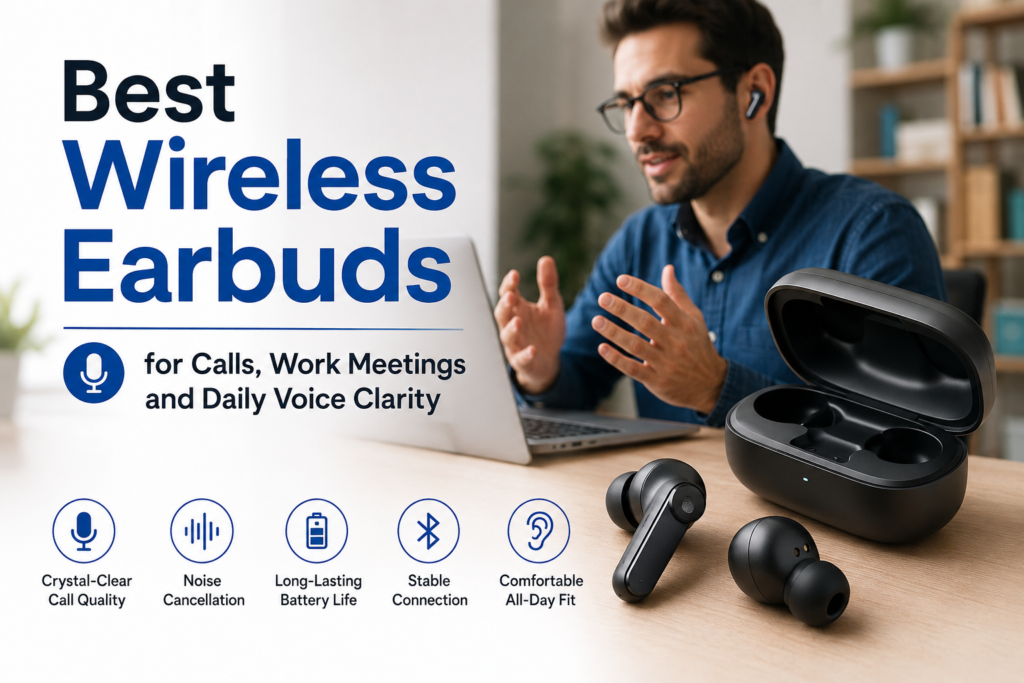
Choosing the best wireless earbuds for calls is no longer just about sound quality. For professionals, remote workers, students, creators, and anyone who spends time on Zoom, Google Meet, Teams, WhatsApp, or regular phone calls, microphone performance matters as much as music playback. The best earbuds for phone calls should make your voice sound clear, reduce background noise, stay comfortable for long work sessions, and switch smoothly between your laptop, phone, and tablet.
Modern call-focused earbuds use advanced microphone arrays, beamforming technology, AI voice processing, and environmental noise cancellation to separate your voice from traffic, keyboard clicks, wind, café noise, and office chatter.
The strongest options usually combine several features: reliable Bluetooth, multipoint connectivity, long battery life, strong ENC performance, low-latency voice pickup, and a secure fit that remains comfortable through back-to-back meetings. Premium models often perform better in noisy environments, while some budget earbuds now offer surprisingly good call quality for everyday work, casual meetings, and mobile conversations.
The chart below compares popular wireless earbuds based on call clarity, microphone design, ENC strength, battery life, Bluetooth version, multipoint support, and price tier so you can quickly find the right pair for your work style and calling needs.
Compare the best wireless earbuds for calls by mic system, ENC strength, Bluetooth version, multipoint support, battery life, and price tier.
| Earbuds Model | Best For | Mic System | ENC Strength | Battery Life | Bluetooth | Multipoint | Price Tier |
|---|
Best TWS Earbuds for Calls
Sony WF-1000XM5
Why They Stand Out
Sony heavily optimized the WF-1000XM5 for voice isolation, adaptive environmental processing, and AI-enhanced speech clarity.

- NOISE CANCELLATION: Experience a personal concert with the bluetooth earbuds noise cancelling feature of Sony WF-1000XM5…
- SOUND QUALITY: Uncover the richness of sound with the noise cancelling earbuds of Sony WF-1000XM5, specially designed fo…
- CALL CLARITY: Maintain clear conversations with the bluetooth earbuds of Sony WF-1000XM5, featuring Sony’s best ever cal…
Best Features
- Bone conduction sensor support
- AI-based noise reduction
- Excellent wind resistance
- Strong multipoint performance
- Premium ANC integration
Ideal Users
- Executives
- Remote workers
- Frequent travelers
- Outdoor callers
Apple AirPods 4
Best Earbuds for iPhone Calls

- WHY APPLECARE+ – Get protection, service and support direct from Apple. AppleCare+ covers unlimited repairs for accident…
- REBUILT FOR COMFORT — AirPods 4 have been redesigned for exceptional all-day comfort and greater stability. With a refin…
- ACTIVE NOISE CANCELLATION — AirPods 4 with Active Noise Cancellation help reduce outside noise before it reaches your ea…
AirPods 4 Earbuds remain among the strongest choices for iPhone users because of Apple’s ecosystem-level optimization.
Strengths
- Natural voice reproduction
- Excellent transparency mode
- Stable FaceTime performance
- Adaptive audio ecosystem
- Reliable indoor call clarity
Best For
- Apple ecosystem users
- FaceTime communication
- MacBook workflows
- Daily office calls
Bose QuietComfort Ultra Earbuds
Best for Noisy Environments
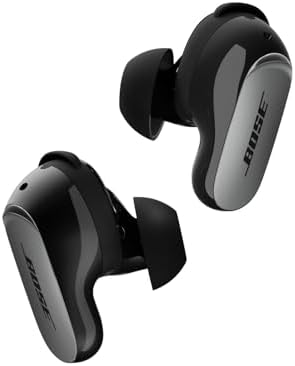
- WORLD-CLASS NOISE CANCELLATION: The best noise cancellation of any Bose wireless earbuds is now even better than before….
- CUSTOMTUNE TECHNOLOGY: CustomTune technology analyses your ears and adapts your in-ear headphones to their shape. The re…
- NOISE CONTROL: Quickly adjust the level of noise cancellation without using Modes, including turning it off completely t…
Bose focuses aggressively on environmental suppression.
These earbuds perform particularly well in:
- Airports
- Cafés
- Public transport
- Urban outdoor environments
- Wind-heavy locations
Key Advantage
Their adaptive voice isolation can maintain understandable speech even under difficult ambient conditions.
Best Wireless Earbuds with Microphone for Work Calls
Jabra Elite 10
Jabra has historically focused on business communication, conferencing, and professional-grade microphone systems.
Why Professionals Prefer Them
- Six-microphone conferencing system
- Strong Teams and Zoom compatibility
- Excellent speech prioritization
- Stable multipoint switching
- Comfortable long-session fit
Best Use Cases
- Sales teams
- Consultants
- Hybrid work professionals
- Multi-device office setups
Samsung Galaxy Buds3 Pro

- REDESIGNED WITH THE BEST SOUND IN MIND: Keep your Galaxy Buds3 Pro in with a design that delivers long-lasting comfort f…
- A SLEEK DESIGN MADE TO SHINE: Let your sound shine as much as you do with Buds3 Pro that light up¹
- AUDIO THAT ADAPTS TO YOUR SURROUNDINGS: Immerse yourself while staying alert to your surroundings thanks to Adaptive Act…
Samsung has improved AI call processing dramatically.
Key Features
- Galaxy AI enhancements
- Excellent Android integration
- Smart adaptive microphones
- Improved wind suppression
- Bluetooth 5.4 efficiency
Best For
- Samsung ecosystem users
- Android productivity users
- Video conferencing
- Daily mobile communication
Best Budget Earbuds for Phone Calls
Soundcore Liberty 4 NC
The Liberty 4 NC delivers surprisingly strong microphone quality for its price category.
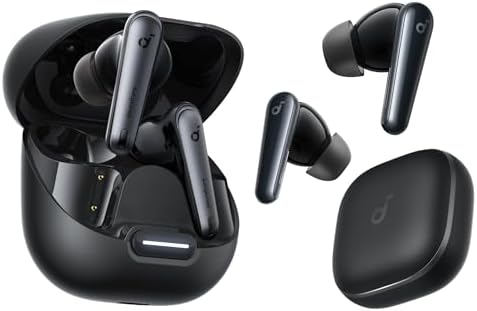
- Reduce Noise By Up to 98.5%: Liberty 4 NC noise cancelling earbuds have a high sensitivity in-ear sound sensor, an overs…
- Noise Cancelling Adapts to Ears and Environments: Adaptive ANC 2.0 makes real-time calculations and adjusts to your ear …
- Crisp Sound with 3× More Detail: 11mm custom-tuned drivers deliver consistently crisp and detailed sound. Experience Hi-…
Major Advantages
- Strong battery life
- Effective ENC performance
- Reliable app customization
- Good multipoint support
- Competitive pricing
Best Value Segment
These are among the strongest budget-friendly options for work calls and online meetings.
Redmi Buds 8 Lite

- 42dB Hybrid Active Noise Cancellation for Immersive Sound: Experience profound quiet with 42dB Hybrid ANC. Whether commu…
- Powerful 12.4mm Dynamic Driver & Customizable Sound: Hear the difference with a large Φ12.4mm dynamic driver, delivering…
- AI Dual-Microphone System for Crystal-Clear Calls: Talk clearly anywhere. The dual-mic setup with AI noise reduction eff…
Budget-Friendly Daily Calling
Redmi continues improving voice pickup quality in affordable earbuds.
Suitable For
- Students
- Casual callers
- Online classes
- Everyday commuting
- Budget-conscious buyers
TWS Earbuds for Calls: Premium vs Budget Comparison
| Feature | Premium Earbuds | Budget Earbuds |
|---|---|---|
| AI voice isolation | Advanced | Limited |
| Wind reduction | Excellent | Moderate |
| Multipoint pairing | Usually included | Sometimes missing |
| Microphone count | Higher | Lower |
| Codec support | LDAC / aptX Adaptive | AAC / SBC |
| Transparency mode | Advanced | Basic |
| Software optimization | Better | Moderate |
| Bluetooth stability | Excellent | Good |
| Long meeting comfort | Better | Varies |
| Software updates | Frequent | Less frequent |
Best Bluetooth Codecs for Voice Calls
When buying the best Bluetooth earbuds for phone calls, many users focus on microphone count, noise cancellation, battery life, and comfort. Those are important, but Bluetooth codec support also plays a role in how earbuds handle audio transmission, latency, stability, and overall device compatibility. A codec is the technology used to compress and transmit audio between your phone, laptop, tablet, or earbuds.
For music, codecs are often discussed in terms of high-resolution sound quality. For calls, the situation is more complex. Voice calls do not always use the same audio pathway as music playback. A pair of earbuds may support LDAC, aptX, or AAC for listening to music, but phone calls, Zoom meetings, WhatsApp calls, Microsoft Teams, Google Meet, FaceTime, and laptop conferencing often rely on Bluetooth hands-free profiles, microphone bandwidth, device software, and app-level processing.
That means the best Bluetooth codec for calls is not always the one with the highest bitrate. For work calls and voice communication, the real goal is clear speech, low delay, stable connection, efficient battery use, and strong compatibility with your main devices.
AAC
AAC is especially important for users inside the Apple ecosystem. If you use an iPhone, iPad, MacBook, or FaceTime regularly, AAC earbuds are often the most practical choice because Apple devices are well optimized around AAC for wireless audio playback. This makes AAC a reliable codec for users who want smooth everyday performance with iOS and macOS devices.
For voice calls, AAC does not automatically guarantee better microphone quality, because call performance still depends heavily on the earbud’s microphones, voice pickup system, noise reduction algorithms, and Bluetooth call profile. However, earbuds that are well optimized for AAC often deliver a more consistent experience on Apple devices, especially when switching between calls, music, video meetings, and voice notes.
AAC is a smart choice for users looking for wireless earbuds for iPhone calls, FaceTime conversations, WhatsApp calls, and general work communication on Apple hardware. It is also useful for people who want a simple, stable codec without having to manually adjust audio settings.
The main limitation is that AAC performance can vary on Android devices. Some Android phones handle AAC well, while others may not deliver the same level of efficiency or consistency. For Android users, codec support should be evaluated alongside the phone brand, chipset, Bluetooth version, and the earbud manufacturer’s app optimization.
aptX Adaptive
aptX Adaptive is one of the more useful Bluetooth codecs for users who want a balance between audio quality, connection stability, and lower latency. It is designed to adjust dynamically based on wireless conditions, which can help maintain a smoother listening experience when you move through environments with Bluetooth interference, such as offices, airports, gyms, trains, or busy cafés.
For users searching for Bluetooth earbuds for work calls, aptX Adaptive can be valuable because it supports a more flexible wireless connection. Lower latency is especially helpful for video calls, gaming chat, online meetings, and any situation where lip-sync and voice timing matter. When delay is reduced, conversations feel more natural, and interruptions are less awkward.
That said, aptX Adaptive mainly benefits compatible devices. Many Android phones support aptX family codecs, but iPhones do not use aptX. This makes aptX Adaptive more relevant for Android users, Windows laptop users with compatible Bluetooth hardware, and people who want one pair of earbuds for calls, videos, gaming, and music.
For call quality, aptX Adaptive should not be judged alone. The earbuds still need good microphone placement, strong ENC, wind-noise control, and reliable firmware. A budget earbud with aptX Adaptive but weak microphones may still perform worse on calls than a well-tuned earbud with a simpler codec and better voice processing.
LDAC
LDAC is commonly associated with high-resolution wireless music listening. It can transmit more audio data than many standard Bluetooth codecs, making it attractive for users who care about music detail, wider soundstage, and better audio quality from compatible Android devices.
However, when it comes to earbuds for phone calls, LDAC is not always essential. Most call performance depends far more on microphone hardware, voice isolation, environmental noise cancellation, Bluetooth stability, and the platform being used for the call. LDAC may improve music playback, but it does not automatically make your voice clearer during a Teams meeting or WhatsApp call.
LDAC is best for users who want earbuds that serve two purposes: high-quality music listening and occasional calls. If you listen to lossless or high-bitrate audio on an Android phone and also need earbuds for everyday communication, LDAC support can be a nice advantage. But if your main priority is business calls, Zoom meetings, client conversations, or remote work, LDAC should not be the deciding feature.
There is also a practical tradeoff. Higher-bitrate codecs can sometimes use more power or become less stable in crowded wireless environments. For calls, a stable connection is often more valuable than maximum audio bandwidth. A dropped or choppy call is far worse than a slightly less detailed audio stream.
LC3 & LE Audio
LC3 and LE Audio represent the next major step in Bluetooth audio. These emerging standards are designed to improve efficiency, audio quality, latency, battery performance, and the way wireless devices handle sound. For future-focused buyers, LC3 earbuds and LE Audio earbuds may become increasingly important, especially for communication-heavy use.
LC3 is the codec associated with Bluetooth LE Audio. Its purpose is to deliver better perceived audio quality at lower bitrates compared with older Bluetooth audio methods. In practical terms, this can help earbuds use less power while maintaining clearer sound. For voice calls, this could support better battery life, improved speech quality, and more efficient communication between earbuds and source devices.
LE Audio may also improve how earbuds work with multiple devices and public audio systems over time. It is part of a broader shift toward more efficient Bluetooth communication, which could benefit users who rely on earbuds for work calls, video meetings, accessibility features, gaming chat, and long listening sessions.
As Bluetooth LE Audio evolves, emerging technologies like Auracast are expected to transform wireless communication by enabling broader audio sharing, lower latency voice transmission and more efficient multi-device connectivity.
For now, LC3 and LE Audio support should be viewed as a future-ready advantage rather than the only reason to buy a pair of earbuds. Compatibility still matters. Your phone, laptop, operating system, Bluetooth chipset, and earbuds all need to support the relevant features for the benefits to appear. As adoption grows, these standards may become more important for users looking for the best future-proof wireless earbuds for calls.
Which Codec Matters Most for Calls?
For most buyers, the best codec depends on the device ecosystem. iPhone users should prioritize strong AAC optimization, excellent microphones, and reliable FaceTime or call performance. Android users may benefit from aptX Adaptive, LDAC, or LC3 depending on their phone and listening priorities. Laptop users should pay special attention to Bluetooth stability, multipoint pairing, microphone performance, and how the earbuds behave in conferencing apps.
The most important point is this: codec support alone does not determine call quality. The best earbuds for voice calls combine several elements at once, including:
- clear microphone pickup
- strong environmental noise cancellation
- stable Bluetooth connection
- low latency for video calls
- good app and firmware tuning
- multipoint pairing for work devices
- comfortable long-session fit
- strong battery life during calls
A codec can improve the foundation, but the full calling experience comes from how well the earbuds, device, software, and microphone system work together.
Practical Buying Advice By Codec Type
Choose AAC-focused earbuds if you mainly use an iPhone, iPad, MacBook, FaceTime, or Apple ecosystem devices.
Choose aptX Adaptive earbuds if you use compatible Android phones or Windows devices and want a strong balance of latency, stability, and sound quality.
Choose LDAC earbuds if music quality is a major priority and phone calls are important but not the only reason you are buying.
Choose LC3 or LE Audio earbuds if you want a more future-ready option with better efficiency, potential voice improvements, and next-generation Bluetooth support.
For work calls, the safest strategy is to treat codec support as one part of the buying decision, not the headline feature. A well-designed pair of wireless earbuds with microphone for work calls should sound clear to the person on the other end, stay connected during meetings, switch smoothly between devices, and keep your voice stable in real-world environments.
Call Quality Risks Buyers Often Ignore
Poor Wind Resistance
Some earbuds perform well indoors but collapse outdoors.
Weak Multipoint Stability
Switching between laptop and phone can introduce connection inconsistencies.
Artificial Voice Compression
Some aggressive AI systems make voices sound robotic.
Low-Quality App Optimization
Poor firmware tuning can reduce microphone performance.
Overhyped Budget Claims
Marketing frequently exaggerates microphone quality.
Battery Life Expectations for Calling
| Usage Type | Recommended Battery Life |
|---|---|
| Casual calls | 5–6 hours |
| Work meetings | 7–9 hours |
| Frequent travel | 8+ hours |
| Long remote sessions | 9+ hours |
| Daily commuting | 6–8 hours |
Battery performance during calls is often lower than music playback estimates.
Cost Breakdown: Best TWS Earbuds for Calls
| Category | Expected Price Range |
|---|---|
| Entry-level | $30–$70 |
| Mid-range | $80–$150 |
| Premium flagship | $180–$350 |
| Professional business tier | $200–$400 |
Premium pricing often reflects:
- Better microphone arrays
- Advanced AI processing
- Superior Bluetooth chipsets
- Improved firmware optimization
- Better environmental suppression
Latest Trends in Wireless Earbuds for Calls
AI Call Enhancement
AI systems increasingly isolate human speech dynamically.
Spatial Voice Pickup
Directional processing is becoming more precise.
Bluetooth LE Audio
Lower power consumption with improved voice transmission.
Neural Noise Reduction
Machine learning models reduce unpredictable environmental sounds.
Real-Time Adaptive Processing
Earbuds now adjust call algorithms based on surroundings.
Voice Translation Features
Some flagship earbuds are introducing live AI-assisted translation systems.
Upcoming TWS Earbuds Expected to Improve Call Quality
Several manufacturers are expected to focus heavily on communication-first earbuds in upcoming releases.
Expected developments include:
- More advanced AI microphones
- Dedicated conferencing modes
- Stronger outdoor wind reduction
- Better low-bandwidth voice stability
- LE Audio expansion
- Improved multi-device switching
- Lower latency voice synchronization
Brands expected to push call-focused innovation include:
- Sony
- Apple
- Samsung
- Bose
- Jabra
- Nothing
- OnePlus
- Huawei
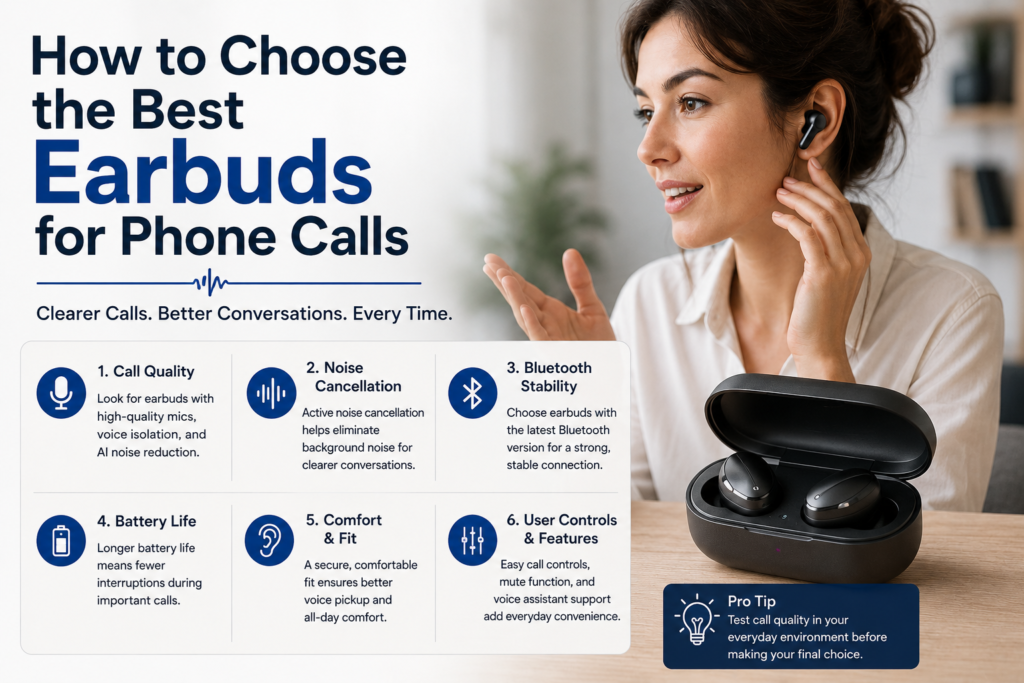
How to Choose the Best Earbuds for Phone Calls
Prioritize Microphone Quality Over Driver Size
Music tuning does not guarantee strong call clarity.
Test Outdoor Performance
Wind handling matters significantly.
Check Multipoint Support
Professionals switching devices frequently benefit greatly.
Evaluate App Support
Good firmware updates improve call consistency.
Match Earbuds to Your Ecosystem
Apple and Android optimization differ substantially.
Readers deciding between platforms should compare:
iPhone vs Android Earbuds
Are Premium Earbuds Worth It for Calls?
For casual users, budget earbuds may already provide acceptable call quality.
However, professionals who spend hours daily on meetings often benefit significantly from premium models because of:
- Better microphone tuning
- Stronger AI voice isolation
- More reliable Bluetooth stability
- Improved comfort during long calls
- Better multipoint transitions
- Superior environmental suppression
The communication difference becomes especially noticeable in noisy environments.
These are among the strongest budget-friendly options for work calls, online meetings, and everyday voice use. For a deeper comparison of mic quality, background noise handling, battery life, and call stability, see our full guide to budget wireless earbuds for calls.
Frequently Asked Questions (FAQs)
Which are the best wireless earbuds for calls in noisy work environments?
The best wireless earbuds for calls in noisy work environments are the ones that combine strong microphone pickup, environmental noise reduction, stable Bluetooth performance, and a comfortable fit that does not shift while speaking. For office calls, coworking spaces, cafés, airports, and outdoor work calls, earbuds like Bose QuietComfort Ultra Earbuds, Sony WF-1000XM5, Jabra Elite 10, and AirPods Pro-style earbuds usually perform better than basic TWS earbuds because they are designed to separate your voice from the surrounding noise.
For call quality, the microphone system matters more than music sound quality. A pair of earbuds can sound excellent for music but still perform poorly on Zoom, Teams, WhatsApp, or regular phone calls if the microphones pick up keyboard clicks, wind, traffic, or nearby voices. That is why premium call-focused earbuds use multiple microphones, beamforming pickup, wind reduction, and digital signal processing to keep your voice forward.
| Work Environment | Main Call Problem | Best Earbud Feature to Look For |
|---|---|---|
| Open office | Nearby voices and keyboard noise | Beamforming microphones + voice isolation |
| Café | Background chatter and dishes | Environmental noise cancellation for calls |
| Airport lounge | Announcements and crowd noise | Strong mic noise suppression |
| Outdoor work call | Wind and traffic | Wind reduction + stable fit |
| Home office | Echo, fan noise, family sounds | Clear microphone tuning + app controls |
Call-quality decision chart
| Priority | Best Type of Earbud |
|---|---|
| Loud environments | Premium earbuds with advanced mic noise reduction |
| Long work meetings | Comfortable earbuds with stable battery life |
| Outdoor calls | Earbuds with wind-noise reduction |
| Zoom and Teams | Earbuds with natural voice pickup |
| Hybrid work | Multipoint earbuds that switch between laptop and phone |
For most work users, the safest choice is not simply the earbud with the most microphones. The best option is the earbud that balances microphone clarity, background suppression, comfort, and connection reliability. This is why Bose QuietComfort Ultra, Jabra Elite 10, and Sony WF-1000XM5 are often discussed in the same buying conversation for wireless earbuds with microphone performance.
Are Bose QuietComfort Ultra Earbuds good for phone calls and work meetings?
Yes, Bose QuietComfort Ultra Earbuds are a strong option for phone calls and work meetings, especially if you often take calls in noisy places. A proper Bose QuietComfort Ultra Earbuds review should look beyond ANC for music and examine how the earbuds handle your outgoing voice. For work calls, the listener on the other end does not care how immersive your music sounds; they care whether your voice is clear, stable, and easy to understand.
Bose QuietComfort Ultra Earbuds are especially useful for people who work from multiple locations: home, office, cafés, airports, cars, hotels, or shared spaces. Their strength is not just quiet listening. It is the combination of premium noise control, voice-focused microphones, and comfort during long sessions.
| Call Scenario | Bose QuietComfort Ultra Earbuds Performance | Why It Matters |
|---|---|---|
| One-on-one phone calls | Very strong | Keeps voice clear and controlled |
| Zoom/Teams meetings | Strong | Good for hybrid work and remote meetings |
| Café calls | Strong | Helps reduce background movement |
| Outdoor calls | Good to very good | Wind can still be difficult, but Bose handles it better than many earbuds |
| Long calls | Strong | Comfortable fit helps reduce fatigue |
Bose call-use chart
| Use Case | Suitability |
|---|---|
| Remote work | 9/10 |
| Business travel | 9/10 |
| Noisy commuting calls | 8.5/10 |
| Outdoor walking calls | 8/10 |
| Studio-level microphone quality | 6.5/10 |
The main limitation is that even premium TWS earbuds cannot fully replace a dedicated boom microphone or wired headset for professional recording, podcasting, or high-stakes broadcasting. But for everyday work calls, business meetings, and travel communication, Bose QuietComfort Ultra Earbuds are among the more reliable premium earbuds to consider.
What makes wireless earbuds with microphone good for business calls?
Good wireless earbuds with microphone performance depends on five things: voice pickup, background noise suppression, wind control, connection stability, and comfort. Many buyers focus only on the number of microphones, but microphone count alone does not guarantee better call quality. The software behind the microphones is just as important.
A strong call earbud should know which sound is your voice and which sound is noise. It should reduce traffic, fans, typing, nearby conversation, and room echo without making your voice sound robotic or underwater. The best earbuds for work do this by combining beamforming microphones, voice algorithms, accelerometers, wind filters, and app-based controls.
| Call Quality Factor | What It Does | Why It Matters |
|---|---|---|
| Beamforming microphones | Focuses pickup toward your mouth | Makes your voice easier to isolate |
| ENC/voice noise reduction | Reduces background noise for the listener | Helps in cafés, offices, and streets |
| Wind reduction | Controls air movement across the microphones | Important for outdoor calls |
| Stable Bluetooth | Prevents dropouts and audio delay | Essential for meetings |
| Comfortable fit | Keeps microphones positioned correctly | Improves consistency |
Microphone-quality chart
| Feature | Impact on Calls | Impact on Music |
|---|---|---|
| Beamforming mics | High | Low |
| Environmental noise cancellation | High | Low |
| ANC for listening | Medium | High |
| Bluetooth stability | High | High |
| Codec quality | Low to medium | High |
| Earbud fit | High | High |
For work calls, the best earbuds are not always the best music earbuds. A warm, bass-heavy earbud may be fun for listening but average for meetings. A call-focused earbud should make your voice sound clean, centered, and consistent even when the world around you is not quiet.
Are premium earbuds worth buying for remote work and office calls?
Premium earbuds are worth buying for remote work if calls are a major part of your day. If you only take one short call per week, budget earbuds may be enough. But if you use Zoom, Teams, Google Meet, WhatsApp, FaceTime, Slack huddles, or client calls daily, premium earbuds can make a real difference in professionalism and comfort.
The biggest benefit is consistency. Budget earbuds may sound acceptable in a quiet room but struggle when a fan turns on, traffic passes outside, or someone speaks nearby. Premium earbuds are usually better at maintaining voice clarity in imperfect conditions. They also tend to offer better fit, better multipoint support, better controls, better app tuning, and more reliable battery behavior.
| Buyer Type | Budget Earbuds Enough? | Premium Earbuds Recommended? |
|---|---|---|
| Occasional calls | Yes | Optional |
| Daily remote worker | Sometimes | Yes |
| Sales/client calls | Rarely | Strongly yes |
| Outdoor worker | Rarely | Yes |
| Frequent traveler | Rarely | Yes |
| Student attending online classes | Often | Depends on budget |
Remote-work value chart
| Premium Feature | Value for Work |
|---|---|
| Better microphones | 10/10 |
| Multipoint connection | 9/10 |
| Long comfort | 9/10 |
| Strong background suppression | 9/10 |
| Better music quality | 6/10 |
| Spatial audio | 4/10 |
Premium earbuds such as Bose QuietComfort Ultra Earbuds, Jabra Elite 10, Sony WF-1000XM5, and similar high-end models are best for people who treat earbuds as a work tool, not just a music accessory. If your voice quality affects meetings, client trust, teaching, selling, interviewing, or collaboration, premium earbuds can be a worthwhile investment.
What are the best earbuds for work if I switch between laptop and phone?
The best earbuds for work should support stable switching between devices, clear microphone quality, good comfort, and enough battery life for back-to-back meetings. For hybrid workers, multipoint Bluetooth is one of the most important features because it allows earbuds to stay connected to two devices, such as a laptop and a phone, at the same time.
This matters in real work life. You may be listening to a meeting on your laptop and suddenly receive a phone call. Or you may join a Teams call from your computer and then take a WhatsApp call from your phone. Without smooth switching, earbuds become frustrating. With good multipoint, they become a daily productivity tool.
| Work Feature | Why It Matters |
|---|---|
| Multipoint Bluetooth | Switches between laptop and phone more easily |
| Strong microphone quality | Keeps your voice clear in meetings |
| Comfortable fit | Helps during long workdays |
| Reliable touch controls | Lets you mute, answer, or adjust quickly |
| Transparency mode | Helps you hear coworkers or home sounds |
| Good case battery | Keeps earbuds available throughout the day |
Best work-earbud buying chart
| Work Style | Recommended Priority |
|---|---|
| Remote worker | Microphone quality + comfort |
| Office worker | Transparency mode + multipoint |
| Frequent traveler | ANC + call clarity |
| Sales professional | Voice quality + connection stability |
| Student | Battery life + budget value |
| Freelancer | Laptop/phone switching + meeting reliability |
For work, avoid buying earbuds based only on music reviews. Search intent like best wireless earbuds for calls, wireless earbuds with microphone, and best earbuds for work should be answered with call performance first, then comfort, then device switching, then sound quality.
People Also Ask — Best TWS Earbuds for Calls
What are the best true wireless earbuds for calls in 2026?
The best true wireless earbuds for calls in 2026 are the models that can keep your voice clear while reducing background noise on the listener’s side. Strong options usually include Bose QuietComfort Ultra Earbuds, Sony WF-1000XM5, Jabra Elite 10, AirPods Pro-style earbuds, and other premium earbuds designed around voice isolation.
For calls, the “best” earbud depends on where you speak most often. If you work in quiet rooms, many mid-range earbuds can perform well. If you take calls in cafés, offices, airports, trains, or outdoors, premium call processing becomes more important. Bose is especially relevant for people searching for a Bose QuietComfort Ultra Earbuds review because its value is not limited to ANC for listening; it is also designed to improve voice clarity in busy places.
| Best For | Earbud Type to Consider |
|---|---|
| Noisy travel calls | Bose QuietComfort Ultra-style premium ANC earbuds |
| Office meetings | Jabra-style business-friendly earbuds |
| Apple ecosystem calls | AirPods Pro-style earbuds |
| Android customization | Sony/JBL-style app-rich earbuds |
| Budget work calls | Mid-range earbuds with ENC and stable Bluetooth |
2026 call-earbud priority chart
| Buying Priority | Importance |
|---|---|
| Microphone clarity | 10/10 |
| Background noise reduction | 10/10 |
| Comfort for meetings | 9/10 |
| Bluetooth stability | 9/10 |
| ANC for your own listening | 8/10 |
| Music sound quality | 7/10 |
The best true wireless earbuds for calls are not always the loudest or bassiest earbuds. They are the earbuds that make you sound clear to other people.
Which wireless earbuds have the clearest microphone for calls?
The wireless earbuds with the clearest microphone usually have beamforming microphones, voice isolation software, wind reduction, and stable Bluetooth transmission. Premium earbuds often perform better because they use more advanced processing to separate speech from noise.
However, “clearest microphone” can mean different things. In a quiet room, clarity means your voice sounds natural. In a café, clarity means your voice stays understandable despite background chatter. Outdoors, clarity means wind does not overwhelm your speech. A good earbud should perform across all three conditions.
| Microphone Test | What to Listen For | Strong Result |
|---|---|---|
| Quiet room | Natural voice tone | Voice sounds full, not thin |
| Café noise | Background suppression | Voice stays forward |
| Outdoor wind | Wind control | Speech remains understandable |
| Keyboard typing | Noise filtering | Clicks are reduced |
| Walking call | Stability | Voice does not cut in and out |
Clear-mic performance chart
| Mic Quality Element | Importance for Calls |
|---|---|
| Voice isolation | 10/10 |
| Wind control | 9/10 |
| Natural tone | 8/10 |
| Background suppression | 10/10 |
| Bluetooth stability | 9/10 |
For buyers comparing Bose QuietComfort Ultra, Sony, Jabra, and Apple earbuds, the best approach is to choose based on your main call environment. Bose is excellent for noisy and travel-heavy users. Jabra is often strong for business-style calls. Apple is excellent for Apple-device users. Sony is strong for users who also want premium sound and ANC.
Are noise cancelling earbuds better for phone calls?
Noise cancelling earbuds can be better for phone calls, but only if they include good microphone noise reduction. There are two types of “noise cancelling” to understand. The first is ANC, which reduces the noise you hear. The second is ENC or voice noise reduction, which reduces the noise the other person hears during a call.
Many buyers confuse these two. A pair of earbuds can have strong ANC for listening but only average microphone performance. For call quality, you need earbuds that specifically improve outgoing voice clarity.
| Feature | Who Benefits? | Main Purpose |
|---|---|---|
| ANC | You | Reduces what you hear |
| Transparency mode | You | Lets outside sound in |
| ENC/voice isolation | Person listening to you | Reduces background noise from your mic |
| Beamforming microphones | Both indirectly | Focuses pickup on your voice |
| Wind reduction | Person listening to you | Reduces outdoor wind noise |
ANC vs call-noise chart
| Situation | ANC Helps You Hear? | ENC Helps Others Hear You? |
|---|---|---|
| Bus ride | Yes | Yes, if mic processing is strong |
| Office meeting | Yes | Yes |
| Café call | Somewhat | Very important |
| Walking outdoors | Somewhat | Very important |
| Quiet bedroom | Not necessary | Less important |
So, noise cancelling earbuds are better for calls only when the microphone system is also strong. For this reason, a Bose QuietComfort Ultra Earbuds review should always separate listening ANC from call microphone quality.
What earbuds work best for Zoom, Teams, and Google Meet?
The best earbuds for Zoom, Teams, and Google Meet are the ones that provide clear voice pickup, long comfort, stable laptop connection, and low-friction controls. For video meetings, microphone quality matters more than music detail. The goal is to sound professional, not just to hear the meeting clearly.
For meeting platforms, the biggest problems are unstable Bluetooth switching, weak microphone input, room echo, and background sounds. Premium earbuds can help, but setup also matters. Make sure your meeting app is using the earbud microphone, not the laptop microphone, and test audio before important calls.
| Meeting Need | Best Feature |
|---|---|
| Clear speech | Beamforming microphones |
| Long meetings | Comfortable fit |
| Hybrid work | Multipoint connection |
| Noisy room | Voice noise reduction |
| Quick control | Reliable touch or squeeze controls |
| Laptop calls | Strong Bluetooth stability |
Meeting-readiness chart
| Feature | Zoom/Teams/Meet Importance |
|---|---|
| Microphone clarity | 10/10 |
| Comfort | 9/10 |
| Bluetooth stability | 9/10 |
| Battery life | 8/10 |
| ANC | 7/10 |
| Spatial audio | 3/10 |
For work meetings, earbuds like Bose QuietComfort Ultra Earbuds, Jabra Elite 10, Sony WF-1000XM5, and AirPods Pro-style models are strong because they combine premium voice handling with everyday comfort. The best choice depends on your device ecosystem and whether your meetings happen mostly in quiet rooms or noisy locations.
Are Bose QuietComfort Ultra Earbuds worth buying mainly for calls?
Bose QuietComfort Ultra Earbuds are worth buying mainly for calls if you also care about ANC, travel comfort, premium listening, and noisy-environment performance. If your only need is microphone quality in a quiet office, a dedicated headset or cheaper work-focused earbuds may be enough. But if you want one pair of earbuds for calls, commuting, flights, music, and work, Bose becomes a more compelling option.
The reason Bose fits the best wireless earbuds for calls conversation is that call quality is part of a broader premium package. You get noise control for your own listening, voice processing for calls, a comfortable in-ear fit, and a premium sound profile. That combination makes sense for professionals, commuters, travelers, and remote workers who do not want separate earbuds for every task.
| Buyer Question | Bose QuietComfort Ultra Answer |
|---|---|
| Are they good for calls? | Yes, especially in noisy places |
| Are they only for music? | No, they also work well for work and calls |
| Are they worth it for quiet rooms only? | Maybe, but they may be more than you need |
| Are they good for travel work? | Yes, this is one of their strongest use cases |
| Are they better than a boom mic headset? | More portable, but not as specialized |
Bose value chart for call-focused buyers
| Use Case | Value Rating |
|---|---|
| Business travel | 10/10 |
| Hybrid work | 9/10 |
| Café calls | 8.5/10 |
| Daily commuting | 9/10 |
| Quiet desk-only calls | 7/10 |
| Podcast recording | 5/10 |
Best TWS Earbuds for Calls — Editorial Recommendations
Best Overall
Sony WF-1000XM5
Best for iPhone Users
AirPods 4
Best for Android Users
Samsung Galaxy Buds3 Pro
Best for Work Meetings
Jabra Elite 10
Best Budget Option
Soundcore Liberty 4 NC
Best Outdoor Calling
Bose QuietComfort Ultra Earbuds
Best Battery Life
OnePlus Buds Pro 3