
Reset Guides for Popular Earbud Brands: AirPods, Galaxy Buds, Sony, Beats, Soundcore, JBL, Bose and Bowers & Wilkins
Amazon Affiliate Disclosure
Earsbud.com may earn a commission when readers purchase products through qualifying affiliate links. This does not increase the price you pay. Reset instructions, product recommendations, replacement suggestions, cables, charging cases, and accessory mentions should always be evaluated for compatibility, safety, warranty support, and real-world usefulness.
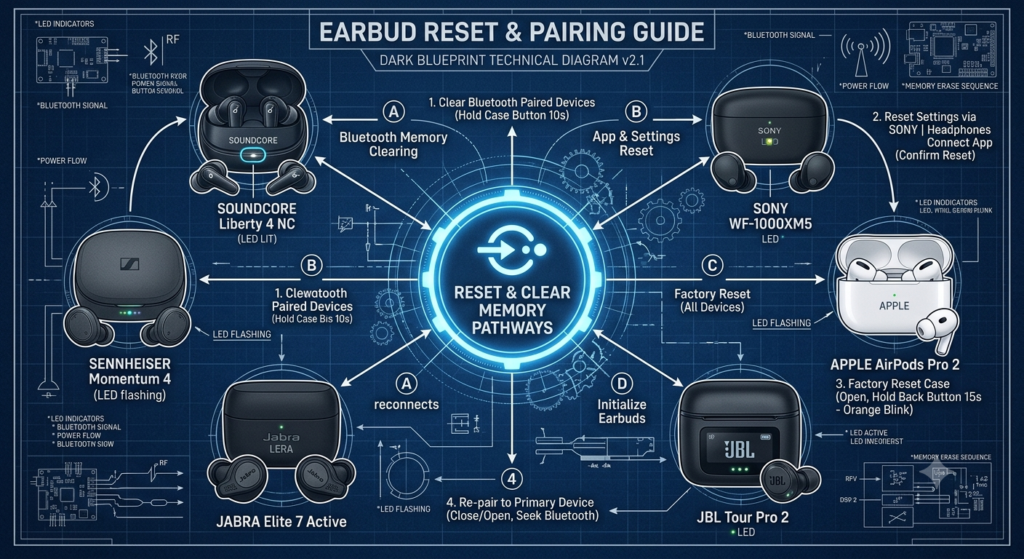
Resetting earbuds sounds simple until you realize every brand handles it differently. AirPods rely on the charging case and Apple device pairing flow. Samsung often uses the Galaxy Wearable app. Sony separates a basic reset from full initialization. Bose uses different button timings depending on the model. JBL has model-specific tap patterns. Soundcore resets vary across Liberty, Life, AeroFit, Sleep, and P-series earbuds. Bowers & Wilkins uses app-based resets or case-button resets depending on the generation.
A reset can fix Bluetooth pairing issues, one-earbud sync problems, app detection errors, firmware glitches, battery reporting confusion, audio cutting out, earbuds connecting to the wrong device, or touch controls behaving strangely. But a reset is not magic. It will not repair a dead battery, water damage, broken charging pins, swollen earbuds, or physically damaged hardware—these cases require replacement or professional repair. For more structured troubleshooting methods and step-by-step fixes, refer to the earbuds guides section.
Charge Earbuds
& Charging Case
Forget Device
from Bluetooth
Factory Reset
Earbuds
Re-Pair with
Your Device
Update Earbuds
Firmware
Problem Fixed?
✅ Yes → Enjoy
❌ No → Repair or Replace
Quick Jump
| Brand | Go to Section | Best For | Reset Method Style |
|---|---|---|---|
| Apple AirPods | Reset AirPods | AirPods, AirPods Pro, AirPods Max users | Case button + Bluetooth forget |
| Samsung Galaxy Buds | Reset Samsung Galaxy Buds | Galaxy Buds+, Live, Pro, Buds2, Buds3 | Galaxy Wearable app / case pairing |
| Sony Earbuds | Reset Sony Earbuds | WF-1000XM, LinkBuds, WF-C series | Reset or initialize by model |
| Beats Earbuds | Reset Beats Earbuds | Beats Fit Pro, Studio Buds, Powerbeats | Case system button |
| Soundcore Anker Earbuds | Reset Soundcore Anker Earbuds | Liberty, Life, AeroFit, Sleep, P-series | Case button or touch controls |
| JBL Earbuds | Reset JBL Earbuds | Tune, Live, Wave, Tour, Reflect, Endurance | Tap-hold pattern or JBL app |
| Bose Earbuds | Reset Bose Earbuds | QC Earbuds, QC Ultra, Ultra Open | Case button, timing varies |
| Bowers & Wilkins Earbuds | Reset Bowers & Wilkins Earbuds | PI5, PI7, Pi6, Pi8 | Case button or Music app |
What Is This Guide For?
This guide is for users who need to reset Bluetooth earbuds because something no longer behaves correctly.
It covers:
- How to reset earbuds by brand
- Factory reset wireless earbuds
- Reset Bluetooth earbuds before pairing again
- Reset AirPods
- Reset Samsung Galaxy Buds
- Reset Sony earbuds
- Reset Beats earbuds
- Reset Soundcore Anker earbuds
- Reset JBL earbuds
- Reset Bose earbuds
- Reset Bowers & Wilkins earbuds
- What to do before resetting earbuds
- What a reset does and does not fix
- When to restart instead of factory reset
- What to do when earbuds will not pair after reset
- How reset connects with charging, firmware, battery life, and Bluetooth dropout issues
For broader wireless earbud help, visit Earsbud.
Who Needs This Guide?
You need this guide if:
- Your earbuds will not pair.
- One earbud connects but the other does not.
- Your earbuds connect to the wrong device.
- The app cannot detect your earbuds.
- The earbuds show duplicate Bluetooth entries.
- Audio cuts out after pairing.
- Battery percentage looks wrong.
- Touch controls are unresponsive.
- ANC or transparency mode behaves strangely.
- Firmware update caused connection issues.
- You are selling or giving away earbuds.
- You want to remove old pairing history.
A reset is especially useful when the problem is software, Bluetooth memory, app sync, or pairing data. It is less useful when the problem is physical charging failure, battery aging, or liquid damage.
Benefits of Resetting Earbuds Correctly
Resetting earbuds the right way can help:
- Clear old Bluetooth pairing history
- Fix earbuds not pairing
- Restore left/right synchronization
- Remove duplicate Bluetooth entries
- Fix app detection problems
- Reconnect earbuds to a new phone
- Improve multipoint switching
- Recover after firmware glitches
- Fix touch control or ANC setting errors
- Prepare earbuds for resale
- Rebuild a clean connection from scratch
The key phrase is “correctly.” Resetting the wrong way can leave the earbuds half-paired, connected to old devices, missing from the app, or stuck in pairing mode.
Restart vs Reset vs Factory Reset
Not every issue needs a factory reset.
| Action | What It Does | Best For | Deletes Pairing Data? |
|---|---|---|---|
| Restart / reboot | Powers earbuds off and on | Minor glitches, unresponsive controls | Usually no |
| Soft reset | Refreshes earbuds or case behavior | Sync issues, temporary pairing errors | Usually no |
| Factory reset / initialize | Restores default settings and clears pairing | New phone, serious bugs, resale | Usually yes |
| Forget device | Removes earbuds from phone/laptop | Clean re-pairing | Deletes from source device only |
| Firmware update | Changes earbud software | Bugs, features, stability | No, usually |
Samsung’s support distinguishes restarting from factory reset: restarting can help minor unresponsiveness, while factory reset is performed through Galaxy Wearable for many Galaxy Buds models. (Samsung au)
Before You Reset Any Earbuds
Do this first:
- Charge the earbuds and case.
- Clean the charging contacts.
- Keep both earbuds inside or near the case.
- Forget the earbuds from your phone’s Bluetooth settings if the brand recommends it.
- Update the companion app.
- Turn off Bluetooth on nearby old devices.
- Write down custom EQ or control settings if you want to restore them later.
- Confirm your exact model.
- Use the official brand app where available.
- Do not reset during a firmware update.
If the earbuds do not wake up, one side stays dead, or the case does not show power, fix charging first with how to fix earbuds not charging before attempting a reset.
Reset Comparison Chart by Brand
| Brand | Basic Reset Location | App Reset? | Clears Pairing? | Important Note |
|---|---|---|---|---|
| AirPods | Charging case setup button | No separate app | Yes after forgetting device | Updates and pairing are Apple ecosystem-based |
| Galaxy Buds | Galaxy Wearable / case connect button on newer models | Yes | Yes | Some models require app access |
| Sony | Case/touch controls depending on model | Some app support | Initialization clears pairing | Reset and initialize are not always the same |
| Beats | Charging case system button | Sometimes Beats app for Android | Usually yes | Apple support covers model-specific button steps |
| Soundcore | Case button or touch controls | Some app control | Usually yes | Reset method varies widely by model |
| JBL | Tap-hold pattern or JBL Headphones app | Yes on supported models | Yes | TWS models use different gestures |
| Bose | Case Bluetooth button | Bose app may assist | Factory restore clears settings | Timing varies by model |
| Bowers & Wilkins | Case button or Music app | Yes | Yes | Pi6/Pi8 reset differs from PI5/PI7 |
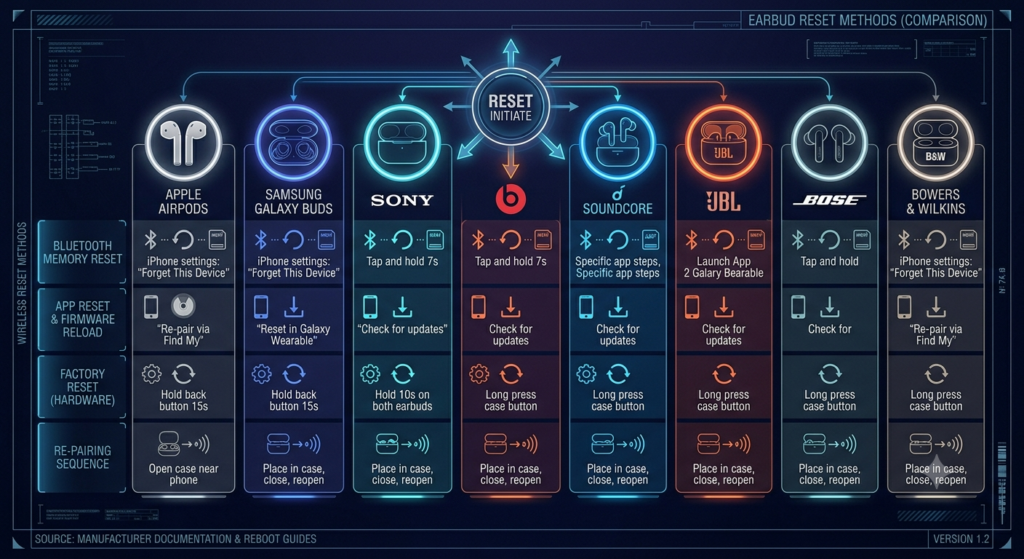
Reset AirPods
AirPods reset is usually needed when AirPods will not pair, connect to the wrong Apple device, show wrong battery levels, appear as mismatched AirPods, or continue to fail after charging and Bluetooth checks.
Apple’s reset guidance includes placing AirPods in the charging case, waiting with the lid closed, forgetting the AirPods from Bluetooth settings, then holding the setup button on the case until the status light changes from amber to white on supported models. (Apple Support)
Quick Reset Steps for AirPods
- Place both AirPods in the charging case.
- Close the lid and wait about 30 seconds.
- Open Bluetooth settings on iPhone, iPad, or Mac.
- Tap the information button beside AirPods.
- Choose Forget This Device.
- Open the AirPods case lid.
- Hold the setup button on the back of the case for about 15 seconds.
- Wait for the status light to flash amber, then white.
- Reconnect AirPods near your Apple device.
When to Reset AirPods
- AirPods will not connect
- AirPods connect but no sound plays
- One AirPod is missing
- Battery levels look wrong
- AirPods connect to the wrong device
- AirPods fail after firmware update
- You are giving them to someone else
Reset Samsung Galaxy Buds
Samsung Galaxy Buds reset methods vary by model. Many Galaxy Buds models use the Galaxy Wearable app for factory reset, while some newer models also include case-button pairing or reset behavior.
Samsung’s support page says Galaxy Buds+, Galaxy Buds Live, Galaxy Buds Pro, and Galaxy Buds2 can be factory reset through Galaxy Wearable by going to Earbud settings, selecting Reset, and confirming Reset. (Samsung au) Samsung also notes that restarting Galaxy Buds can be done by placing them in their charging case slots and removing them after seven seconds or more, with the case charged first if needed. (Samsung au)
Quick Reset Steps for Many Galaxy Buds
- Charge both earbuds and the case.
- Connect Galaxy Buds to your phone.
- Open the Galaxy Wearable app.
- Tap Earbud settings.
- Tap Reset.
- Confirm Reset.
- Remove the Galaxy Buds from Bluetooth settings if needed.
- Pair again.
Quick Restart Steps
- Place both Galaxy Buds in the charging case.
- Close the case or keep them inserted for at least seven seconds.
- Remove them and reconnect.
- If the case battery is low, charge the case first.
When to Reset Galaxy Buds
- Galaxy Wearable cannot control settings
- Buds connect but one side is missing
- Pairing fails on a new phone
- Audio is unstable after update
- Touch controls stop responding
- Buds appear twice in Bluetooth settings
Reset Sony Earbuds
Sony is one of the brands where wording matters. Sony often separates reset from initialize. A reset may restart the earbuds without deleting pairing data, while initialization restores factory settings and deletes pairing information.
Sony’s WF-1000XM4 support page explains that reset is performed one earbud at a time and retains pairing information, while initialization restores factory settings and deletes pairing information. (Sony) Sony’s WF-SP800N support page also states that reset keeps device registration, while initialization deletes all pairing information and restores settings to factory state. (Sony)
Quick Sony Reset Logic
Because Sony reset steps vary by model, use this structure:
- Confirm exact Sony model.
- Charge both earbuds and the case.
- Check Sony Sound Connect app.
- Try a restart/reset first.
- If pairing data must be cleared, initialize the earbuds.
- Remove old Sony earbuds from Bluetooth settings.
- Pair again.
Example: Sony WF-1000XM4 Reset Pattern
Sony’s WF-1000XM4 reset process includes placing one earbud into the charging case, connecting the case to power, then opening and closing the lid more than five times within 20 seconds until the indicator behavior confirms reset; the process is then repeated for the other earbud. (Sony)
Example: Sony Touch-Sensor Reset Pattern
For some Sony models, reset involves placing earbuds in the case with the lid open and holding the touch sensor on the left unit for about 20 seconds, then repeating on the right unit. (Sony)
When to Reset Sony Earbuds
- One Sony earbud connects but not both
- LDAC or codec behavior is unstable
- Sony app cannot detect earbuds
- Firmware update caused glitches
- ANC or Ambient Sound behaves incorrectly
- Pairing fails on a new phone or laptop
Reset Beats Earbuds
Beats earbuds often use a charging case system button. The reset timing depends on the model.
Apple’s Beats reset support page says Beats Fit Pro and Powerbeats Fit can be reset by placing both earbuds in the charging case, leaving the case open, then pressing and holding the system button for 15 seconds until the light flashes red and white. (Apple Support)
Quick Reset Steps for Beats Fit Pro / Powerbeats Fit
- Place both earbuds in the charging case.
- Leave the case open.
- Press and hold the system button.
- Keep holding for about 15 seconds.
- Release when the light flashes red and white.
- Remove Beats from Bluetooth settings.
- Pair again.
Beats Flex Note
Beats Flex is not a true wireless earbud with a charging case. Apple’s Beats reset page says Beats Flex reset uses the volume button on the left control module and the power button on the right control module for 15 seconds until the light flashes. (Apple Support)
When to Reset Beats
- Beats will not pair with iPhone or Android
- Beats app does not detect earbuds
- One side is silent
- Case pairing button does not behave normally
- Beats connect but no sound plays
- You are preparing them for resale
If your Beats still connect but battery drains too fast after reset, move to battery life tips for earbuds.
Reset Soundcore Anker Earbuds
Soundcore reset steps vary greatly by model. Liberty, Life, AeroFit, Sleep, C-series, R-series, and P-series earbuds may use different combinations of case buttons, touch controls, and app resets.
Soundcore’s Liberty Buds support page says to press and hold the button on the back of the charging case for 10 seconds until the case LED flashes white rapidly three times. (support.soundcore.com) Soundcore’s Liberty 2 Pro Upgraded Version page says to first delete/forget the pairing history, then place earbuds in the case with the case open and hold the back case button for 10 seconds until both earbuds’ LEDs blink red three times. (support.soundcore.com)
Quick Reset Steps for Many Soundcore Case-Button Models
- Forget the earbuds from Bluetooth settings.
- Place both earbuds in the charging case.
- Keep the case open if the model requires it.
- Press and hold the reset/case button for around 10 seconds.
- Watch for LED flashes.
- Close and reopen the case.
- Pair again.
Touch-Control Soundcore Reset Models
Some Soundcore earbuds reset through touch controls instead of a case button. Soundcore’s P31i/R60i NC page says that after putting on the earbuds, users can press and hold the touch area on both earbuds for 10 seconds until a prompt tone confirms reset. (support.soundcore.com)
When to Reset Soundcore Earbuds
- Soundcore app cannot detect earbuds
- Left or right earbud does not connect
- Earbuds appear separately
- Sound is choppy
- Battery level seems wrong
- Multipoint or LDAC settings behave strangely
- Sleep or AeroFit models do not wake properly
Reset JBL Earbuds
JBL reset instructions are highly model-specific. Some JBL earbuds reset through the JBL Headphones app, while many TWS models use a tap-and-hold gesture.
JBL’s official Tune Series factory reset page says supported JBL Headphones app models can be reset from the app by going to Support, selecting Reset to Factory Setting, and confirming Reset. It also lists model-specific hardware resets, such as placing older Tune TWS earbuds in the case and holding the right earbud for more than five seconds, or triple-tapping either earbud and holding on the third tap for more than five seconds on several newer Tune models. (JBL Support)
JBL’s True Wireless Stereo reset page also describes a factory reset pattern: double-tap the right earbud button, then on the third tap press and hold for more than five seconds until the unit shuts off; JBL notes the earbuds must be connected for this reset and may need to be forgotten from paired Bluetooth devices before re-pairing. (JBL Support)
Quick Reset Steps for Many JBL TWS Earbuds
- Charge both earbuds.
- Disconnect from old Bluetooth devices.
- Keep earbuds connected if the reset method requires it.
- Double tap or triple tap depending on model.
- Hold on the final tap for more than five seconds.
- Wait for the earbuds to power off or reset.
- Forget them from Bluetooth settings.
- Pair again.
JBL App Reset Method
- Open JBL Headphones app.
- Select your earbuds.
- Go to Support.
- Tap Reset to Factory Setting.
- Confirm Reset.
- Re-pair after reset.
When to Reset JBL Earbuds
- JBL app cannot control earbuds
- Tune/Wave/Live/Tour earbuds will not pair
- One earbud is missing
- Audio cuts out after firmware update
- Earbuds keep connecting to old devices
- EQ or ANC settings behave incorrectly
Reset Bose Earbuds
Bose reset steps depend heavily on the model. Some Bose models have a reset, while others have a deeper factory restore. Timing matters.
Bose’s QuietComfort Ultra Earbuds support page says to keep the case open with earbuds inside, then press and hold the Bluetooth button on the back of the case for 30 seconds; the earbud status light behavior indicates reset progress. (Bose Support) Bose’s QuietComfort Ultra Earbuds 2nd Gen page gives a different timing: place both earbuds in the case, keep the case open, then hold the back button for 25 seconds until the status light blinks white twice. (Bose Support) Bose’s Ultra Open Earbuds reset page says to hold the back case button for 20 seconds until the earbud status light blinks white twice and then changes behavior. (Bose Support)
Quick Reset Logic for Bose Earbuds
- Confirm exact Bose model.
- Charge earbuds and case.
- Place both earbuds in the case.
- Keep the case open.
- Press and hold the case Bluetooth button.
- Hold for the model-specific time.
- Watch the case/earbud light sequence.
- Remove Bose earbuds from Bluetooth settings.
- Pair again through Bluetooth or the Bose app.
When to Reset Bose Earbuds
- Bose app cannot detect earbuds
- QuietComfort earbuds will not connect
- One Bose earbud stops responding
- ANC modes behave strangely
- Earbuds connect but audio is unstable
- Firmware update created issues
- You are preparing earbuds for a new owner
Reset Bowers & Wilkins Earbuds
Use the corrected display name Bowers & Wilkins, but keep your slug consistent with your planned URL if already mapped.
Bowers & Wilkins reset steps vary between PI5/PI7-era earbuds and newer Pi6/Pi8 models.
For PI5/PI7-style support, Bowers & Wilkins says to place both earbuds into the charge case and hold the inside case button for five seconds; the case LED flashes blue after reset, and users need to forget/unpair the earbuds before pairing them again in the Bowers & Wilkins app. (support.bowerswilkins.com) For a serious red-light system crash, Bowers & Wilkins gives a hard reset process: place both earbuds in the case and hold the inside case button for 15 seconds until the case LED turns off and then changes to green. (support.bowerswilkins.com)
For Pi6 or Pi8 earbuds, Bowers & Wilkins says factory reset clears paired device history and restores defaults; users place earbuds inside the case, close the lid, hold the recessed button next to the USB socket for 3–5 seconds, release when the case LED flashes amber, then wait for solid amber during reset and green when reset completes. (support.bowerswilkins.com)
Quick Reset Steps for PI5 / PI7-Style Earbuds
- Place both earbuds in the charge case.
- Press and hold the button inside the case for five seconds.
- Wait for the case LED confirmation.
- Forget earbuds from phone/tablet Bluetooth settings.
- Pair again through the Bowers & Wilkins app.
Hard Reset for Red-Light Error
- Place both earbuds in the charge case.
- Hold the inside case button for 15 seconds.
- Wait for LED to turn off and then green.
- Forget and re-pair the earbuds.
Quick Reset Steps for Pi6 / Pi8
- Place earbuds inside the case.
- Close the lid.
- Hold the recessed button near the USB socket for 3–5 seconds.
- Release when the LED flashes amber.
- Wait for green confirmation.
- Remove earbuds from Bluetooth pairing lists.
- Pair again.
When to Reset Bowers & Wilkins Earbuds
- One PI5/PI7/Pi6/Pi8 earbud is not working
- Red LED error appears
- Music app cannot detect earbuds
- Pairing history needs clearing
- Sound or ANC behavior is unstable
- You are transferring earbuds to a new owner
If reset works but the case battery or charging behavior remains unstable, connect readers to battery life tips for earbuds and how to fix earbuds not charging.
Troubleshooting: Earbuds Not Pairing After Reset
If earbuds will not pair after reset, do this:
- Forget the earbuds from every nearby phone, tablet, laptop, and TV.
- Turn Bluetooth off on old devices.
- Charge the earbuds and case.
- Put earbuds in pairing mode again.
- Restart the phone.
- Pair from Bluetooth settings, not only the app.
- If the app is required, update the app first.
- Try another phone.
- Reset again only after confirming both earbuds are charged.
- Contact support if one earbud never appears.
Troubleshooting: One Earbud Still Does Not Work After Reset
A reset can re-sync earbuds, but it cannot fix every one-sided failure.
Possible causes:
- One earbud is not charging
- Dirty charging contacts
- One battery is deeply discharged
- Earbuds are paired separately
- One earbud firmware state is corrupted
- Case is not detecting one side
- Hardware failure
- Water or sweat damage
Fix order:
- Clean both earbuds and case pins.
- Charge for 30–60 minutes.
- Forget duplicate Bluetooth entries.
- Reset again.
- Pair as a single device.
- Check the app battery levels.
- Test on a second phone.
Troubleshooting: Reset Button Does Nothing
If the reset button or gesture does nothing:
- The earbuds may not be charged.
- The case battery may be dead.
- The lid may need to stay open.
- The earbuds may need to be connected first.
- The model may use the app instead of a button.
- You may be using the wrong reset method for your model.
- The button may be damaged.
- The earbuds may be in firmware update or fault mode.
Do not repeatedly force the button. Charge first, confirm the model, then follow the exact brand method.
Costs: What Resetting Earbuds Costs
Most reset fixes cost nothing.
| Fix | Estimated Cost | When Needed |
|---|---|---|
| Restart earbuds | $0 | Minor glitch |
| Forget and re-pair | $0 | Bluetooth profile issue |
| Factory reset | $0 | Pairing/app/sync issue |
| Firmware update | $0 | Software bug |
| Clean contacts | $0–$10 | One side not detected |
| New charging cable | $5–$25 | Case cannot stay powered |
| Replacement case | $40–$120+ | Case button/battery failure |
| Single earbud replacement | $50–$120+ | One side defective |
| New earbuds | $30–$300+ | Battery or hardware failure |
When Replacement Makes More Sense
Replacement may be smarter if:
- One earbud never appears after reset.
- The case cannot charge or reset.
- The earbuds have water damage.
- Battery life is far below usable range.
- The product is out of warranty and replacement parts are expensive.
- Reset fixes the problem only temporarily.
- The app no longer supports the model.
Risks: What Resetting Earbuds Can Do
Resetting is safe when done correctly, but there are trade-offs.
Possible Reset Effects
| Risk | What It Means |
|---|---|
| Pairing history deleted | You must pair again |
| Custom EQ lost | You may need to rebuild sound settings |
| Touch controls reset | Button/tap layout may return to default |
| ANC settings reset | Noise control preferences may change |
| Multipoint devices removed | Phone/laptop switching must be reconfigured |
| App profile refreshed | App may treat earbuds like new |
| Find My / tracking changes | Some models may need account setup again |
| Update issue exposed | Firmware bugs may still need updates |
Do Not Reset During
- Firmware update
- Wet or moisture-exposed condition
- Very low battery
- Active call
- Charging error
- Overheating
- Case red-light error unless brand specifically instructs hard reset
Trends & Latest Tech in Earbud Reset and Recovery
1. More App-Based Resets
Modern earbuds increasingly rely on companion apps for reset, diagnostics, ANC control, EQ, multipoint, battery reports, and firmware. This improves control but creates a new dependency: if the app cannot detect the earbuds, users may need a hardware reset path.
2. Smart Cases Are Becoming Recovery Tools
Cases are no longer just chargers. Newer cases include screens, buttons, Bluetooth controls, firmware status, and reset paths. Future reset guides will need to cover earbuds and case firmware together.
3. LE Audio and Multipoint Make Resets More Important
Bluetooth LE Audio, Auracast, and multipoint device switching can create more complex connection states. A clean reset may become more useful when earbuds manage several devices, codecs, and broadcast modes.
4. Brand Ecosystems Are Getting Tighter
Apple, Samsung, Bose, Sony, and Bowers & Wilkins increasingly pair earbuds with cloud accounts, companion apps, device switching, and firmware systems. Resetting may no longer be just a hardware action; it may involve app data, account association, and paired-device cleanup.
5. Diagnostics Will Become More Visual
Smart charging cases and companion apps are starting to show more battery, connection, firmware, and mode information. Reset tools may become easier for users as diagnostics become visible.
Upcoming Models: What to Look For Before Buying
Before buying earbuds, look for reset and recovery quality.
| Feature | Why It Matters |
|---|---|
| Physical reset button | Useful when app fails |
| App-based reset | Easier for non-technical users |
| Clear LED signals | Confirms reset actually worked |
| Case screen | May show reset/update status |
| Separate left/right battery | Helps diagnose one-side issues |
| Firmware history | Shows brand support quality |
| Multipoint manager | Reduces connection confusion |
| Clear manual | Prevents wrong reset attempts |
| Replacement case availability | Extends product life |
| Strong support page | Helps long-term troubleshooting |
FAQ: Reset Guides for Popular Earbud Brands
How do I reset wireless earbuds by brand?
To reset wireless earbuds by brand, first identify the exact model, charge both earbuds and the case, forget the earbuds from Bluetooth settings, and follow the official reset method for that brand. AirPods usually use the case setup button, Samsung Galaxy Buds often use the Galaxy Wearable app, Sony may require reset or initialization, Beats use the case system button, Soundcore varies by model, JBL uses app or tap-hold gestures, Bose uses model-specific case button timing, and Bowers & Wilkins uses the Music app or case button.
How to factory reset Tozo wireless water resistant earbuds?
A TOZO earbuds factory reset is the fastest way to fix pairing issues, one-ear problems, or connection glitches. It clears all Bluetooth data and restores default settings.
Steps to reset TOZO earbuds:
- Place both earbuds inside the charging case
- Make sure the lid is open
- Press and hold the button on the back of the charging case for about 10–15 seconds
- Wait until the LED light flashes rapidly or changes behavior
- Remove the earbuds and reconnect them to your phone via Bluetooth
After reset, you’ll need to forget “TOZO” from Bluetooth settings and pair them again from scratch.
How to reset JLab earbuds?
Resetting JLab earbuds can fix common issues like pairing problems, one side not working, or audio sync glitches. The exact reset process depends on your model, but most JLab earbuds (including JBuds Air, Go Air, and Epic Air series) follow a similar method.
Start by placing both earbuds in the charging case and keeping the lid open. Then, press and hold the touch sensors or buttons on both earbuds for about 10–15 seconds until the LED lights flash red and white. This indicates a successful factory reset. After that, remove the earbuds from your device’s Bluetooth list, then re-pair them as a new device.
If you’re using newer models like JLab Go Air Pop or JLab JBuds Air ANC, the reset may also require tapping one earbud three times after holding the buttons, but the LED flashing pattern is always the key confirmation.
A proper JLab earbuds reset is often the quickest fix for Bluetooth pairing issues, one-earbud not working, or audio imbalance problems, and usually restores the earbuds to factory performance without needing any additional troubleshooting.
Does factory resetting earbuds delete pairing history?
Yes, a factory reset usually deletes Bluetooth pairing history and restores default settings. Some brands distinguish between a restart or basic reset and a full factory reset. For example, Sony explains that some reset procedures retain device registration, while initialization deletes pairing information and restores factory settings. (Sony)
Should I forget earbuds from Bluetooth before or after reset?
In most cases, forget the earbuds from Bluetooth settings before or immediately after reset, then pair again from scratch. Forgetting removes the old device profile from your phone, tablet, laptop, or TV. This prevents the source device from trying to reconnect using corrupted or outdated pairing data.
Why are my earbuds not pairing after factory reset?
Earbuds may not pair after factory reset because they are still saved on another device, one earbud is not charged, the case did not complete reset, the earbuds are not in pairing mode, or the phone is holding an old Bluetooth profile. Turn off Bluetooth on nearby devices, forget old entries, charge the case, repeat the correct reset method, restart your phone, and pair again.
Can resetting earbuds fix one earbud not working?
Resetting can fix one earbud not working if the cause is left/right sync, pairing memory, app detection, or firmware state. It will not fix a dead battery, dirty charging contact, damaged case pin, moisture damage, or failed earbud hardware. If one earbud still does not appear after reset, clean the contacts, charge both sides, and test on another phone.
People Also Ask
What is the difference between reset and restart on earbuds?
A restart usually powers earbuds off and back on without deleting pairing data. A reset may refresh device behavior, and a factory reset usually clears settings and Bluetooth pairing history. Some brands use these words differently, so the safest approach is to check your exact model’s support page before performing a full factory reset.
How long do I hold the reset button on earbuds?
The reset timing depends on the brand and model. AirPods commonly use about 15 seconds on the case setup button. Beats Fit Pro and Powerbeats Fit use 15 seconds on the system button. Bose models may use 20, 25, or 30 seconds depending on the product. Soundcore often uses 10 seconds on many case-button models. JBL commonly uses a tap-and-hold gesture for more than five seconds on many TWS models. Always match the timing to the exact model.
Why do my earbuds appear as two separate Bluetooth devices after reset?
Earbuds may appear as two separate Bluetooth devices when the left and right sides are out of sync, pairing was interrupted, or one earbud entered pairing mode separately. Put both earbuds in the case, forget all duplicate Bluetooth entries, reset the earbuds again, and pair them as one device. If one side never joins, check charging and battery status.
Do I need the brand app to reset earbuds?
Sometimes. Samsung Galaxy Buds often use the Galaxy Wearable app for factory reset. JBL, Bose, Soundcore, Jabra, Nothing, and Bowers & Wilkins may offer app-based reset for supported models. However, many earbuds also include a physical button or touch-control reset path for situations where the app cannot connect.
Should I update firmware before or after resetting earbuds?
If the earbuds connect normally and the app detects them, update firmware before resetting unless the issue is severe. If the earbuds will not connect, reset first, pair again, then update firmware. Never reset while a firmware update is actively installing because interrupting firmware can create more serious problems.
Conclusion: Reset the Earbuds, Clear the Bluetooth Memory, Then Rebuild the Connection
Resetting earbuds is most effective when it is done as part of a clean sequence: charge the earbuds, clean the contacts, forget old Bluetooth entries, follow the correct brand reset method, restart the phone, re-pair, update firmware, and test again.
The mistake many users make is treating “reset” as one universal button combination. Earbuds do not work that way. AirPods, Galaxy Buds, Sony, Beats, Soundcore, JBL, Bose, and Bowers & Wilkins each use different reset logic, and sometimes different models within the same brand use different timings.
A good reset guide should not only tell users which button to press. It should explain when to reset, when not to reset, what data is cleared, what to test afterward, and when the problem is no longer software. That is how this hub should work for Earsbud: one page to guide the reader quickly, and individual brand pages to solve the exact model problem without guesswork.